Unlock a world of possibilities! Login now and discover the exclusive benefits awaiting you.

- Qlik Community
- :
- Forums
- :
- Analytics & AI
- :
- Products & Topics
- :
- App Development
- :
- Color Pie chart
- Subscribe to RSS Feed
- Mark Topic as New
- Mark Topic as Read
- Float this Topic for Current User
- Bookmark
- Subscribe
- Mute
- Printer Friendly Page

 Maya
Maya
- Mark as New
- Bookmark
- Subscribe
- Mute
- Subscribe to RSS Feed
- Permalink
- Report Inappropriate Content
Color Pie chart
Hi everyone,
I have a problem with pie chart color and the property : Color (by Expression)
I have my Dimension:
=if([BLN.Baseline_Number]=1,
if(round([BLN.Finish_Date]-[BLN.Start_Date])=round([PRJ.Finish_Date]-[PRJ.Start_Date]) and date([BLN.Start_Date],'DD/MM/YYYY')<>date([PRJ.Start_Date],'DD/MM/YYYY'),'Décalage', if(round([BLN.Finish_Date]-[BLN.Start_Date])<>round([PRJ.Finish_Date]-[PRJ.Start_Date]),'En retard'))
,'Planning respecté')
My measure: (who count the number of project)
=count( {<[PRJ.Statut]={'Non commencé', 'En cours'}>} [PRJ.ID])
In ther property Color: by Expression
I put exactly the same formula as my dimension but with rgb color codes.
=if([BLN.Baseline_Number]=1,
if(round([BLN.Finish_Date]-[BLN.Start_Date])=round([PRJ.Finish_Date]-[PRJ.Start_Date]) and date([BLN.Start_Date],'DD/MM/YYYY')<>date([PRJ.Start_Date],'DD/MM/YYYY'), RGB(255, 255, 0),
if(round([BLN.Finish_Date]-[BLN.Start_Date])<>round([PRJ.Finish_Date]-[PRJ.Start_Date]),RGB(249,63,23)))
,RGB(70, 198, 70))
but it seems my expression doesn't work.
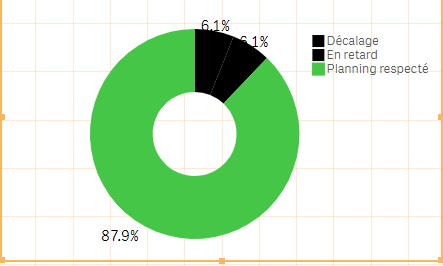
Can you help me please?
Thank you
