Unlock a world of possibilities! Login now and discover the exclusive benefits awaiting you.

- Qlik Community
- :
- Forums
- :
- Analytics & AI
- :
- Products & Topics
- :
- App Development
- :
- Re: Field format stay in timestamp
- Subscribe to RSS Feed
- Mark Topic as New
- Mark Topic as Read
- Float this Topic for Current User
- Bookmark
- Subscribe
- Mute
- Printer Friendly Page

 MNicolas
- Mark as New
- Bookmark
- Subscribe
- Mute
- Subscribe to RSS Feed
- Permalink
- Report Inappropriate Content
Field format stay in timestamp
Hello all,
I have an issue with one of my field which is in timestamp and I want it in date. I think the format is staying in cache, because in the script I tried to formate to date (floor, date 'DD/MM/YYYY') and I untagged the field with timestamp, I reload a dozen times, but the format is staying in timestamp untill I rename the field...
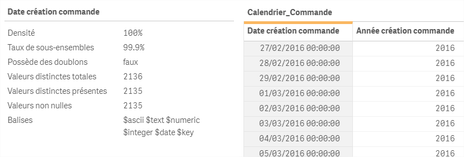
Any idea ?

 agigliotti
- Mark as New
- Bookmark
- Subscribe
- Mute
- Subscribe to RSS Feed
- Permalink
- Report Inappropriate Content
let's try to apply the Floor function in the script.
ex. Floor(your_timestamp_field) as new_Date_Field
I hope it can helps.
Follow me on my LinkedIn | Know Gamma Informatica at gammainformatica.it
MNicolas
- Mark as New
- Bookmark
- Subscribe
- Mute
- Subscribe to RSS Feed
- Permalink
- Report Inappropriate Content
Thanks but as written in my post I tried :
- floor(myfield)
- date(myfield, 'DD/MM/YYYY')
- untagg my field with timestamp
And the timestamp is still here...
agigliotti
- Mark as New
- Bookmark
- Subscribe
- Mute
- Subscribe to RSS Feed
- Permalink
- Report Inappropriate Content
but i saw that your time is always equals to 0.
maybe could you simple apply a date format in your table column?
Follow me on my LinkedIn | Know Gamma Informatica at gammainformatica.it
MNicolas
- Mark as New
- Bookmark
- Subscribe
- Mute
- Subscribe to RSS Feed
- Permalink
- Report Inappropriate Content
Yes the time is equal to zero cause I use the Floor function ....
I dont want to use it in a table. In the filters I can't formate the date and I dont want it to appears on the selection as a timestamp
I just want to know how I can get rid of the cache
