Unlock a world of possibilities! Login now and discover the exclusive benefits awaiting you.

- Qlik Community
- :
- Forums
- :
- Analytics & AI
- :
- Products & Topics
- :
- App Development
- :
- How to find Nullvalues count for each field in UI.
- Subscribe to RSS Feed
- Mark Topic as New
- Mark Topic as Read
- Float this Topic for Current User
- Bookmark
- Subscribe
- Mute
- Printer Friendly Page

 mehul_qlik
- Mark as New
- Bookmark
- Subscribe
- Mute
- Subscribe to RSS Feed
- Permalink
- Report Inappropriate Content
How to find Nullvalues count for each field in UI.
I tried few option but it gives me 0 as results .
=$(=concat('if($Field=' & chr(39) & $Field & chr(39) & ',nullcount([' & $Field & '])', ',') & concat(right($Field&')',1)))
pick(
FieldIndex('$Field', only({1<$Table=P($Table), $Field=P($Field)>}[$Field]))
, $(=concat({1} DISTINCT 'NullCount({1} TOTAL [' & [$Field] & '])', ',', FieldIndex('$Field', [$Field])))
)
Above both the expressions giving 0 as output


 Kaushik2020
- Mark as New
- Bookmark
- Subscribe
- Mute
- Subscribe to RSS Feed
- Permalink
- Report Inappropriate Content
Could you please share a sample data with your expectations/Expected output.
mehul_qlik
- Mark as New
- Bookmark
- Subscribe
- Mute
- Subscribe to RSS Feed
- Permalink
- Report Inappropriate Content
HI Kaushik,
please find attched sample data for same.
mehul_qlik
- Mark as New
- Bookmark
- Subscribe
- Mute
- Subscribe to RSS Feed
- Permalink
- Report Inappropriate Content
Please find output
 howdash
- Mark as New
- Bookmark
- Subscribe
- Mute
- Subscribe to RSS Feed
- Permalink
- Report Inappropriate Content
Try this.
Script
In the script, load the data and dynamically create an expression that will count null values for each field in a table. Like this:
// load data
data:
LOAD
    id,
    name,
    host_id,
    host_name,
    neighbourhood_group,
    neighbourhood,
    latitude,
    longitude,
    room_type,
    price,
    minimum_nights,
    number_of_reviews,
    last_review,
    reviews_per_month,
    calculated_host_listings_count,
    availability_365,
    number_of_reviews_ltm,
    license
FROM [Sample Data.xlsx]
(ooxml, embedded labels, table is Sheet1)
;

// dynamically create expression that will calculate null values for each available field
For i = 1 to NoOfFields('data')

	Let vFieldName = FieldName($(i), 'data');

	If i = 1 then

    	Let vFieldNames = 'If($Field = ' & Chr(39) & '$(vFieldName)' & Chr(39) & ', NullCount($(vFieldName))';
        Let vClosingParens = ')';

	Else

		Let vFieldNames = '$(vFieldNames)' & ', If($Field = ' & Chr(39) & '$(vFieldName)' & Chr(39) & ', NullCount($(vFieldName))';
        Let vClosingParens = '$(vClosingParens)' & ')';

	EndIf

Next i

// combine vFieldNames and vClosingParens to build final expression
Let vNullCountExpr = '$(vFieldNames)' & '$(vClosingParens)';
UI / Frontend
Then, in the frontend, you can use the Table object with $Field dimension, like this:

And then add a measure that is $(vNullCountExpr), like this:

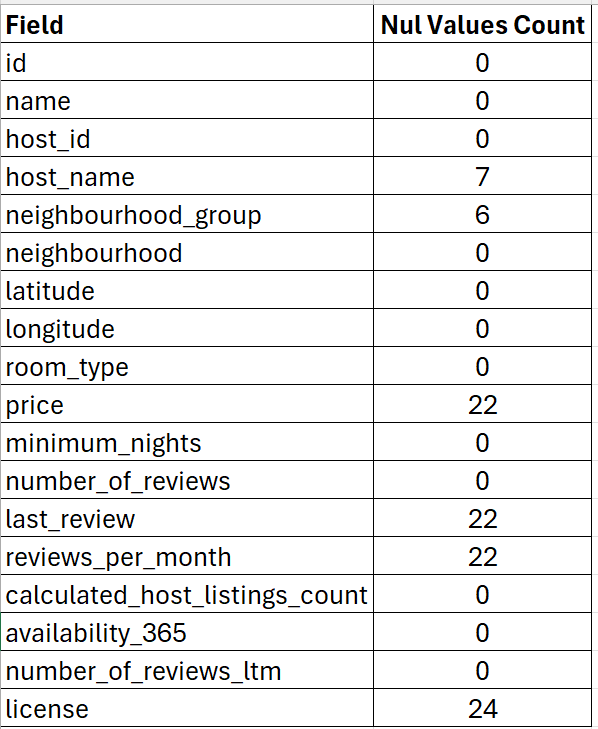
This script along with the Dimension and Measure will produce a table like this:

This will, effectively, count null values in each of the available fields.
Kaushik2020
- Mark as New
- Bookmark
- Subscribe
- Mute
- Subscribe to RSS Feed
- Permalink
- Report Inappropriate Content
Reply shared by @howdash works well. Thanks a lot. attached is the qvf.
mehul_qlik
- Mark as New
- Bookmark
- Subscribe
- Mute
- Subscribe to RSS Feed
- Permalink
- Report Inappropriate Content
Hi,
Thanks for the help. But still i am getting - as expresion output in my application. Attaching the screenshot for same.

howdash
- Mark as New
- Bookmark
- Subscribe
- Mute
- Subscribe to RSS Feed
- Permalink
- Report Inappropriate Content
Looks like you have an equals sign in front of $(vNullCountExpr) in your expression. Try removing it.
mehul_qlik
- Mark as New
- Bookmark
- Subscribe
- Mute
- Subscribe to RSS Feed
- Permalink
- Report Inappropriate Content
@howdash , Thanks it works for excel file. But when i tried same script and exp in QVD load it was showing '-'. as Output.
howdash
- Mark as New
- Bookmark
- Subscribe
- Mute
- Subscribe to RSS Feed
- Permalink
- Report Inappropriate Content
Let's take a look. Can you share the script and the expressions that you are using? As well as the screenshot of the table that you are seeing.
