Unlock a world of possibilities! Login now and discover the exclusive benefits awaiting you.

- Qlik Community
- :
- Forums
- :
- Analytics & AI
- :
- Products & Topics
- :
- App Development
- :
- Pivot Table Month by Month
- Subscribe to RSS Feed
- Mark Topic as New
- Mark Topic as Read
- Float this Topic for Current User
- Bookmark
- Subscribe
- Mute
- Printer Friendly Page

 betz
betz
- Mark as New
- Bookmark
- Subscribe
- Mute
- Subscribe to RSS Feed
- Permalink
- Report Inappropriate Content
Pivot Table Month by Month
Hello,
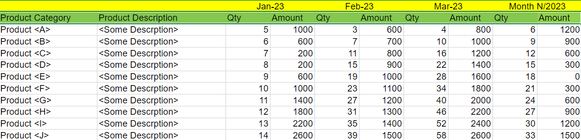
How do I achieve the following layout?
I want to sum and count the sales per month.
For example the data looks like this:
LOAD
Product,
SalesDate,
Amount,
Quantity
As in the following image, I assume it should be a PIVOT table so I need the SalesDate to be a dimension, but how do I make each month a dimension like in the image?

 Or
Or
- Mark as New
- Bookmark
- Subscribe
- Mute
- Subscribe to RSS Feed
- Permalink
- Report Inappropriate Content
You would add a Month field to your load, e.g.
LOAD
Product,
SalesDate,
MonthName(SalesDate) as SalesMonth,
Amount,
Quantity
betz
- Mark as New
- Bookmark
- Subscribe
- Mute
- Subscribe to RSS Feed
- Permalink
- Report Inappropriate Content
Yes, but would it show the dimensions as I described like in the image I've provided?

 Nagaraju_KCS
- Mark as New
- Bookmark
- Subscribe
- Mute
- Subscribe to RSS Feed
- Permalink
- Report Inappropriate Content
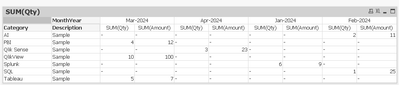
Try this
LOAD Category,
Description,
Month(Date)&'-'&Year(Date) as MonthYear,
Qty,
Amount
FROM tableName;

 barnabyd
- Mark as New
- Bookmark
- Subscribe
- Mute
- Subscribe to RSS Feed
- Permalink
- Report Inappropriate Content
G'day @betz,
The solution from @Nagaraju_KCS, while it will give you the correct output, it will sort alphabetically, which you don't want.
The solution from @Or, which uses the MonthName() function, gives you the correct date format and the correct sorting.
To achieve the dimensions as in your diagram, you need to use the Pivot chart, so that you can add your dimensions to both rows and columns.
Cheers, Barnaby.
BI Consultant
Nagaraju_KCS
- Mark as New
- Bookmark
- Subscribe
- Mute
- Subscribe to RSS Feed
- Permalink
- Report Inappropriate Content
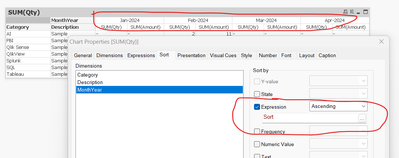
create one field for sort like below
Year(Date)*100+(Num(Month(Date))) as Sort,
and apply on chat sort expression.