Unlock a world of possibilities! Login now and discover the exclusive benefits awaiting you.

- Qlik Community
- :
- Forums
- :
- Archive
- :
- Archived Groups
- :
- Losing selections after reloading
- Subscribe to RSS Feed
- Mark Topic as New
- Mark Topic as Read
- Float this Topic for Current User
- Bookmark
- Subscribe
- Mute
- Printer Friendly Page

 Marcio_Campestr
- Mark as New
- Bookmark
- Subscribe
- Mute
- Subscribe to RSS Feed
- Permalink
- Report Inappropriate Content
Losing selections after reloading
Good Morning!
About a month ago I migrated Qlikview from version 11.20 to version 12 (SR5).
Everything is working fine (at least for now), but I have a problem with an application. I save it with an initial selection value in a field and, after reload by QMC, this selection is "clean".
If I open the app via desktop, set the selection and reload it the selections stays.
Does anyone have an idea (any one) on the subject? I researched here in the community and found nothing to justify such behavior.
Thank you!

 marcus_sommer
- Mark as New
- Bookmark
- Subscribe
- Mute
- Subscribe to RSS Feed
- Permalink
- Report Inappropriate Content
This behaviour could be caused from the usage of section access within the application or the use of sesssion recovery within the qmc.
- Marcus
Marcio_Campestr- Mark as New
- Bookmark
- Subscribe
- Mute
- Subscribe to RSS Feed
- Permalink
- Report Inappropriate Content
Hi Marcus
Thanks for the response, but:
1) I'm not using section access within the app.
2) The server is configured to not allow session recovery.
marcus_sommer
- Mark as New
- Bookmark
- Subscribe
- Mute
- Subscribe to RSS Feed
- Permalink
- Report Inappropriate Content
At the moment I'm out of ideas about further reasons - maybe a bug ... whereby a short search within the forum was without any hits.
As a workaround you could try to implement an OnOpen trigger to set your default selection again.
- Marcus
Marcio_Campestr- Mark as New
- Bookmark
- Subscribe
- Mute
- Subscribe to RSS Feed
- Permalink
- Report Inappropriate Content
Thanks Marcus
I implemented the logic. I'll test now.
Hope it works.

- Mark as New
- Bookmark
- Subscribe
- Mute
- Subscribe to RSS Feed
- Permalink
- Report Inappropriate Content
I have a similar problem. For example the reload schedule time of a document is 5 minutes.
I wanted to achieve a reset of the current selection when a user changes the sheet.So I put a "Clear All On Active Sheet" trigger on every sheet. The effect is that on the QlikView Server every 5 minutes the current selection of a user will be reset.
The cause is the trigger I mentioned.
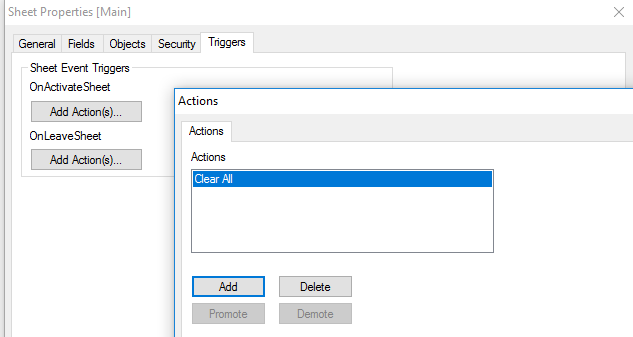
If I use QlikView Desktop, then there's no reset after a reload. I don't know if it a bug or a feature, but this is really annoying.
The only solution I know is hiding the tabrows and using buttons with triggers (change sheet, clear selection) instead.
When pressing the button, the selection will be cleared but not on reload. But this is very time-consuming, because you have to copy every button on every sheet.
(using QlikView 11.2 SR15)