Unlock a world of possibilities! Login now and discover the exclusive benefits awaiting you.

- Qlik Community
- :
- Forums
- :
- Archive
- :
- Archived Groups
- :
- NullInterpret for Excel (any changes? adjustments?...
- Subscribe to RSS Feed
- Mark Topic as New
- Mark Topic as Read
- Float this Topic for Current User
- Bookmark
- Subscribe
- Mute
- Printer Friendly Page

 evan_kurowski
- Mark as New
- Bookmark
- Subscribe
- Mute
- Subscribe to RSS Feed
- Permalink
- Report Inappropriate Content
NullInterpret for Excel (any changes? adjustments?)
Hello All,
NullInterpret for Excel content seems to not be working for me at the moment, and I've had to fall back on ole trusty Len(Trim()) testing for blank detections.
set NullInterpret ='';
The above has trapped Excel blanks in the past, but I'm currently observing a disconnect (I've tested by trying all the documented variants for suggested settings of the NullInterpret variable. this capability still seems functional in conjunction with flat-files, only Excel intake seems impacted).
Anyone know of any updates, workarounds, or changes? Thanks all, appreciate any assistance.


- Mark as New
- Bookmark
- Subscribe
- Mute
- Subscribe to RSS Feed
- Permalink
- Report Inappropriate Content
May be this?
set NullInterpret ='';
Table:
Load * From Table;
Load NullCount(FieldName) as FieldX Resident Table;
evan_kurowski
- Mark as New
- Bookmark
- Subscribe
- Mute
- Subscribe to RSS Feed
- Permalink
- Report Inappropriate Content
Hello Anil,
I've tried a variety of secondary passes, exporting out to QVD and reloading, or using a RESIDENT pass on existing table, different settings on the NullInterpret settings.
The only place it seems to be working is on flat-file load.
The blank cells from Excel material are coming in as empty strings ''
-will test as TRUE when expression asks if the field value = ''
-will show up in a list box as an empty value
What has stopped working is that the sequence of NullInterpret recognizing the empty string, and converting it to the surrogate string.
Of the 3-step process, for Excel at least, it appears Step 1, recognition of empty string has broken down.
//1.
set NullInterpret = '';
//2.
NullAsValue *;
//3.
Let NullValue = '*MY NULL STRING*';
[TABLE]:
LOAD
MY_FIELD AS [NULLINTERPRET_NOT_CATCHING],
//empty strings will not be converted to Null() and still be present after load
IF(Len(Trim(MY_FIELD))=0,Null(),MY_FIELD) AS [CONVERTS_BLANKS_TO_NULL_STRING]
//the empty strings get converted to programmatic Null(), then in turn fields named by NullAsValue converted into the NullValue string
FROM [XLS\MySpreadsheet.xlsx]
(ooxml, embedded labels, table is Sheet1);
- Mark as New
- Bookmark
- Subscribe
- Mute
- Subscribe to RSS Feed
- Permalink
- Report Inappropriate Content
Perhaps this?
IF(Len(Trim(MY_FIELD)) > 0,Null(),MY_FIELD) AS [CONVERTS_BLANKS_TO_NULL_STRING]
OR
IF(Len(Trim(MY_FIELD)) > 0,'NULL',MY_FIELD) AS [CONVERTS_BLANKS_TO_NULL_STRING]
evan_kurowski
- Mark as New
- Bookmark
- Subscribe
- Mute
- Subscribe to RSS Feed
- Permalink
- Report Inappropriate Content
Appreciate the responses Anil, as you can see in our examples, we have workarounds. Len(Trim()) has been the most consistent of all blank testing.
The purpose of this thread isn't to find a workaround, but to establish whether
set NullInterpret = '';
1. stopped working in conjunction with detection of blanks in Excel
2. the NullInterpret special variable has undergone changes in functionality
3. is being used incorrectly in this example
evan_kurowski
- Mark as New
- Bookmark
- Subscribe
- Mute
- Subscribe to RSS Feed
- Permalink
- Report Inappropriate Content
**Update as of 10/25/2017**
I had an Excel input file that worked just fine yesterday with set NullInterpret = '';
It detected all blanks and filled them in with a placeholder value, just as advertised, and confirms past experiences that blank detection of Excel data is a simple matter, and works under proper conditions.
But I still have my prior example… where the Excel input refused the above technique.
So what possible conditions between the two scenarios could be activating/deactivating the ability for NullInterpret to trap Excel blanks?
evan_kurowski
- Mark as New
- Bookmark
- Subscribe
- Mute
- Subscribe to RSS Feed
- Permalink
- Report Inappropriate Content
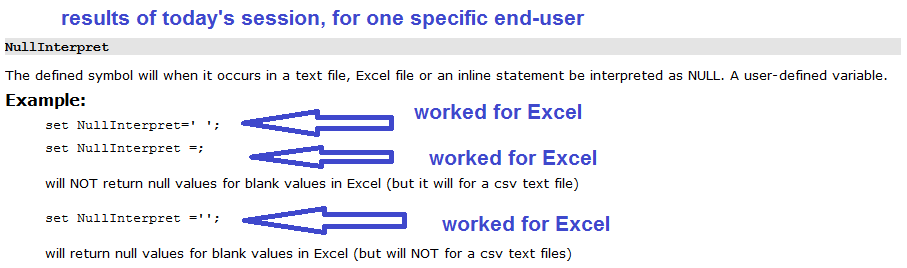
However, to add to today's functionality report, the NullInterpret functionality now appears hyper-attached, as every listed configuration mentioned in the help file for settings resulted in NullAsValue being applied (even in cases where the documentation said it wasn't supposed to)
All three of these worked with my Excel file today:
Set NullInterpret = ' ';
Set NullInterpret = '';
Set NullInterpret = ;