Unlock a world of possibilities! Login now and discover the exclusive benefits awaiting you.

- Qlik Community
- :
- Blogs
- :
- Technical
- :
- Design
- :
- Data Types in QlikView

.png "Former Employee") hic
hic
- Subscribe to RSS Feed
- Mark as New
- Mark as Read
- Bookmark
- Subscribe
- Printer Friendly Page
- Report Inappropriate Content
There are no data types in QlikView.
This is not a limitation – it is a conscious design decision.
One of the initial requirements of QlikView was that it should be possible to mix data from different sources: We wanted users to be able to have a data model with some data from a database, some from an Excel sheet, and some from a comma delimited text file. Some of these sources have proper data types, others don’t. So relying on the data types of the data source would be difficult. Further, we wanted the internal functions to be able to always return a relevant calculation – there must never be any type of conversion problems. We wanted simplicity for the user.
 Enter the Dual format.
The dual format is a brilliantly simple solution to the above requirements: Its core is that every field value has two values – one string that is displayed, and one number that is used for sorting and calculations. The two values are inseparable; they are like the two sides of a single coin. They are both needed to describe the field value properly.
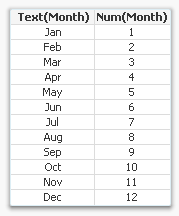
For example, months have the string values ‘Jan; ‘Feb’ … ‘Dec’, which are displayed. At the same time they have numeric values 1 to 12, which are used for sorting. Similarly, weekdays have the string values ‘Mon’; ‘Tue’ … ‘Sun’ and at the same time the numeric values 0 to 6.
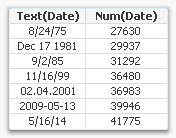 Dates and times have string values that look like dates, e.g. ‘12/31/2011’ or ‘06.06.1944 06:30’ and at the same time they have numeric values corresponding to the number of days since Dec 30 1899. As I write this, the (numeric) time is 41215.6971. How months, weekdays, dates and times should be displayed is defined in the environment variables in the beginning of the script.
This way QlikView can sort months, days and dates numerically, or calculate the difference between two dates. Numbers can be formatted in arbitrary ways. In essence, QlikView can have data that is much more complex than plain strings.
When dual values are used as parameters inside QlikView functions, the function always uses just one of the two representations. If a string is expected, as in the first parameter of Left(s,n), the string representation is used. And if a number is expected, as in the Month(date) function, the number representation is used.
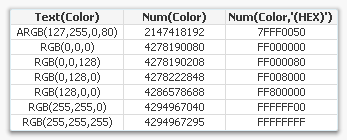 QlikView functions all return dual values, when possible. Even the color functions do, see table. However, string functions, e.g. Left(s,n), is the exception; because they don’t have a number that can be associated with the string, they leave the number part of the dual empty.
Finally, there is of course a function with which you can create your own dual values: Dual(s,n). With it you can create any combination of string and number. Use it if you want to assign a sort order to strings or if you want to assign text to numeric values.
Here is how one of the top contributors of QlikCommunity uses duals for Booleans: Rob Wunderlich’s Dual flags.
Further reading related to this topic:
You must be a registered user to add a comment. If you've already registered, sign in. Otherwise, register and sign in.