Unlock a world of possibilities! Login now and discover the exclusive benefits awaiting you.


.png "Former Employee") hic
hic
- Subscribe to RSS Feed
- Mark as New
- Mark as Read
- Bookmark
- Subscribe
- Printer Friendly Page
- Report Inappropriate Content
Today I have a blog post for the Geeks¹. For the hard-core techies who love bits and bytes. The rest of you can stop reading now. For you, there are other interesting posts in the Business Discovery Blog and in this blog, the QlikView Design blog. 
Now to the bit-stuffed pointers:
During the QlikView script run, after each load statement, the Qlik engine transforms the data loaded into two table types: one data table and several symbol tables. The engine creates one symbol table per field:

The symbol tables contain one row per distinct value of the field. Each row contains a pointer and the value of the field, both the numeric value and the textual component. Basically, the symbol tables are look-up tables for the field values.
The data tables are the same tables as you can see in the QlikView internal table viewer (<CTRL>-T) when you have chosen the “Internal table view” – the same number of rows, the same number of columns. However, the tables do not contain the data itself – they contain the pointers only. But since the pointers can be used to look up the real value in the symbol tables, no information has been lost.
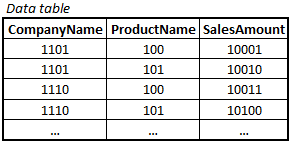
These pointers are no ordinary pointers. They are bit-stuffed indices, meaning – they only have as many bits that it takes to represent the field, never more. So if a field contains four distinct values, the index is only two bits long, because that is the number of bits it takes to represent four values. Hence, the data table becomes much smaller than it would have been otherwise.
The bit-stuffed pointers and the symbol tables are the reasons why the Qlik engine can compress data the way it can.
Understanding this will help you optimize your document. It’s obvious that the number of records and number of columns in a table will affect the amount of memory used, but there are also other factors:
- The length of the symbols will affect the size of the symbol table.
- The number of distinct values in a field will affect the number of rows in the symbol table as well as the length of the pointers.
When creating QlikView scripts, always ask yourself if there is any way to reduce these numbers, to minimize the memory usage. Here are a couple of common cases:
- You have a long, concatenated, composite key that you don’t need to display. Use Autonumber() and the symbols will take no space in the symbol table. The integer values will instead be calculated implicitly.
- You have a field with many unique timestamps. Then you are sometimes better off if you first split it into two fields – Date and Time – and round the Time downwards to closest 15-seconds interval or to nearest full minute, e.g.:
Date(Floor(Timestamp)) as Date,
Time(Floor(Frac(Timestamp),1/24/60)) as Time,
These expressions will give you at most 24*60=1440 distinct time values (11 bits) and typically 365 distinct dates (9 bits). In other words, as soon as you have a timestamp field with more than 1 million (20 bits) distinct values, the pointer for the timestamp field takes more space than the pointers for the two individual fields. And for the number of rows in the symbol table(s) you hit the break-even much sooner. So you should consider splitting it into two fields sooner, maybe when you have around 100k distinct values.
If you found this post interesting, I greet you welcome to the QlikGeeks.
PS. All of the above is of course true for both QlikView and Qlik Sense. Both use the same engine.
If you want to read more about QlikView internals, see also
Logical Inference and Aggregations
Colors, States and State vectors
¹ Geeks, see picture:

You must be a registered user to add a comment. If you've already registered, sign in. Otherwise, register and sign in.