Unlock a world of possibilities! Login now and discover the exclusive benefits awaiting you.

Recent Ideas
-
Folders in your own workspace and streams
A user should be able to create folders in his own workspace to manage his projects. The same function should be available in streams too.
-
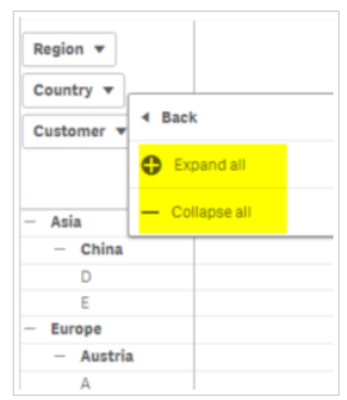
Qlik Sense Pivot table: "Expand/collapse ALL" on single level
When using a Pivot table with several levels, one can "right-click" on the level and use the option "expand/collapse All". This option does not allow ... Show MoreWhen using a Pivot table with several levels, one can "right-click" on the level and use the option "expand/collapse All". This option does not allow to expand the single level.
Customers want to be able to expand a level "expand next level" and keep others collapsed.
This Idea was recorded as a copy of an old idea in the previous ideation system. It was again requested by a customer.
-
Copy Sheet from one App to Another
Hello,A basic requirement : being able to copy one sheet of an App to another App.Yes, that's that simple. -
Qlik Sense - modify the expression of a bookmark
Hi,Could be useful to modify a bookmark expression.Now if you want to change a bookmark you need to create a new one and delete the previous one, it's... Show MoreHi,
Could be useful to modify a bookmark expression.
Now if you want to change a bookmark you need to create a new one and delete the previous one, it's not possible to replace it.
I hope this feature will be available in coming release.
Also be able to easily duplicate a bookmark could helps.
Best Regards
Andrea -
Change column width of the pivot table in Qlik Sense
I want to see a lot of axis values at once but it's automatically adjusted so you have to scroll to see it.I'd like to adjust the width of the column ... Show MoreI want to see a lot of axis values at once but it's automatically adjusted so you have to scroll to see it.
I'd like to adjust the width of the column as desired.
-
In-House Email Server in Qlik SaaS
Hi there, It would be great to have an in-house email server within Qlik SaaS. Despite setting up Qlik SaaS in January 2023, we are encountering many ... Show MoreHi there,
It would be great to have an in-house email server within Qlik SaaS.
Despite setting up Qlik SaaS in January 2023, we are encountering many issues, having to look into third party tools such as: MailChimp and Amazon SES to set this up. As there is no options for OAuth authentication, our internal IT team is reluctant to look into basic authentication as it is deprecated by Microsoft, which Qlik SaaS needs to also consider to look into different authentication processes here.
Here are some reasons why it would be beneficial to have an in-house email server SMTP server in Qlik SaaS:
-
Data Security: By having an in-house email server, Qlik SaaS can have better control over data security. They can implement robust security measures, such as encryption, access controls, and regular backups, to protect sensitive information exchanged through emails. This reduces the risk of data breaches and unauthorised access.
-
Privacy and Compliance: Hosting an email server in-house allows Qlik SaaS to adhere to specific privacy and compliance requirements more effectively. They can ensure that data is stored and managed in accordance with relevant regulations, such as GDPR (General Data Protection Regulation), HIPAA (Health Insurance Portability and Accountability Act), or industry-specific standards.
-
Customisation and Integration: An in-house email server offers greater flexibility for customisation and integration with other systems. Qlik SaaS can tailor the email server to meet their specific business needs, integrate it with their existing infrastructure, and implement custom features or workflows. This level of control can enhance productivity and streamline communication processes.
-
Performance and Reliability: With an in-house email server, Qlik SaaS can optimise performance and ensure reliable email delivery. They have full control over the server's hardware, network configuration, and software, allowing them to fine-tune performance parameters and monitor the server's health closely. This reduces the risk of email delays, downtime, or other performance issues.
-
Reliance on Third Party Software: Instead of relying on third-party email service providers and paying recurring subscription fees, Qlik SaaS can leverage their own infrastructure to manage email communication, potentially resulting in cost savings over time for Qlik SaaS customers.
-
Seamless Integration with Internal Systems: An in-house email server can be seamlessly integrated with other internal systems and applications used by Qlik SaaS. For example, we can integrate email data with their customer relationship management (CRM) system, help desk software, or analytics platforms. This integration allows for better data synchronisation and workflow automation, leading to improved efficiency and customer experience.
-
Flexibility and Scalability: With an in-house email server, Qlik SaaS has the flexibility to scale their email infrastructure based on their evolving needs. As their user base grows, they can easily add more server resources or upgrade hardware to accommodate the increased email traffic. This scalability ensures that the email service remains responsive and reliable even during periods of high demand.
-
-
Email on failed load
Every morning and throughout the day we have to MANUALLY check the tasks to see if anything failed. yes, we have an extension (seems buggy from review... Show MoreEvery morning and throughout the day we have to MANUALLY check the tasks to see if anything failed.
yes, we have an extension (seems buggy from reviews) but this needs to be a STANDARD feature.
Geesh, how hard is this ? Add a setting (engine?) - done.
Qlikview has been doing this for YEARS.

-
Keep formatting on Excel Export
When exporting a table or pivot table, the cell and value colors should be preserved. End users develop specifications for how to color these based o... Show MoreWhen exporting a table or pivot table, the cell and value colors should be preserved. End users develop specifications for how to color these based on operational conditions, and often make selections based on these. The formatting is a critical part of the actionable insights.
-
Selections show on exports in Qlik SaaS, like they can do in QlikView exports
We would like to see the ability to automatically have metadata like app name, object name and current selections added to a header or footer when exp... Show MoreWe would like to see the ability to automatically have metadata like app name, object name and current selections added to a header or footer when exports are done in Qlik Cloud for both Qlik Sense and QlikView apps.
This was really useful in QlikView but has been missed by us and our users in Qlik Cloud. -
Last logon timestamp on user object
Today, to get last logon timestamp (know as "com.qlik.user-session.begin") for users we need to parse through a lot of data on the audit api. It would... Show MoreToday, to get last logon timestamp (know as "com.qlik.user-session.begin") for users we need to parse through a lot of data on the audit api. It would be of great value if this was found directly on the user object. Both on the api "/api/v1/users" and on manage users info as admin on web.
Suggestion: Add the "lastLogon" to the user object like this{"id": "649aaaaaaaaaaaaaaaaaa","tenantId": "BBBBBBBBBBBBBBBBBB","status": "active","subject": "987654321","name": "Jon Doe","email": "jon.doe@domain.com","preferredZoneinfo": "Europe/Berlin","roles": ["Role 1","Role 2"],"createdAt": "2023-06-27T07:10:49.458Z","lastUpdatedAt": "2026-02-03T11:03:46.036Z","created": "2023-06-27T07:10:49.458Z","lastUpdated": "2026-02-03T11:03:46.036Z","lastLogon": "2026-02-04T12:07:49.029Z""links": {"self": {}}} -
Easy Json Reader
Hi guys,I think it would be nice if we can add a json local file as easy as we can read a csv or txt file.Best Regards, Marcel.
-
QlikSense Folders inside Apps
After using qlik sense since 2 years, I found out that I have around 50-100 sheets just in one app on avg depending on the APP. Is quite complicated t... Show MoreAfter using qlik sense since 2 years, I found out that I have around 50-100 sheets just in one app on avg depending on the APP. Is quite complicated to have those sheets organized, and will be quite handy if a Folder functionality inside an app is available.
PLEASE!!!
-
Stop renaming connections after saving
Attaching my name to a connection just because I save it ? Is this another odd design decision ? Even if I manually specify the name, Qliksense will... Show MoreAttaching my name to a connection just because I save it ? Is this another odd design decision ?
Even if I manually specify the name, Qliksense will override my action and the ONLY
option is to open QMC and manually change the name back.
-
Dragging items without losing the size
I think a really important thing we need to be able to do is drag items without them resizing. I've had a few issues now where I'm working with severa... Show MoreI think a really important thing we need to be able to do is drag items without them resizing.
I've had a few issues now where I'm working with several KPIs and trying to move them around on a sheet is a nightmare. I have to resize them every single time I move them because they change size when moved.
Please add in some kind of option where for example if you hold CTRL while dragging an item, it stays the same size. If it's too big to fit the space, then it goes back to its original position.
-
Horizontal/Vertical view toggle in Combo Chart
Currently in Qlik Sense we are able to change view to horizontal only on Bar Chart. It would be extremely helpful to have the same option (ability to ... Show MoreCurrently in Qlik Sense we are able to change view to horizontal only on Bar Chart. It would be extremely helpful to have the same option (ability to switch between horizontal/vertical layout) also in Combo Chart.
This feature would make visualization where the dimension values are long and you want to compare say actual vs budget a lot nicer.
thanks
Lech
-
Movable Windows
Hello, It's 2022, and I was wondering if Qlik Sense can implement moveable windows. For instance, when you choose to create or modify an expression, ... Show MoreHello,
It's 2022, and I was wondering if Qlik Sense can implement moveable windows. For instance, when you choose to create or modify an expression, the Expression Editor window takes up the entire screen. Developers should be able to resize or move the window to see what's behind it, to remind them what KPI they are revising, or what measure they are modifying. Or, when you start a Load Script run, move the window so you can see the actual Load Script and make sure you didn't forget to change something before running the load. This can save the developer a lot of time.
Thanks in advance,
Chris
-
Apply bookmark on top of current selections
Hi qlik team,In QlikView it was possible to specify that the bookmark be on top of the current selection. This functionality made bookmarks more dyn... Show MoreHi qlik team,
In QlikView it was possible to specify that the bookmark be on top of the current selection.
This functionality made bookmarks more dynamic and really opened up a lot of options for our users. They are really missing this when using Qlik Sense, and it would allow us a lot of flexibility in our app. It could help us with initial selections when the user opens the app, permit our users to use default bookmarks that can update the different date fields, and really augment the user experience by making complex comparisons by simply applying bookmarks.
-
Allow for legends when 'The expression is a color code' is turned on
When setting charts' appearance with colour by the expression, the legend is hidden and the corresponding options in property manual is disabled.Chart... Show MoreWhen setting charts' appearance with colour by the expression, the legend is hidden and the corresponding options in property manual is disabled.
Charts affected: Bar chart, Combo Chart, Gauge, Line Chart, Pie Chart, Scatter plotCustomers have requested for this feature to be revisited and for legends to be enabled when the expression is a color code.
-
QS: Horizontal Filter Pane
Hello everyone,in QlikView it was possible to arrange a listbox horizontally to display a calendar year or the calendar months.Unfortunately Qlik Sens... Show MoreHello everyone,
in QlikView it was possible to arrange a listbox horizontally to display a calendar year or the calendar months.
Unfortunately Qlik Sense does not offer this possibility, only with the help of extensions. But this function should become a standard function of the filter box.
Thanks

-
Sheet Show/Hide
It would be great if we can get the feature of conditional show for Qlik sense application sheet