Unlock a world of possibilities! Login now and discover the exclusive benefits awaiting you.

- Qlik Community
- :
- Support
- :
- Support
- :
- Knowledge
- :
- Support Articles
- :
- Qlik Web Connectors Troubleshooting Guide
- Subscribe to RSS Feed
- Mark as New
- Mark as Read
- Bookmark
- Subscribe
- Printer Friendly Page
- Report Inappropriate Content
Qlik Web Connectors Troubleshooting Guide

 Bjorn_Wedbratt
- Mark as New
- Bookmark
- Subscribe
- Mute
- Subscribe to RSS Feed
- Permalink
- Report Inappropriate Content
Qlik Web Connectors Troubleshooting Guide
A couple of general things to check if you having trouble with Qlik Web Connectors:
- Check all the prerequisites.
- Check if Qlik Web Connectors is running (if you are having load errors).
- Check if you have a valid licence installed (check the 'Licence' tab in the main Qlik Web Connectors UI).
Startup Issues
- I am seeing a 'System.MissingMethodException' in my event log.
=> Please ensure you have the .NET Framework 3.5 SP1 installed on your machine. If you get this error you are probably using QVSource 1.2.5 or earlier which is now deprecated. Please upgrade to Qlik Web Connectors which uses .NET 4.
- I am getting a message Could not load file or assembly 'System.Web, Version=4.0.0.0, Culture=neutral, PublicKeyToken=b03f5f7f11d05a3a' or one of its dependencies.
=> You probably only have the .NET 4 Client Profile edition installed. You will need the full .NET framework which you can download here. - I am getting an error which includes the text System.Net.HttpListenerException: The process cannot access the file because it is being used by another process.
=> See Issues starting Qlik Web Connectors Web Service - I am getting a crash before Qlik Web Connectors even starts:
=> We had one user who started experiencing this spontaneously after restarting their server (Qlik Web Connectors had been running fine up to this point). It turned out to be due to a user account being removed from have access to the Settings.xml file (alongside the main Qlik Web Connectors exe). This was fixed by simply renaming/deleting this Settings.xml file and allowing Qlik Web Connectors to recreate it. If this does fix your issue and you renamed the old Settings.xml file you should be able to compare the permissions to see what changed.
- I am getting an "0x80004005: Access is denied" message on start up
=> See Issues starting Qlik Web Connectors Web Service - I am seeing a WinIOError when Qlik Web Connectorsis starting or it has stopped working since I upgraded
=> It has been seen very occasionally that when you unzip Qlik Web Connectors (or any zip for that matter) to your machine the files/folders sometimes do not pick up or inherit the correct users/permissions which might result in a WinIOError when you try to run Qlik Web Connectors. You should check that your user account and/or whichever user account you have configured to run Qlik Web Connectors still has full access to the install folder.
General Connector Issues
A large number of temporary files are accumulating on my machine in the Content.IE5 directory
- A bug has been identified in QlikView (Bug Id: 69453) which causes every request made to a http end point (including Qlik Web Connectors, but not only Qlik Web Connectors) when a QlikView application was reloaded via publisher (it does not appear to occur when reloaded in QlikView desktop), that a new file appeared in the following temporary folder:
C:\Windows\System32\config\systemprofile\AppData\Local\Microsoft\Windows\Temporary Internet Files\Content.IE5
This is nothing to do with Qlik Web Connectors however, as you might only be making a large number of http load requests since using Qlik Web Connectors it might appear to be related. Qlik have given us Bug Id 69453 for this issue and we are awaiting a resolution. We do believe it happens only in conjunction with IE11 although this is not confirmed.
=> One possible workaround appears to be to enable “Can Execute External Programs” in the script editor Settings and add a line something like the following to your load script:
Execute cmd /C del /s /q "C:\Windows\System32\config\systemprofile\AppData\Local\Microsoft\Windows\Temporary Internet Files\Content.IE5\WebConnectorV2*.xml";
Or you could also consider adding a scheduled windows task which temporarily clears down this directory.
Trouble with text encoding
=> Qlik Web Connectors starts OK but there are no connectors listed or some connectors are missing.
In rare circumstances it seems that the Qlik Web Connectors ZIP file does not download properly OR does not unzip correctly on the end user's machine. Please try downloading and unzipping Qlik Web Connectors again to see if this resolves your issue.
Missing Connectors
- When I start Qlik Web Connectors, I don't see any connectors listed or only some of them.
=> If you only see some of then, then please:
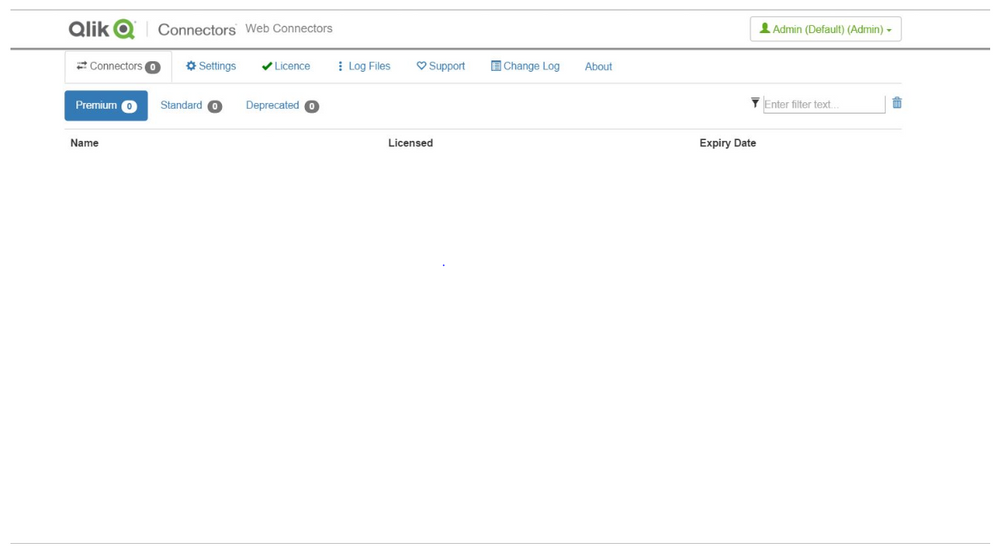
- See if the 'include beta connectors' and 'include deprecated connectors' option along the bottom of Qlik Web Connectors has been unchecked. If you still don't see the connectors you expect, then please see the next point.
- Ensure that the .NET 4 full edition is installed. If this is not the issue please see the next point.
- In rare circumstances it seems that the Qlik Web Connectors ZIP file does not download properly OR does not unzip correctly on the end user's machine. If you check where you unzipped Qlik Web Connectors to, and the "QlikWebConnectors\Connectors" folder, you'll probably see that this is empty or only has a few folders (it should have a folder for each connector). Please try downloading and unzipping Qlik Web Connectors again to see if this resolves your issue.
Unable to Change the Authenticated Account
- Even when I click on 'Delete Settings' to clear the authenticated account, when I then click on 'Authenticate' I'm automatically authenticated, without given the option to enter the new account details.
=> We've noticed that this can happen with the Facebook connectors and is due to cookies being stored with your IE web browser. So, from IE please log out of Facebook and try again. If this still doesn't work, clear your IE cookies using a tool such as CCleaner.
Certain characters (e.g. é,è,ê) are not correctly retrieved
=> We would now recommend you use Qlik Web Connectors 1.2.5.2 or later and the QVX file format which should resolve this issue:
LOAD .... FROM [http://localhost:5555/QVSource/[Connector]/?table=[Table]¶meters=?????&format=qvx] (qvx);
Syntax Error Since Upgrading to QlikView 11
=> If you have started receiving a 'Syntax error....' when reloading your QlikView application which started happening after upgrading to QlikView 11 - please ensure you have no colon ':' characters in your field/column names - you could replace these, for example, with an underscore '_' character.
Qlik Sense Specific Load Errors
1) When I use Qlik Web Connectors I get the data, but when I then run it in Qlik Sense, I get the following Load error: LOAD statement only works with lib:// paths in this script mode
=> There is a feature in Qlik Sense, which stop arbitrary load URLs from being used. There is a workaround which involves disabling Standard Mode as described here
QlikView Load Errors
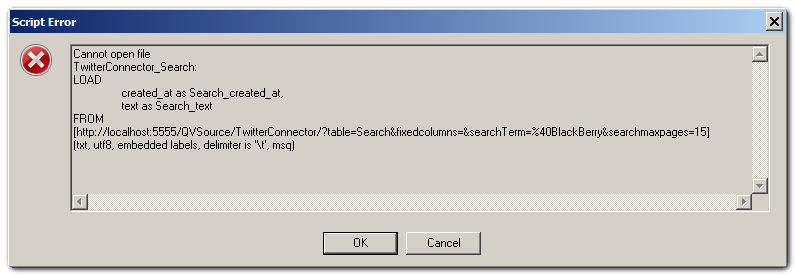
1) I am getting an error 'Cannot open HTML File', 'Cannot open file' or 'Field not found' (or some other load script error) when trying to reload my QlikView application. Something like the following:
=> The first step with any errors like this is to take the url in the load request, in this case: http://localhost:5555/QVSource/TwitterConnector/?table=Search&fixedcolumns=&searchTerm=%40BlackBerry...
And try it in a standard web browser where you should receive a more helpful error. Some typical causes of this are:
- Qlik Web Connectors not running.
- No licence file being installed.
- An error being returned from the API Qlik Web Connectors is attempting to communicate with.
If, when browsing to the load request url, you see under the section, "WebExcep" the error message "System.Net.WebException: Unable to connect to the remote server", then please ensure that the machine on which Qlik Web Connectorsis installed is able to connect to the internet or the end points specified for connector you're using - these end points can be found on the Connector's 'About' tab under permissions.
2) My Qlik Web Connectors application reloaded OK in QlikView desktop but fails when reloading via QlikView Server or publisher.
=> We have discovered an apparent bug in QlikView where if you have new lines in the http url to Qlik Web Connectors, e.g. something like:
| 1 2 3 4 5 6 7 8 9 10 11 |
TwitterConnector_SearchV2: LOAD id as SearchV2_id, created_at as SearchV2_created_at, text as SearchV2_text, ...removed for clarity... FROM [http://localhost:5555/QVSource/TwitterConnector/?table=SearchV2& searchTerm=qlikview& format=qvx] (qvx); |
The reload works OK in QlikView desktop but not in QlikView Server/Publisher. We therefore recommend always ensuring that your urls are on a single line, e.g.:
| 1 2 3 4 5 6 7 8 9 |
TwitterConnector_SearchV2: LOAD id as SearchV2_id, created_at as SearchV2_created_at, text as SearchV2_text, ...removed for clarity... FROM [http://localhost:5555/QVSource/TwitterConnector/?table=SearchV2&searchTerm=qlikview&format=qvx] (qvx); |
Performance Issues
If you believe your load script is running particularly slowly (bearing in mind that with Qlik Web Connectors, you could be download large amounts of data across the public web which be significantly slower than accessing data stores on your LAN) please try turning off logging (both in Qlik Web Connectors Log Files) and log file generation from QlikView and see if this makes a difference.
Connector Specific Issues
Facebook Connector
- The number of comments I am getting back for posts does not match the comment_count field of the FeedItems table.
=> Please see Qlik Web Connectors Facebook API Troubleshooting for some discussion about discrepancies between data from the Facebook Graph API and the data seen on the Facebook web site.
Google Connector(s)
- I cannot log into the Google Analytics Connector (or one of the other Google Connectors).
=> This might happen because of the enhanced security in Internet Explorer/Windows. We would first recommend seeing if you can log into the service using a standard Internet Explorer browser. For example if you are having problems with the Google Analytics Connector try logging in to the Google Analytics Website first, if this doesn't work you know the problem is not with Qlik Web Connectors. The solution to this is probably to add certain sites to your trusted list in the Internet Options - in the case of Google Analytics a user reported that adding gstatic.com and google-analytics.com fixed this issue.
- Google Two Factor Authentication Issues
=> If you are having issues using Google Two Factor Authentication please contact us. However, we believe that now all of our Google Connectors use OAuth2 that there should not be any issues using this as you are redirected to a Google Web Page (hosted in Qlik Web Connectors) when authenticating. This page discusses this in a little more detail with respect to the YouTube API however all Google APIs now work in a similar manner.
Twitter Connector
- I am only seeing results go back to [DD/MM/YY]?
=> The Twitter search API only returns up to 1500 Tweets or 1 weeks worth of Tweets which probably explains why you only get back to [DD/MM/YY]. We recommend creating an application which is reloaded every hour (or at least every day) and accumulating the matching tweets in a qvd file.
- '401 Not Authorized' Error when attempting to authenticate
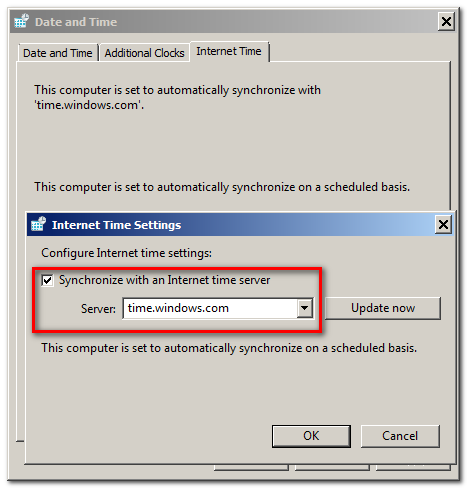
=> If you receive a '(401) Not Authorized' error when trying to authenticate with the Twitter Connector '((401) Não Autorizado' in Portuguese, where this issue was observed from a Brazilian user), this might be because your PC time is not syncronised closely enough with the Twitter servers. We recommend ensuring your PC's time is synchronised with a time server as illustrated below:
- I am having trouble using some or all of the tables in Twitter. They hang for a long time when I request the data in the user interface and then show no results.
=> We have had two customers report this issue and in both cases it was because an outgoing proxy or firewall (barracuda in one case) was blocking the outgoing requests. We would recommend you or your network admin runs a network trace whilst the request is running and failing in order to determine this is the case. Most connectors list on the About tab the urls they need to connect to and so we would advise ensuring that these are all open to you. If you need to run the network trace yourself you could try running Fiddler on the same machine that Qlik Web Connectors is running on - this should confirm to you whether the API calls Qlik Web Connectors is making are running successfully.
Google Analytics
- The data I am getting from Google Analytics doesn't make sense.
=> Before contacting us with queries regarding the data you are getting back in Qlik Web Connectors from Google Analytics please first test your feed/request in the Google Analytics Query Explorer. If you are getting the same data back there, which is likely, then the question you have is probably best sent to Google rather than us.
Qlik Web Connectors Gives Different Values to When Manually Checked
We've had some instances where it appears that some numbers in Qlik Web Connectors based QlikView applications are giving different values to those when they are manually checked for example the average time spent on a web page (Google Analytics) or number of visits.
The first thing to check in this instance is that you also get the same numbers in the Google Analytics Query Explorer.
Since Qlik Web Connectors gets the data from the same system, there should be no, or nominal differences. The following are a few steps that you can follow to identify and reconcile the differences.
- Run exactly the same metrics in Qlik Web Connectors as on the platform. It sounds obvious, but having an extra metric might change the outcome.
- Use Qlik Web Connectors (or even better the Google Analytics Query Explorer) and not your application to check values by recreating the metric and looking at the data tab in Qlik Web Connectors.
- Try to match the manual report to Qlik Web Connectors, so if Qlik Web Connectors gives you 3 columns of data i.e date, pages visited and average time then get the same report manually and compare the values. Or visa-versa, which ever is easier to do.
- Match the time scales. If Qlik Web Connectors gives you each day's data for a month, but the manual report just gives you 1 figure for the whole month then values like averages will be affected.
- Try a smaller time scale or data set this will make it easier to identify where data might be missing, so look at numbers on a day by day basis.
- Check the ranges coming back in Qlik Web Connectors. If you select a date range, check that all those dates in the data i.e. the first or last days aren't missing.
- If the values in Qlik Web Connectors can be matched to the manual reports, but there's still a problem in the application then you need to review your script, data model, expressions and objects as what you get in Qlik Web Connectors will be the same as fed into your application.
Please note, that sampling (detailed here) may also explain why you are getting results different to those you expect of different to those you are seeing in another table/chart either in the Google Analytics interface or in QVSource/QlikView. The Google Analytics Connector has a table named QueryInfo which will tell you if your request is returning sampled data.


