Unlock a world of possibilities! Login now and discover the exclusive benefits awaiting you.

- Qlik Community
- :
- Forums
- :
- Analytics & AI
- :
- Products & Topics
- :
- Management & Governance
- :
- read values of custom properties in script
- Subscribe to RSS Feed
- Mark Topic as New
- Mark Topic as Read
- Float this Topic for Current User
- Bookmark
- Subscribe
- Mute
- Printer Friendly Page

 ali_hijazi
- Mark as New
- Bookmark
- Subscribe
- Mute
- Subscribe to RSS Feed
- Permalink
- Report Inappropriate Content
read values of custom properties in script
Hello
Is there a way to read the custom property values assigned to a user or an app from the script?
Please advise on how to accomplish this

- Mark as New
- Bookmark
- Subscribe
- Mute
- Subscribe to RSS Feed
- Permalink
- Report Inappropriate Content
I am not aware of any simple way. But they are held in the Repository that is a Postgres database and could be used a data source in the load script - but you'd need to reverse engineer the database structure to work out the SQL to use.
Or maybe a QRS API call like https://help.qlik.com/en-US/sense-developer/3.2/Subsystems/RepositoryServiceAPI/Content/RepositorySe...
I must admit I have never used either though.
 EliGohar
- Mark as New
- Bookmark
- Subscribe
- Mute
- Subscribe to RSS Feed
- Permalink
- Report Inappropriate Content
Hi @ali_hijazi
Here's a script which selects a custom property (in this case, language) and matches it with the relevant values and users.
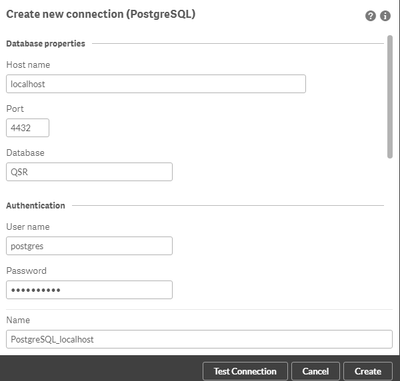
Of course you need to create postgreSQL data connection to qlik DB 🙂
language:
LOAD ID as "Definition_ID",
	Name as CusomeName
    Where "Name"='language';
SELECT "ID",
	"Name",
	"ValueType",
	"ChoiceValuesString",
	"ObjectTypesString",
	"CreatedDate",
	"ModifiedDate",
	"ModifiedByUserName"
FROM "public"."CustomPropertyDefinitions";

Inner Join

LOAD
	Value,
	Definition_ID,
	User_ID
;
SELECT "ID",
	"Value",
	"CreatedDate",
	"ModifiedDate",
	"ModifiedByUserName",
	"App_ID",
	"ContentLibrary_ID",
	"DataConnection_ID",
	"EngineService_ID",
	"ServerNodeConfiguration_ID",
	"ProxyService_ID",
	"RepositoryService_ID",
	"SchedulerService_ID",
	"Extension_ID",
	"ReloadTask_ID",
	"ExternalProgramTask_ID",
	"Stream_ID",
	"Definition_ID",
	"User_ID",
	"VirtualProxyConfig_ID",
	"UserSyncTask_ID",
	"PrintingService_ID",
	"AppContentQuota_ID",
	"WebExtensionLibrary_ID",
	"Widget_ID",
	"SharedContent_ID",
	"AnalyticConnection_ID"
FROM "public"."CustomPropertyValues";

Left Join

LOAD ID  as User_ID,
	UserId,
	UserDirectory;
SELECT "ID",
	"UserId",
	"UserDirectory",
	"Name",
	"RolesString",
	"Inactive",
	"CreatedDate",
	"ModifiedDate",
	"ModifiedByUserName",
	"RemovedExternally",
	"Blacklisted",
	"DeleteProhibited"
FROM "public"."Users";
Hope it helps,
Eli.
 sarmon
- Mark as New
- Bookmark
- Subscribe
- Mute
- Subscribe to RSS Feed
- Permalink
- Report Inappropriate Content
Hi Eli,
Could you please elaborate on how to connect to Qlik DB postgreSQL data
EliGohar
- Mark as New
- Bookmark
- Subscribe
- Mute
- Subscribe to RSS Feed
- Permalink
- Report Inappropriate Content
@sarmon sure, go to the data load editor, create a new connection, select PostgreSQL data source and fill the values like in the screenshot below: