How to - "Use a variable as Title in Qlik Sense objects using Engine API's CreateDimension() method".
The requirement is to display the values inside a variable as a Title in a Qlik Sense object using Engine API.
For example: We have a variable vTitle in our Qlik Sense application which contains some value. In our case vTitle = 1111111.
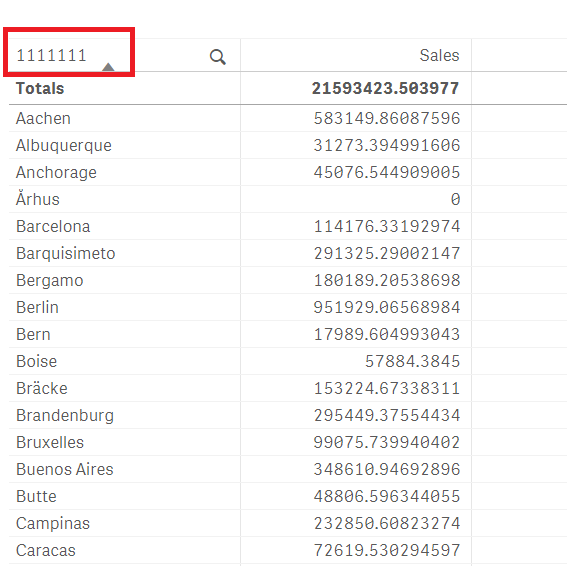
Now, we want to create a Table object and display the Label as "1111111" instead of the Field name (Field created using Engine API's method).
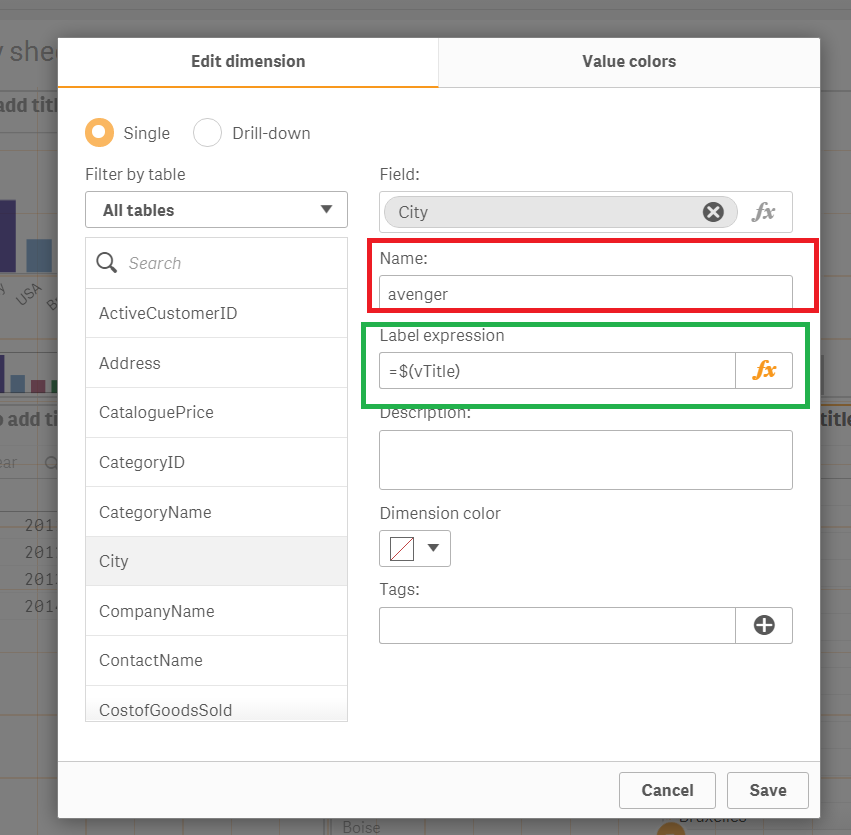
Note: There is a difference between "Name" field & "Label expression" field in Qlik Sense.
The "Name " field doesn't support use of any Formulas (refer to the below screenshot). Only the "Label expression" field can support use of formulas (Symbol Fx gives us that HINT).
Resolution:
Use the following code to create a master dimension and use a variable expression as Title for Labels:
The property that needs to be used is: "qLabelExpression": "=$(vTitle)"
Once we create a Master dimension using the above code, we create a simple Table & use the Dimension "avenger" in my table & as expected it displays the Label as the value inside variable vTitle.