Unlock a world of possibilities! Login now and discover the exclusive benefits awaiting you.

- Qlik Community
- :
- All Forums
- :
- Qlik NPrinting
- :
- Qlik Sense NPrinting POST REST API Connection 403 ...
- Subscribe to RSS Feed
- Mark Topic as New
- Mark Topic as Read
- Float this Topic for Current User
- Bookmark
- Subscribe
- Mute
- Printer Friendly Page

 wandapec
- Mark as New
- Bookmark
- Subscribe
- Mute
- Subscribe to RSS Feed
- Permalink
- Report Inappropriate Content
Qlik Sense NPrinting POST REST API Connection 403 (Forbidden) Error
I have created a GET REST connection to NPrinting and it works perfectly. This is the GET REST Connection Setup...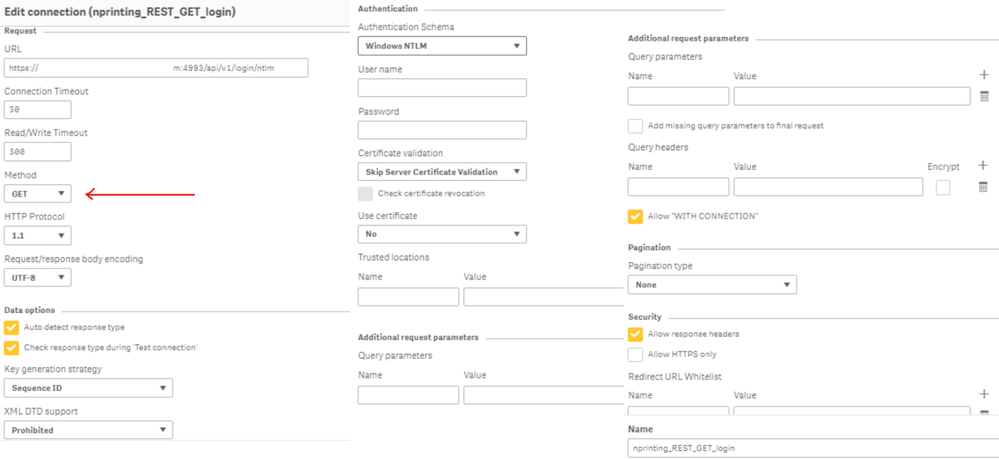
My problem is that I am not able to set up a POST REST Connection. Everything is the same, except for the Method and the Trusted Locations, which has been loaded into NPrinting. 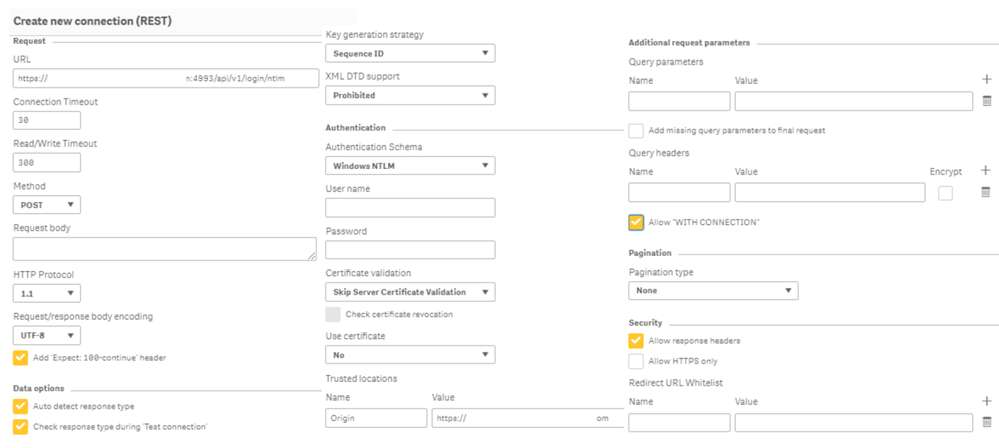
I managed to get the POST working in Postman, by first doing a GET login. Then copying the XSRF-TOKEN out of the Cookie and adding it to a X-XSRF-TOKEN key under Headers.
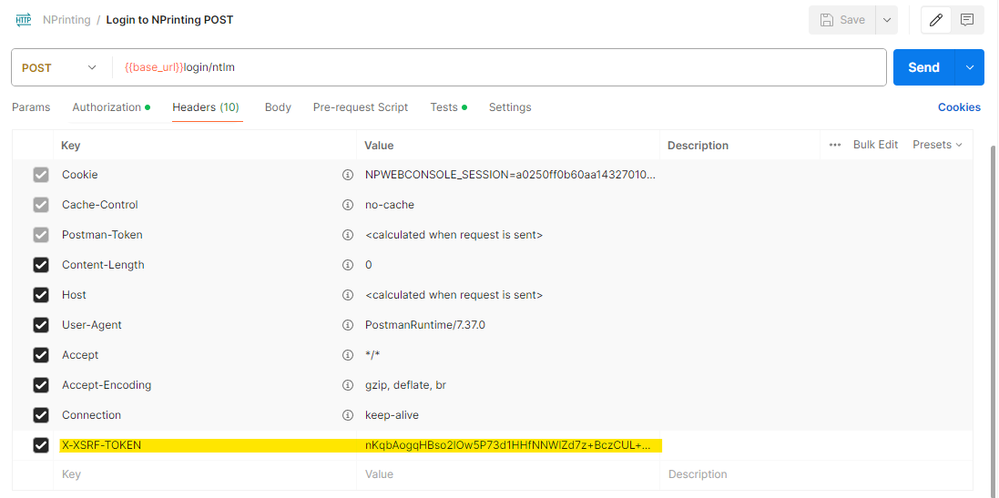
This was a manual workaround, the problem is how to do it when setting up a Qlik Sense POST REST login connection... I can't get the XSRF-TOKEN to add it to the connection, to get the connection to authenticate, i.e., not give the 403 (Forbidden) error...
Accepted Solutions

 Ruggero_Piccoli
- Mark as New
- Bookmark
- Subscribe
- Mute
- Subscribe to RSS Feed
- Permalink
- Report Inappropriate Content
Hi,
When opening a new conversation in the community please always add the label with the correct version you are using. For example, the strig to retrieve the token changed and you need to use the correct one.
Please check the following article https://community.qlik.com/t5/Official-Support-Articles/How-to-create-NPrinting-GET-and-POST-REST-co...and let us know if it solves.
Best Regards,
Ruggero
Best Regards,
Ruggero
---------------------------------------------
When applicable please mark the appropriate replies as CORRECT. This will help community members and Qlik Employees know which discussions have already been addressed and have a possible known solution. Please mark threads with a LIKE if the provided solution is helpful to the problem, but does not necessarily solve the indicated problem. You can mark multiple threads with LIKEs if you feel additional info is useful to others.
wandapec
- Mark as New
- Bookmark
- Subscribe
- Mute
- Subscribe to RSS Feed
- Permalink
- Report Inappropriate Content
Thanks @Ruggero_Piccoli. I fixed the post...
I took a closer look at the post you linked to, which I had seen previously, and I had missed one small difference between what I was doing and Frank's setup..
In NPrinting, I added the Qlik Sense address as a trusted origin. Then in Qlik Sense, I think I was fooled by the word 'Trusted' and was adding the origin to the Trusted Locations section.
Changed it to the Query Headers section and it worked!
Thanks for your help.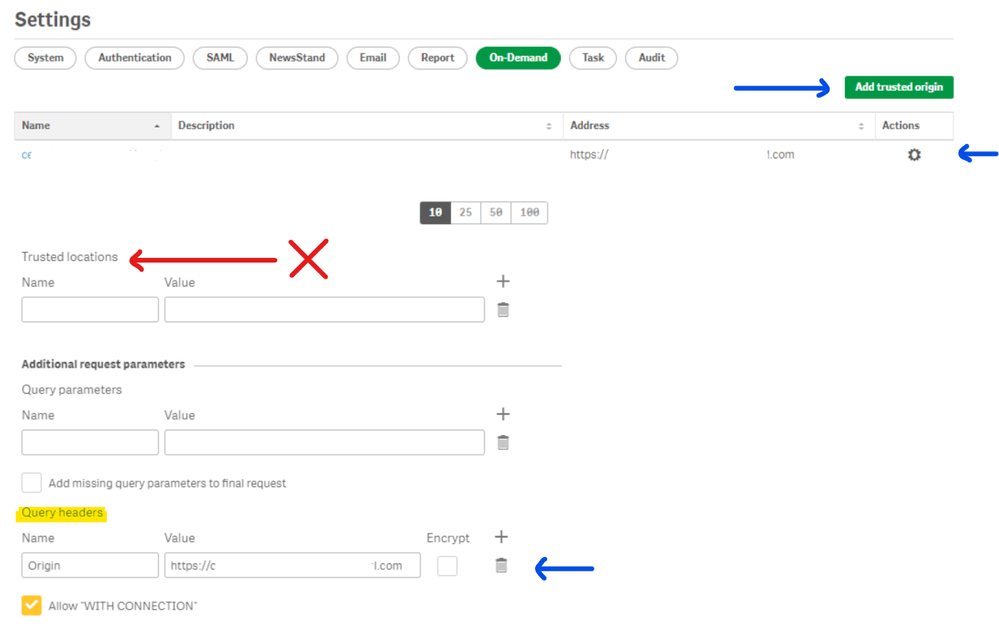
Ruggero_Piccoli
- Mark as New
- Bookmark
- Subscribe
- Mute
- Subscribe to RSS Feed
- Permalink
- Report Inappropriate Content
Hi,
When opening a new conversation in the community please always add the label with the correct version you are using. For example, the strig to retrieve the token changed and you need to use the correct one.
Please check the following article https://community.qlik.com/t5/Official-Support-Articles/How-to-create-NPrinting-GET-and-POST-REST-co...and let us know if it solves.
Best Regards,
Ruggero
Best Regards,
Ruggero
---------------------------------------------
When applicable please mark the appropriate replies as CORRECT. This will help community members and Qlik Employees know which discussions have already been addressed and have a possible known solution. Please mark threads with a LIKE if the provided solution is helpful to the problem, but does not necessarily solve the indicated problem. You can mark multiple threads with LIKEs if you feel additional info is useful to others.
wandapec
- Mark as New
- Bookmark
- Subscribe
- Mute
- Subscribe to RSS Feed
- Permalink
- Report Inappropriate Content
Thanks @Ruggero_Piccoli. I fixed the post...
I took a closer look at the post you linked to, which I had seen previously, and I had missed one small difference between what I was doing and Frank's setup..
In NPrinting, I added the Qlik Sense address as a trusted origin. Then in Qlik Sense, I think I was fooled by the word 'Trusted' and was adding the origin to the Trusted Locations section.
Changed it to the Query Headers section and it worked!
Thanks for your help.
 Ana31
Ana31
- Mark as New
- Bookmark
- Subscribe
- Mute
- Subscribe to RSS Feed
- Permalink
- Report Inappropriate Content
Hi,
I used to get the same error then after giving in query headers i was able to create the connection. now I am facing the same error in my code snippet when i am loading the data. This is the error:
HTTP protocol error 403 (Forbidden):
The server refused to fulfill the request. In this post connection under URL i gave npritning url which is https://RemotedesktopServer:npPORT while the Origin and in npritining on demand trusted orgin where we need to give Qliksense hub link it is https://QlikorganisationNameServer
If you can see, both Names of the server is different. is it because of this i am getting error in my load script. Note: I am sure my script is correct just I am not sure of this connection thing is correct or not. And i use MAY 2021
Thanks!
Ruggero_Piccoli
- Mark as New
- Bookmark
- Subscribe
- Mute
- Subscribe to RSS Feed
- Permalink
- Report Inappropriate Content
Hi,
I recommend using a supported version of Qlik NPrinting and opening a new, dedicated thread for your specific case.
It is normal that the NPrinting API URL (e.g. https://RemotedesktopServer:npPORT/api/v1/connections/ConnectionID/reload) is different from the Origin. Please ensure the Origin you send matches exactly one of the Trusted Origins configured in NPrinting.
Also check authentication before launching the reload:
- Make sure the token is correctly retrieved from the authentication call and then passed into the connection reload call.
- Confirm the user you authenticate with is allowed to use the NPrinting APIs.
Best Regards,
Ruggero
Best Regards,
Ruggero
---------------------------------------------
When applicable please mark the appropriate replies as CORRECT. This will help community members and Qlik Employees know which discussions have already been addressed and have a possible known solution. Please mark threads with a LIKE if the provided solution is helpful to the problem, but does not necessarily solve the indicated problem. You can mark multiple threads with LIKEs if you feel additional info is useful to others.
Ana31
- Mark as New
- Bookmark
- Subscribe
- Mute
- Subscribe to RSS Feed
- Permalink
- Report Inappropriate Content
Hi,
Thanks for the reply.
I have one more doubt regarding the authentication, We login Nprinting using 'Windows Login' (i.e whatever userid and password for RDP). In the GET & POST while creating connection I gave this login credentials domain\userid and password under Authentication Schema > Windows NTLM. Will this be an issue as you mentioned Confirm the user you authenticate with is allowed to use the NPrinting APIs? This user is a Admin role in Nprinting though. Can you please clarify on this.
And yes, will start a new thread. thank you!
Ruggero_Piccoli
- Mark as New
- Bookmark
- Subscribe
- Mute
- Subscribe to RSS Feed
- Permalink
- Report Inappropriate Content
Hi,
It is not clear what and how are you developing. In any case you have to retrieve the session token. There are many examples online with step-by-step guide, like https://community.qlik.com/t5/Official-Support-Articles/How-to-use-NPrinting-APIs-with-Qlik-REST-Con...
Best Regards,
Ruggero
Best Regards,
Ruggero
---------------------------------------------
When applicable please mark the appropriate replies as CORRECT. This will help community members and Qlik Employees know which discussions have already been addressed and have a possible known solution. Please mark threads with a LIKE if the provided solution is helpful to the problem, but does not necessarily solve the indicated problem. You can mark multiple threads with LIKEs if you feel additional info is useful to others.
Ana31
- Mark as New
- Bookmark
- Subscribe
- Mute
- Subscribe to RSS Feed
- Permalink
- Report Inappropriate Content
Hi,
Thanks for the help. I got the correct output. i.e to trigger nprinting task once Qlik app reloads. Pls find the code below:
NOTE: those using qlik onprem 2021 version
LIB CONNECT TO 'REST_GET ';
RestConnectorMasterTable:
SQL SELECT
"Set-Cookie",
"__KEY__response_header"
FROM JSON "_response_header" PK "__KEY__response_header";
cookie_items:
LOAD
[Set-Cookie]
RESIDENT RestConnectorMasterTable
WHERE NOT IsNull([__KEY__response_header]);
DROP TABLE RestConnectorMasterTable;
LET vCookieRaw = Peek('Set-Cookie',0,'cookie_items');
LET vCookie = TextBetween(
vCookieRaw,
'SameSite=None,',
' Path=/',
SubStringCount(vCookieRaw,'SameSite=None')-1
);
DROP TABLE cookie_items;
LET vTaskId = 'xx-xxx';
LET vPublishURL =
'https://qlikNprintingServer:4993/api/v1/tasks/' & '$(vTaskId)' & '/executions';
LIB CONNECT TO 'REST_POST';
RestNPTaskTriggerTable:
SQL SELECT
"__KEY_data"
FROM JSON (wrap off) "data" PK "__KEY_data"
WITH CONNECTION (
URL "$(vPublishURL)",
HTTPHEADER "cookie" "$(vCookie)"
);
DROP TABLE RestNPTaskTriggerTable;
TRACE >>> Triggered NP task: $(vTaskId);
