Unlock a world of possibilities! Login now and discover the exclusive benefits awaiting you.

- Qlik Community
- :
- Forums
- :
- Data Integration
- :
- Products & Topics
- :
- Qlik Replicate
- :
- Re: Qlik Replicate: Unable to test ms-cdc/sqlserve...
- Subscribe to RSS Feed
- Mark Topic as New
- Mark Topic as Read
- Float this Topic for Current User
- Bookmark
- Subscribe
- Mute
- Printer Friendly Page

 dineshkumarl
- Mark as New
- Bookmark
- Subscribe
- Mute
- Subscribe to RSS Feed
- Permalink
- Report Inappropriate Content
Qlik Replicate: Unable to test ms-cdc/sqlserver source endpoint
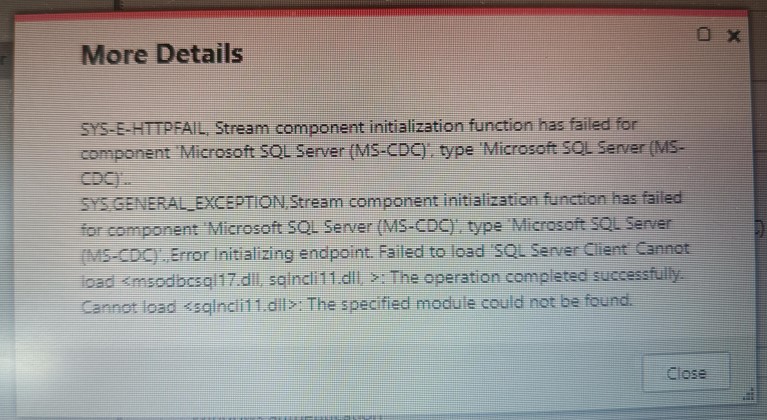
I am trying to setup SQL Server as source in Qlik Replicate. However, I am receiving error 'Failed to load SQL Client' cannot load <msodbcsql17.dll, sqlncli11.dll, > Cannot load sqlncli.dll. The specified module cannot be found.
I was able to locate sqlncli.dll in WinSxS folder and setup environment path for the same.
- Restarted Qlik Replicate server and check. Still ended up receiving the same error.
I have tried installing odbc driver version 18.1, 17.6 and 11 but still issue persists.
I have attached error screenshot for reference.
Below are pre-requisites enabled at mssql source db:
> Preparing the MSSQL database for CDC
The following section explains how to set up the database for CDC.
To set up the database for CDC:
> Setup the database for MS-CDC by executing the following: exec source_db_name.dbo.sp_cdc_enable_db
where source_db_name is the name of the source database. (Skip the step if CDC is enabled for the source database)
> The replication task automatically enables MS-CDC for all the source tables.
However, if you prefer to enable MS-CDC manually, execute the following script (for each of the intended source tables):
exec sys.sp_cdc_enable_table
@Source_schema = N'schema_name',
@Source_name = N'table_name',
@role_name = NULL
where schema_name and table_name are the names of the source schema and the source table respectively.
> Required permissions
The user specified in the endpoint settings must have the following privileges on the source database:
Running without the db_owner role
If the user is not a member of the db_owner database role, the following permissions must be granted on the source database for CDCUSER:
- grant VIEW DATABASE STATE
- grant SELECT
Kindly assist.
- Subscribe by Topic:
-
Configuration
-
Connectivity - Sources or Targets
-
Errors - Unexpected Behavior
-
Functionality
- « Previous Replies
-
- 1
- 2
- Next Replies »

 S_Ravi
- Mark as New
- Bookmark
- Subscribe
- Mute
- Subscribe to RSS Feed
- Permalink
- Report Inappropriate Content
I tested , it works now having both odbc 17 and 18 on qreplicate server , it picks odbc 18 correctly.

 john_wang
- Mark as New
- Bookmark
- Subscribe
- Mute
- Subscribe to RSS Feed
- Permalink
- Report Inappropriate Content
Glad to hear that, thank you so much for your great support @S_Ravi !
dineshkumarl
- Mark as New
- Bookmark
- Subscribe
- Mute
- Subscribe to RSS Feed
- Permalink
- Report Inappropriate Content
Hello,
I was able to resolve the issue by :
We were able to succeed with test connection after installing ODBC driver 17.6 and removing internal parameter. 18 did not work for me.

- « Previous Replies
-
- 1
- 2
- Next Replies »