Unlock a world of possibilities! Login now and discover the exclusive benefits awaiting you.

- Qlik Community
- :
- Forums
- :
- Forums by Product
- :
- Products (A-Z)
- :
- Qlik Sense
- :
- Documents
- :
- Qlik Sense App: Send Data From The Load Script
- Move Document
- Delete Document
- Subscribe to RSS Feed
- Mark as New
- Mark as Read
- Bookmark
- Subscribe
- Printer Friendly Page
- Report Inappropriate Content
Qlik Sense App: Send Data From The Load Script

 stevedark
- Move Document
- Delete Document and Replies
- Mark as New
- Bookmark
- Subscribe
- Mute
- Subscribe to RSS Feed
- Permalink
- Report Inappropriate Content
Qlik Sense App: Send Data From The Load Script
QlikView has two features which allow it to send alerts and data to the user, using Alerts in the front end or QMC notifications on the Server. Presently Sense lacks these out of the box, but it is possible to implement the same using the free Qlik Web Connectors SMTP Connector.
This application implements the sending of data as an HTML table embedded in an email each time an app is reloaded.
It was produced to go alongside this blog post, which describes the process in detail:
https://www.quickintelligence.co.uk/send-data-from-qlik-load-script/
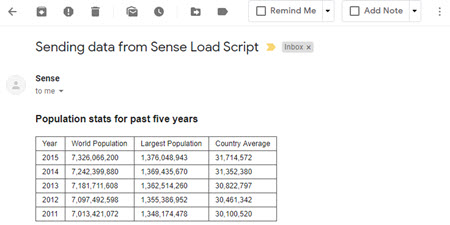
I hope that you find the application useful. You will find other applications that I have uploaded under my profile on QlikCommunity or on our Downloads page..
Steve

 Sivapriya_d
- Move Comment
- Delete Comment
- Mark as Read
- Mark as New
- Bookmark
- Permalink
- Report Inappropriate Content
Thanks @stevedark . Sorry i missed to highlight. I am on QSEW and using Qlik web connector to establish SMTP connection. I got the issue sorted with Style tag but would you be able to advise on remaining things?
Also have you faced any issues while sending the notification to the larger audience using SMTP connector?
Appreciate if you could share any notable/major issues you faced with SMTP connector.
Thanks,
stevedark
- Move Comment
- Delete Comment
- Mark as Read
- Mark as New
- Bookmark
- Permalink
- Report Inappropriate Content
Hi @Sivapriya_d
The local path is required because that is what QWC requires for the file with the body of the email in it. That local path needs to be the same location as the library is pointing to - so you write the file to the lib:// location and read it from c:\. You should be able to use a UNC path, but I tend to use a local drive.
There will be a limit on size, I think there is a config setting in QWC which you might be able to use to increase that limit.
If you are sending to a very large audience you might chose to load the recipients into a table in Qlik and then loop around using a for i = 0 to NoOfRows('Recipients') - 1 and then a peek('Recipient', i, 'Recipients') to get each email address. This will take longer to burst out all of the emails, but they are more likely to arrive.
The biggest limitation with this approach is the fact that when you store the message body to a file any double quotes in the text will break it. Technically the HTML should have double quotes in it, but the email client will deal with it if you just leave them out.
Hope that helps.
Steve
Sivapriya_d
- Move Comment
- Delete Comment
- Mark as Read
- Mark as New
- Bookmark
- Permalink
- Report Inappropriate Content
Thank you so much @stevedark . It really helps me with the setup.
Thanks,
Sivapriya
Sivapriya_d
- Move Comment
- Delete Comment
- Mark as Read
- Mark as New
- Bookmark
- Permalink
- Report Inappropriate Content
Hi @stevedark ,
Hope you are well!
Would like to know if you have used this solution extensively, i.e to send charts like Bar using css/javascript.
Thanks,
Sivapriya
stevedark
- Move Comment
- Delete Comment
- Mark as Read
- Mark as New
- Bookmark
- Permalink
- Report Inappropriate Content
Hi @Sivapriya_d
I use it a lot to send tables in HTML and CSV attachments. I've not done much with charts when sending. The emails I send tend to have headline details and then a link to the Sense application, often with a selection in the URL, so the recipient can get the full details.
Steve
- « Previous
- Next »