Unlock a world of possibilities! Login now and discover the exclusive benefits awaiting you.

- Qlik Community
- :
- All Forums
- :
- QlikView App Dev
- :
- Re: Group Expressions label
- Subscribe to RSS Feed
- Mark Topic as New
- Mark Topic as Read
- Float this Topic for Current User
- Bookmark
- Subscribe
- Mute
- Printer Friendly Page

- Mark as New
- Bookmark
- Subscribe
- Mute
- Subscribe to RSS Feed
- Permalink
- Report Inappropriate Content
Group Expressions label
Hello,
please help me.
I created a group expressions with three metrics: Sales, Non_Retail, Farmacy. I grouped this metrics and this work very well. I would like to see the label expressions when i change the selection. I think, i should use a text object, but what function could i use?
Thanks

 MayilVahanan
- Mark as New
- Bookmark
- Subscribe
- Mute
- Subscribe to RSS Feed
- Permalink
- Report Inappropriate Content
Hi,
Try this,
=GetCurrentField([GroupName])
This gives the group name like Sales, Non_Retail, Farmacy what you select currently.
Hope it helps.
Please close the thread by marking correct answer & give likes if you like the post.
- Mark as New
- Bookmark
- Subscribe
- Mute
- Subscribe to RSS Feed
- Permalink
- Report Inappropriate Content
Hi Mayil,
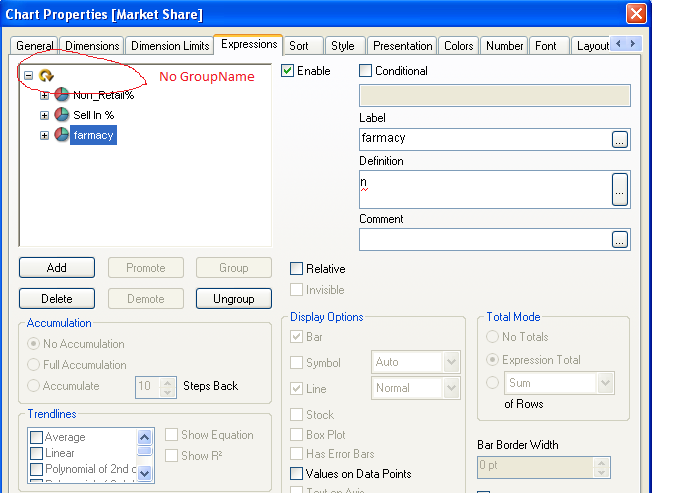
Thanks, but i don't have GroupName, because this is a expressions group and this groups don't have name
- Mark as New
- Bookmark
- Subscribe
- Mute
- Subscribe to RSS Feed
- Permalink
- Report Inappropriate Content
MayilVahanan
- Mark as New
- Bookmark
- Subscribe
- Mute
- Subscribe to RSS Feed
- Permalink
- Report Inappropriate Content
hi,
Its not possible in qlikview. In dimension only we can set using "Edit Group". But not in expression group.
Please close the thread by marking correct answer & give likes if you like the post.
- Mark as New
- Bookmark
- Subscribe
- Mute
- Subscribe to RSS Feed
- Permalink
- Report Inappropriate Content
And..... if i create a text box, it' isn't there function for i get the expression name?, for example, to get 'Sell In%' or 'Farmacy' when i change the selection?
MayilVahanan
- Mark as New
- Bookmark
- Subscribe
- Mute
- Subscribe to RSS Feed
- Permalink
- Report Inappropriate Content
Hi,
Its not possible to get the expression name in text box. You can get the dimension "group name" by using GetCurrentField([GroupName]) or expression value by using expression in textbox not expression name.
Hope it helps
Please close the thread by marking correct answer & give likes if you like the post.
- Mark as New
- Bookmark
- Subscribe
- Mute
- Subscribe to RSS Feed
- Permalink
- Report Inappropriate Content
ok, thanks

 fkeuroglian
- Mark as New
- Bookmark
- Subscribe
- Mute
- Subscribe to RSS Feed
- Permalink
- Report Inappropriate Content
please check this
hope help
Fernando