Unlock a world of possibilities! Login now and discover the exclusive benefits awaiting you.

- Qlik Community
- :
- All Forums
- :
- QlikView App Dev
- :
- Grouping Dimension Values
- Subscribe to RSS Feed
- Mark Topic as New
- Mark Topic as Read
- Float this Topic for Current User
- Bookmark
- Subscribe
- Mute
- Printer Friendly Page

- Mark as New
- Bookmark
- Subscribe
- Mute
- Subscribe to RSS Feed
- Permalink
- Report Inappropriate Content
Grouping Dimension Values
Hi,
I want to have account type as my dimension. account type has value A, B, C, D, E, F, G
What If I want to have A. B, C as Group 1. B, C, E as Group 2, E, F, G as Group 3?
it does overlap and I know that. but I want to have three dimensions Group 1, Group 2, Group3 and as described above they are combinations of original values.\
Thanks!
David

 sunny_talwar
- Mark as New
- Bookmark
- Subscribe
- Mute
- Subscribe to RSS Feed
- Permalink
- Report Inappropriate Content
I don't believe so. Would you be able to share your script?
- Mark as New
- Bookmark
- Subscribe
- Mute
- Subscribe to RSS Feed
- Permalink
- Report Inappropriate Content
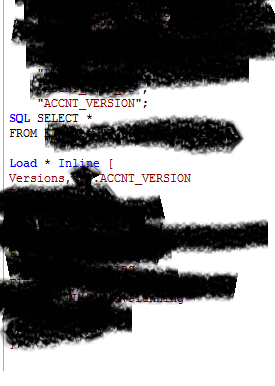
Hi Sunny,
I would love to share but I cannot share everything so Please be understanding.
but there are all the information that you need.
you can the there is SQL in there and I am pulling directly from DB.
and ACCNT_VERSION is the column name.
and in Load * Inline
Versions : is the new group name that I am assigning and
ACCNT_VERSION is the existing original value. I have used Qualify for the original table so I have additional table name and a dot in front of ACCNT_VERSION
I cannot figure out what I did wrong. but still the entire table and and the inline table is still separate.
it is also verified in data model.
Please help!
Thank you very much
sunny_talwar
- Mark as New
- Bookmark
- Subscribe
- Mute
- Subscribe to RSS Feed
- Permalink
- Report Inappropriate Content
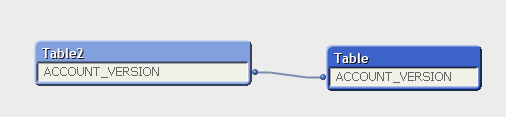
Do you see any differences between the new field and old field name? I understand the need for confidentiality, but the fields not connecting is something which you will have to check on your end. In the example below you will see that the two tables are auto connected because they have the same field name
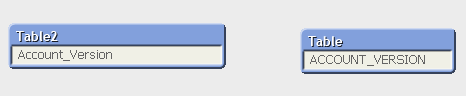
But doesn't connect if anything between them doesn't match
- Mark as New
- Bookmark
- Subscribe
- Mute
- Subscribe to RSS Feed
- Permalink
- Report Inappropriate Content
Thank you Sunny you are the best.
I found out that the qualify that I used for the first table was affecting the second column as well resulting in adding a table name to the second inline table.
I used unqualify for the inline table and now those two are well hooked up!
Thank you so much!!
@sunny T
sunny_talwar
- Mark as New
- Bookmark
- Subscribe
- Mute
- Subscribe to RSS Feed
- Permalink
- Report Inappropriate Content
Awesome 
I am glad it worked out for you.
Best,
Sunny

 jason_nicholas
- Mark as New
- Bookmark
- Subscribe
- Mute
- Subscribe to RSS Feed
- Permalink
- Report Inappropriate Content
I am having the same issue, but feel I must be missing something from this answer. I would appreciate it if you could take a look and see if it is clear where I went wrong.
Just as David has, I have a number of entries in my source data which I want to put into groups. In my case, my data has a "Building Time Zone" listed with reference cities, but I want to turn these into regions.
ie- GMT is listed as "Dublin, Edinburgh, Lisbon, London" (all four cities are included in a single entry). I want to combine this entry with two other similar entries into a group called EMEA. I also want to group the North America and APAC entries together.
Based on the answer given here, I have the following script. I put a strikethrough on the unrelated data for clarity. NA, EMEA, and APAC are my desired group names, and they are followed by the specific text which appears in my source data.
LOAD
[Booking ID],
[Booking Date],
[Booking Event Name],
[Building Time Zone],
Category,
Resource,
Notes
FROM
[October NEW AV Support Query.xls]
(biff, embedded labels)
Load * inline[
Group, [Building Time Zone]
NA, Arizona
NA, [Central Time]
NA, [Eastern Time]
NA, [Pacific Time]
EMEA, [Amsterdam, Berlin, Bern, Rome, Stockholm, Vienna]
EMEA, [Brussels, Copenhagen, Madrid, Paris]
EMEA, [Dublin, Edinburgh, Lisbon, London]
APAC, [Beijing, Chongquing, Hong Kong, Urumqi]
APAC, [Calcutta, Chennai, Mumbai, New Delhi]
APAC, [Kuala Lumpur, Singapore]
];
sunny_talwar
- Mark as New
- Bookmark
- Subscribe
- Mute
- Subscribe to RSS Feed
- Permalink
- Report Inappropriate Content
What is the exact issue you are running into? Script not running or the data is not getting mapped correctly?
jason_nicholas
- Mark as New
- Bookmark
- Subscribe
- Mute
- Subscribe to RSS Feed
- Permalink
- Report Inappropriate Content
when I hit Reload, I get the message:
Garbage after statement
LOAD.....
then goes on to show exactly what I have above, without the closing ;
sunny_talwar
- Mark as New
- Bookmark
- Subscribe
- Mute
- Subscribe to RSS Feed
- Permalink
- Report Inappropriate Content
I think the issue is related to a missed space between the word inline and the square bracket
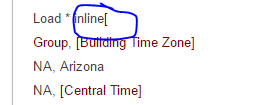
Try with this:
Load * inline [
Group, [Building Time Zone]
NA, Arizona
NA, [Central Time]
NA, [Eastern Time]
NA, [Pacific Time]
EMEA, [Amsterdam, Berlin, Bern, Rome, Stockholm, Vienna]
EMEA, [Brussels, Copenhagen, Madrid, Paris]
EMEA, [Dublin, Edinburgh, Lisbon, London]
APAC, [Beijing, Chongquing, Hong Kong, Urumqi]
APAC, [Calcutta, Chennai, Mumbai, New Delhi]
APAC, [Kuala Lumpur, Singapore]
];
jason_nicholas
- Mark as New
- Bookmark
- Subscribe
- Mute
- Subscribe to RSS Feed
- Permalink
- Report Inappropriate Content
Unfortunately, adding the space did not help. I started fresh and copied the inline load statement directly from your response. Here is the new script. (previously, I edited out some of the columns I loaded for brevity. This time I left them in)
Directory;
LOAD [Reservation ID],
[Booking ID],
[Booking Date],
[Booking Event Name],
[Event Start],
[Event End],
[Building Time Zone],
Building,
[Room Code],
[Customer Host],
[Customer Host Type],
[Line of Business],
Category,
Resource,
Notes
FROM
[October NEW AV Support Query.xls]
(biff, embedded labels, table is Sheet$);
Load * inline [
Group, [Building Time Zone]
NA, Arizona
NA, [Central Time]
NA, [Eastern Time]
NA, [Pacific Time]
EMEA, [Amsterdam, Berlin, Bern, Rome, Stockholm, Vienna]
EMEA, [Brussels, Copenhagen, Madrid, Paris]
EMEA, [Dublin, Edinburgh, Lisbon, London]
APAC, [Beijing, Chongquing, Hong Kong, Urumqi]
APAC, [Calcutta, Chennai, Mumbai, New Delhi]
APAC, [Kuala Lumpur, Singapore]
];
and I get
Garbage after statement
Load * inline [
Group, [Building Time Zone]
NA, Arizona
NA, [Central Time]
NA, [Eastern Time]
NA, [Pacific Time]
EMEA, [Amsterdam, Berlin, Bern, Rome, Stockholm, Vienna]
EMEA, [Brussels, Copenhagen, Madrid, Paris]
EMEA, [Dublin, Edinburgh, Lisbon, London]
APAC, [Beijing, Chongquing, Hong Kong, Urumqi]
APAC, [Calcutta, Chennai, Mumbai, New Delhi]
APAC, [Kuala Lumpur, Singapore]
]