Unlock a world of possibilities! Login now and discover the exclusive benefits awaiting you.

- Qlik Community
- :
- All Forums
- :
- QlikView App Dev
- :
- Is there any way to find out about different state...
- Subscribe to RSS Feed
- Mark Topic as New
- Mark Topic as Read
- Float this Topic for Current User
- Bookmark
- Subscribe
- Mute
- Printer Friendly Page

 datanibbler
- Mark as New
- Bookmark
- Subscribe
- Mute
- Subscribe to RSS Feed
- Permalink
- Report Inappropriate Content
Is there any way to find out about different states?
Hello,
I wonder: Is there any way, in an app that has several states defined, to find out which sheets/ charts use each state? Apart from opening every single sheet and chart and documenting it if it hasn't been done before?
Thanks a lot!
Best regards,
DataNibbler

 marcus_sommer
- Mark as New
- Bookmark
- Subscribe
- Mute
- Subscribe to RSS Feed
- Permalink
- Report Inappropriate Content
Maybe with something like this:
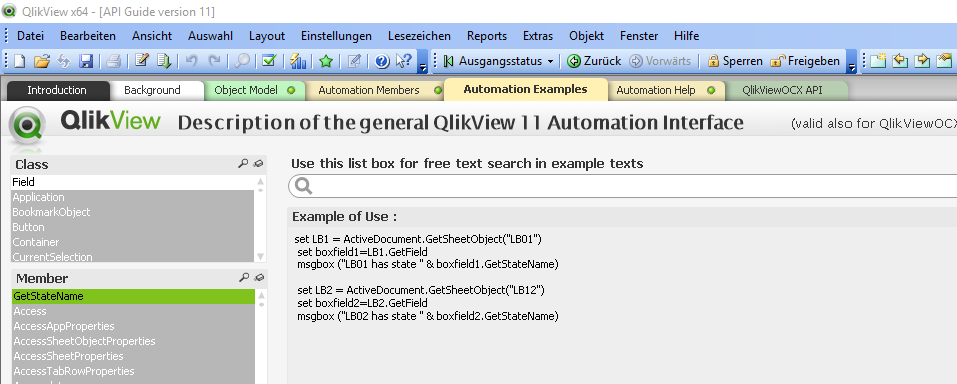
- Marcus

 petter
- Mark as New
- Bookmark
- Subscribe
- Mute
- Subscribe to RSS Feed
- Permalink
- Report Inappropriate Content
Yes it is - almost - for all charts you can find out but not if a sheet belongs to an alternate state.
If you have already defined one or more alternate states in you QlikView document you can go to:
Document Properties / Sheets and the table of Sheet Objects will have a new column named State which can be sorted. The list of Sheets will not have this extra column - must be something they forgot... it seems like a bug.
Unfortunately if you can export the structure by pressing the Export Structure button the column State will not appear in the text file - clearly a bug - something they forgot when they introduced Alternate States.
![2018-04-18 13_32_24-Document Properties [Data Visualization].png](/legacyfs/online/200027_2018-04-18 13_32_24-Document Properties [Data Visualization].png)
The "Data Visualization" app doesnt contain any Alternate States so until you define one this column State will not appear....
datanibbler
- Mark as New
- Bookmark
- Subscribe
- Mute
- Subscribe to RSS Feed
- Permalink
- Report Inappropriate Content
Hi Petter,
okay. That helps me, kind of. So I'll still have to parse through every sheet in the app to find out, but that cannot be helped. The developer of an app should document this from the start (or rather, should have documented it ...)
Thanks a lot!
Best regards,
DataNibbler
petter
- Mark as New
- Bookmark
- Subscribe
- Mute
- Subscribe to RSS Feed
- Permalink
- Report Inappropriate Content
With a macro as marcus_sommer suggests you can probably get the state for both the sheets and the sheet objects.
