Unlock a world of possibilities! Login now and discover the exclusive benefits awaiting you.

- Qlik Community
- :
- All Forums
- :
- QlikView App Dev
- :
- Previous Fiscal Year data does not show up when i ...
- Subscribe to RSS Feed
- Mark Topic as New
- Mark Topic as Read
- Float this Topic for Current User
- Bookmark
- Subscribe
- Mute
- Printer Friendly Page

- Mark as New
- Bookmark
- Subscribe
- Mute
- Subscribe to RSS Feed
- Permalink
- Report Inappropriate Content
Previous Fiscal Year data does not show up when i select date from calendar
Hi all,
Wonder if you can help me.
I have a chart that calculates my sales of previous year using expression
Sum({$<Year_Fiscal_Order = {'$(=max(Year_Fiscal_Order)-1)'}>}[Sales Amount])
When i make a date selection from my calendar ([Invoice Date]) no values are showing for previous year.
Can someone help please?
| Product | Current Year | Previous Year |
| Milk | 200 | 0 |
| Bread | 130 | 0 |
| Tea | 60 | 0 |
| Coffee | 80 | 0 |
| Butter | 30 | 0 |
| Water | 900 | 0 |
| Fish | 20 | 0 |
| Meat | 16 | 0 |
| LOC | 2 | 0 |
In my calendar load, I have created a separate table and left joined where it auto numbered all my fiscal year in ascending order and i left joined that to the main calendar. It works perfectly fine just that when i select dates, then it goes off.
Regards,
- « Previous Replies
-
- 1
- 2
- Next Replies »
- Mark as New
- Bookmark
- Subscribe
- Mute
- Subscribe to RSS Feed
- Permalink
- Report Inappropriate Content
Hi Sunny,
Please see the attached spread sheet.
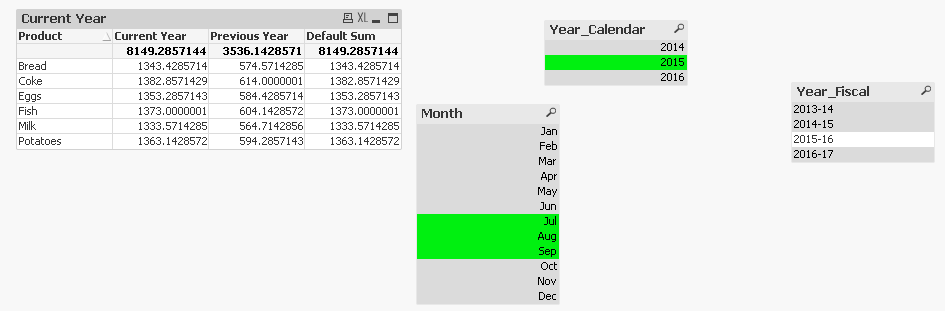
The first table shows values when i select year 2015 and Jul Aug Sept and compares them with previous year of 2014.
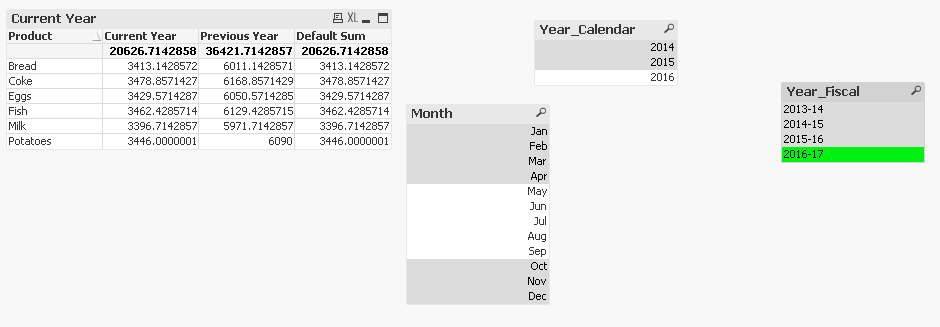
On the table below is a default comparison of of what the table would do. This compares Current Fiscal year with Previous Fiscal year.
I am expecting to see this in one expression. Is that possible?
Regards,
Sarb

 sunny_talwar
- Mark as New
- Bookmark
- Subscribe
- Mute
- Subscribe to RSS Feed
- Permalink
- Report Inappropriate Content
Where did Product dimension came in from? The attached sample has no product dimension. Can you provide an update sample or an expected output based on the sample you have already provided?
- Mark as New
- Bookmark
- Subscribe
- Mute
- Subscribe to RSS Feed
- Permalink
- Report Inappropriate Content
Sunny,
Now attached.
I thought i had attached the product dimension app in there.
Regards,
sunny_talwar
- Mark as New
- Bookmark
- Subscribe
- Mute
- Subscribe to RSS Feed
- Permalink
- Report Inappropriate Content
I still don't see the Product dimension in the attached application 
- Mark as New
- Bookmark
- Subscribe
- Mute
- Subscribe to RSS Feed
- Permalink
- Report Inappropriate Content
Hi Sunny,
Ok that's because the app name is same and on qlik community it just gets overridden by the old one.
Now attached with a different name.
Regards,
Sarb
sunny_talwar
- Mark as New
- Bookmark
- Subscribe
- Mute
- Subscribe to RSS Feed
- Permalink
- Report Inappropriate Content
Here you go...
Expression
Sum({$<InvoiceDate = {"$(='>=' & Date(AddYears(Min(InvoiceDate), -1), 'DD/MM/YYYY') & '<=' & Date(YearEnd(Max(InvoiceDate), -1, 5), 'DD/MM/YYYY'))"}, $(=Concat({<$Table = {CALENDAR}, $Field -= {InvoiceDate, Month}>}'[' & $Field & ']', ', '))>}[Amount])
When 2015 & Jul, Aug, Sept is selected
When 2016-17 is selected
- « Previous Replies
-
- 1
- 2
- Next Replies »