Unlock a world of possibilities! Login now and discover the exclusive benefits awaiting you.

- Qlik Community
- :
- All Forums
- :
- QlikView App Dev
- :
- Rename a field used throughout dashboard
- Subscribe to RSS Feed
- Mark Topic as New
- Mark Topic as Read
- Float this Topic for Current User
- Bookmark
- Subscribe
- Mute
- Printer Friendly Page

- Mark as New
- Bookmark
- Subscribe
- Mute
- Subscribe to RSS Feed
- Permalink
- Report Inappropriate Content
Rename a field used throughout dashboard
Hi, I need to rename a field that is used throughout a dashboard currently. Is there a way for qlikview to rename this field everywhere it is used? ie In Charts, Graphs, etc. I am not talking about changing the label, but actually renaming the field. It currently isn't very descriptive of what it is, and I want to make it where users can know what it is by its name. Thanks!
Accepted Solutions

 sunny_talwar
- Mark as New
- Bookmark
- Subscribe
- Mute
- Subscribe to RSS Feed
- Permalink
- Report Inappropriate Content
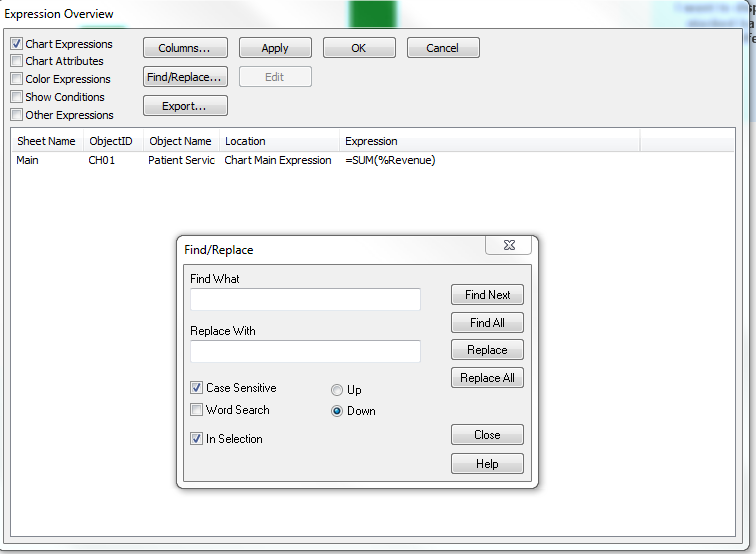
One way would be to go to Expression Overview (Ctrl + Alt + E) and do a Find/Replace
sunny_talwar
- Mark as New
- Bookmark
- Subscribe
- Mute
- Subscribe to RSS Feed
- Permalink
- Report Inappropriate Content
One way would be to go to Expression Overview (Ctrl + Alt + E) and do a Find/Replace

 trdandamudi
- Mark as New
- Bookmark
- Subscribe
- Mute
- Subscribe to RSS Feed
- Permalink
- Report Inappropriate Content
A part from what sunny mentioned above you can also try as below:
In the Edit script you can change the field names and they will get reflected automatically.
For example if you have a script like below:
Data:
Load
Customer,
Amount
Resident Temp;
and you have a chart based on Customer and Amount.
Now you can change the script as below:
Data:
Load
Customer as Cust,
Amount as Sales
Resident Temp;
This will change the fields automatically in the chart to Cust and Sales.
Hope this helps.....
sunny_talwar
- Mark as New
- Bookmark
- Subscribe
- Mute
- Subscribe to RSS Feed
- Permalink
- Report Inappropriate Content
This does work, but it sort of randomly works sometimes and won't work another time. For instance if you change few of the fields, then QlikView will be smart enough to change the field name in some of the places (will still have trouble changing it in other places such as set analysis modifier). So after you do this, I would suggest you to def. do the Find from Expression overview 
trdandamudi
- Mark as New
- Bookmark
- Subscribe
- Mute
- Subscribe to RSS Feed
- Permalink
- Report Inappropriate Content
Got it,,,, Thanks...
- Mark as New
- Bookmark
- Subscribe
- Mute
- Subscribe to RSS Feed
- Permalink
- Report Inappropriate Content
Yes, I experienced what Sunny is saying. Sometimes QlikView is great about changing the field to the new name automatically. Other times, not so much. But the Expression Overview is a great way to find all instances where a changed field is used. Thanks!