Unlock a world of possibilities! Login now and discover the exclusive benefits awaiting you.

- Qlik Community
- :
- All Forums
- :
- QlikView App Dev
- :
- Re: Sum of count
- Subscribe to RSS Feed
- Mark Topic as New
- Mark Topic as Read
- Float this Topic for Current User
- Bookmark
- Subscribe
- Mute
- Printer Friendly Page

- Mark as New
- Bookmark
- Subscribe
- Mute
- Subscribe to RSS Feed
- Permalink
- Report Inappropriate Content
Sum of count
Hi
Attached is my application .. i want total bugs for payments segment .. by week .. the expression i use is doubling the count not sure why .. can someone please look
Thanks

 sunny_talwar
- Mark as New
- Bookmark
- Subscribe
- Mute
- Subscribe to RSS Feed
- Permalink
- Report Inappropriate Content
Where do you see the doubling? Can you point out and on which line chart? Top or Bottom one?

 m_woolf
- Mark as New
- Bookmark
- Subscribe
- Mute
- Subscribe to RSS Feed
- Permalink
- Report Inappropriate Content
See the attached qvw. The new straight table shows all records in your table.
- Mark as New
- Bookmark
- Subscribe
- Mute
- Subscribe to RSS Feed
- Permalink
- Report Inappropriate Content
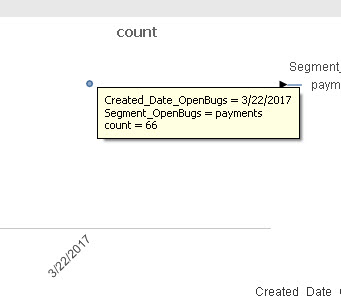
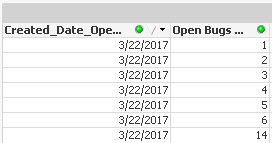
if you look into raw data the total bugs are 35 for 3/22 but in chart it shows 66 , actually its not exactly doubling but not showing the right number
sunny_talwar
- Mark as New
- Bookmark
- Subscribe
- Mute
- Subscribe to RSS Feed
- Permalink
- Report Inappropriate Content
You are looking at a table box which shows distinct combination of fields that are added into the object. I added the other fields and see what I get
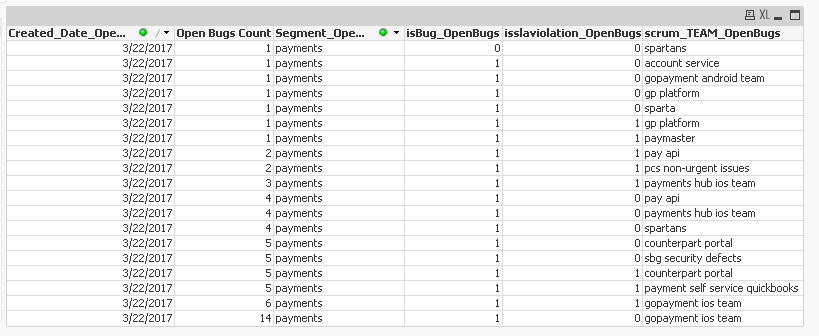
There are multiple rows where Open Bugs Count = 1 but scrum_TEAM_OpenBugs are different. Do you consider them all as 1?
sunny_talwar
- Mark as New
- Bookmark
- Subscribe
- Mute
- Subscribe to RSS Feed
- Permalink
- Report Inappropriate Content
Not a good idea, but you can use Sum(DISTINCT ....)
Sum(DISTINCT {<Segment_OpenBugs ={'payments'}>}[Open Bugs Count])


 neelamsaroha157
- Mark as New
- Bookmark
- Subscribe
- Mute
- Subscribe to RSS Feed
- Permalink
- Report Inappropriate Content
Sum the distinct values gives 35. i am not if this the the correct logic but value are correct as per your req.