Unlock a world of possibilities! Login now and discover the exclusive benefits awaiting you.

- Qlik Community
- :
- All Forums
- :
- QlikView App Dev
- :
- Use alternate state one per dimension value
- Subscribe to RSS Feed
- Mark Topic as New
- Mark Topic as Read
- Float this Topic for Current User
- Bookmark
- Subscribe
- Mute
- Printer Friendly Page

- Mark as New
- Bookmark
- Subscribe
- Mute
- Subscribe to RSS Feed
- Permalink
- Report Inappropriate Content
Use alternate state one per dimension value
Hello!
I am trying to use alternative states to solve my problem. I have two datasets with the same data but they are different snapshots. Except from one sheet all diagrams only take one dataset (specified by flag 'fileName') into concern. On one sheet my goal is to compare those two sets using 8 different expressions in a pivot table. Right now I use 'FileName' as dimension and something like 'Sum({$<FileName = >} Distance)' as expression. That works fine but now there should be two list boxes (for Group1 and Group2) which filter only one dataset (selections made in Group1 should only influence dataset1, selections in Group2 sould only affect dataset2).
As far as I understand alternative states they work that way that two expressions (for the different group) are calculated for each dimension value, but I want to use one state for echt dimension value.
I attached a file of my actual pivot table, but right now, it is not possible to do alternative selections for regions of the two different files.
Does anyone know if this is possible and if yes how?

- « Previous Replies
-
- 1
- 2
- Next Replies »

 sunny_talwar
- Mark as New
- Bookmark
- Subscribe
- Mute
- Subscribe to RSS Feed
- Permalink
- Report Inappropriate Content
Hopefully this:

Expression ->
If(Count(TOTAL <Employee>{[Alt1]<FileName={'D17.11.2015'}>} [Order Date]) = Count(TOTAL <Employee>{[Alt2]<FileName = {'D24.11.2015'}>} [Order Date]), Black(),
If([# Orders] = eMaxOrder, Green(), LightRed()))
- Mark as New
- Bookmark
- Subscribe
- Mute
- Subscribe to RSS Feed
- Permalink
- Report Inappropriate Content
I am afraid but it does not work as desired.
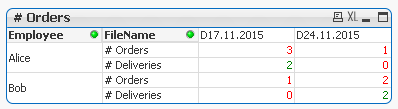
That is what i get, when I do not select anything. For # Deliveries it seems to work correctly but # Orders (Alice) the 3 should be green whereas the 1 should be red. And # Orders (Bob) the 1 should be red and the 2 green.
I also do not understand what "<Employee>" in front of set analysis does, could you explain that?
- Mark as New
- Bookmark
- Subscribe
- Mute
- Subscribe to RSS Feed
- Permalink
- Report Inappropriate Content
I think I found the solution. I had to change the expression for eMaxOrder to
(Count(TOTAL <Employee>{[Alt1]<FileName={'D17.11.2015'}>} [Order Date]) > Count(TOTAL <Employee>{[Alt2]<FileName = {'D24.11.2015'}>} [Order Date]),Count(TOTAL <Employee>{[Alt1]<FileName={'D17.11.2015'}>} [Order Date]), Count(TOTAL <Employee>{[Alt2]<FileName = {'D24.11.2015'}>} [Order Date]))
sunny_talwar
- Mark as New
- Bookmark
- Subscribe
- Mute
- Subscribe to RSS Feed
- Permalink
- Report Inappropriate Content
That is awesome  . Let us know if you still have any problem
- Mark as New
- Bookmark
- Subscribe
- Mute
- Subscribe to RSS Feed
- Permalink
- Report Inappropriate Content
Hi Sunny, I am wondering if FileName field contains many values, how do I deal with it.
sunny_talwar
- Mark as New
- Bookmark
- Subscribe
- Mute
- Subscribe to RSS Feed
- Permalink
- Report Inappropriate Content
What do you mean when you say multiple values? Do you have an example?
- « Previous Replies
-
- 1
- 2
- Next Replies »