Unlock a world of possibilities! Login now and discover the exclusive benefits awaiting you.

- Qlik Community
- :
- All Forums
- :
- QlikView App Dev
- :
- Re: Using different Macors in a QVW
- Subscribe to RSS Feed
- Mark Topic as New
- Mark Topic as Read
- Float this Topic for Current User
- Bookmark
- Subscribe
- Mute
- Printer Friendly Page

- Mark as New
- Bookmark
- Subscribe
- Mute
- Subscribe to RSS Feed
- Permalink
- Report Inappropriate Content
Using different Macors in a QVW
Hi,
I need to use three similar (but different) macros within my QVW. In each macro only the highlighted portion would differ. The challenge I face is, if I modify the code in one place, the same modification gets reflected across the QVW in all other macro codes. How to modify the below code without affecting a similar code elsewhere in the QVW. FYI: I am calling these macros within a Button action.
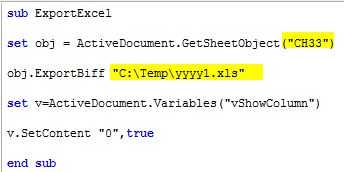
Thanks,
Sudha.
- Tags:
- macros
- « Previous Replies
-
- 1
- 2
- Next Replies »

 santiago_respan
- Mark as New
- Bookmark
- Subscribe
- Mute
- Subscribe to RSS Feed
- Permalink
- Report Inappropriate Content
Make shure your QV variable has a string (text) value, you can try converting the pseudoParam1 to string.
Maybe this line is usefull, replace the line that throws the error with the following:
'this will let you know the value of the variable
msgbox pseudoParam1
'converting the value to a string befose passing it
set obj = ActiveDocument.GetSheetObject(cstr(pseudoParam1))
Let me know if it works.
Regards,

 petter
- Mark as New
- Bookmark
- Subscribe
- Mute
- Subscribe to RSS Feed
- Permalink
- Report Inappropriate Content
Maybe I didn't make myself very clear. Obviously you are still trying with only one sub-routine.
Create three - 3 separate Sub-routines and then create separate Buttons that point to each one - each with a different name. Then you will avoid your problem.
petter
- Mark as New
- Bookmark
- Subscribe
- Mute
- Subscribe to RSS Feed
- Permalink
- Report Inappropriate Content
Here is an attached Application that proves that it should work if it is done like I described.

 rwunderlich
- Mark as New
- Bookmark
- Subscribe
- Mute
- Subscribe to RSS Feed
- Permalink
- Report Inappropriate Content
Sounds like you are using Linked Objects for the buttons. Right Click each button, an select "UnLink".
-Rob
- Mark as New
- Bookmark
- Subscribe
- Mute
- Subscribe to RSS Feed
- Permalink
- Report Inappropriate Content
Hi,
Could you please tell me how to unlink the buttons. When I right click the button, I don't see any option related to link/unlink. I am using Qlikview 11.2 SR6.
Thanks,
Sudha
- Mark as New
- Bookmark
- Subscribe
- Mute
- Subscribe to RSS Feed
- Permalink
- Report Inappropriate Content
Using three different subroutines solved the issue. Thanks!!
- « Previous Replies
-
- 1
- 2
- Next Replies »