Unlock a world of possibilities! Login now and discover the exclusive benefits awaiting you.

- Qlik Community
- :
- All Forums
- :
- QlikView App Dev
- :
- Re: What does the dotted arrow line show in data m...
- Subscribe to RSS Feed
- Mark Topic as New
- Mark Topic as Read
- Float this Topic for Current User
- Bookmark
- Subscribe
- Mute
- Printer Friendly Page

- Mark as New
- Bookmark
- Subscribe
- Mute
- Subscribe to RSS Feed
- Permalink
- Report Inappropriate Content
What does the dotted arrow line show in data model
What does the dotted arrow line show in data model
- « Previous Replies
-
- 1
- 2
- Next Replies »

 BalaBhaskar_Qli
- Mark as New
- Bookmark
- Subscribe
- Mute
- Subscribe to RSS Feed
- Permalink
- Report Inappropriate Content
Circular References, on Circular References loosely coupled tables are created.
 prma7799
- Mark as New
- Bookmark
- Subscribe
- Mute
- Subscribe to RSS Feed
- Permalink
- Report Inappropriate Content
I think it is showing or representing curricular loop
prma7799
- Mark as New
- Bookmark
- Subscribe
- Mute
- Subscribe to RSS Feed
- Permalink
- Report Inappropriate Content
Please check
Data Model
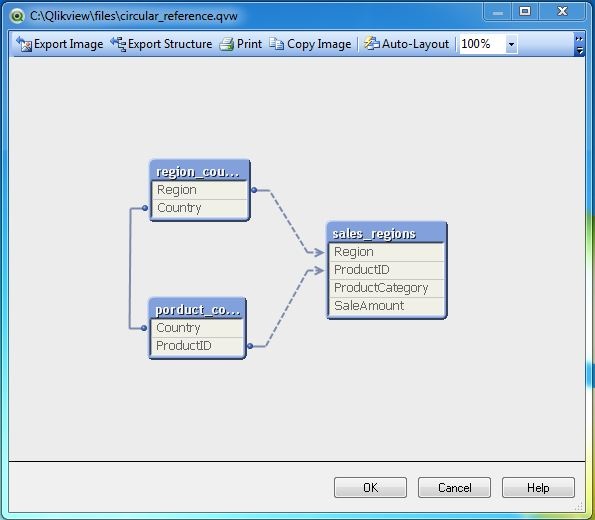
To find the exact cause of the above warning we can look at the data model by using the menu command for table viewer - Control+T. The following screen comes up, which clearly shows the circular reference. Here the join between RegionCountry and SalesRegion can be directly achieved using the field Region. It can also be achieved by first going to the table ProductCountry, using the field Country and then mapping ProdcutID with Salesregion.

 Sergey_Shuklin
- Mark as New
- Bookmark
- Subscribe
- Mute
- Subscribe to RSS Feed
- Permalink
- Report Inappropriate Content
Hello!
For avoiding loops try to use unique keys for all fact tables and dimension tables (dictionaries). Multiple syntethic keys can be the reason why loop had appeared.
prma7799
- Mark as New
- Bookmark
- Subscribe
- Mute
- Subscribe to RSS Feed
- Permalink
- Report Inappropriate Content
Hi dynamic_girl
You have been very active on the community but I find it hard to believe there is not one thread that you have received an answer to!
Can you take some time to mark correct / useful response's to your posts for the benefit of other people who may have a similar query?
Please check dynamic_girl
Read the below thread please.
- Mark as New
- Bookmark
- Subscribe
- Mute
- Subscribe to RSS Feed
- Permalink
- Report Inappropriate Content
i dont have multiple common fields ,there are only two tables in my data model,
and the two table are just associated with id field,
whats the reason
how i should associate or join my tables then to avoid this loop?
can any info be provided from table structure view?
prma7799
- Mark as New
- Bookmark
- Subscribe
- Mute
- Subscribe to RSS Feed
- Permalink
- Report Inappropriate Content
Please check this
- Mark as New
- Bookmark
- Subscribe
- Mute
- Subscribe to RSS Feed
- Permalink
- Report Inappropriate Content
i have a value in percentage displayed as :
123456.89%
i want to round off to 12.89%(eg two digits) ,how to do that?

 Peter_Cammaert
- Mark as New
- Bookmark
- Subscribe
- Mute
- Subscribe to RSS Feed
- Permalink
- Report Inappropriate Content
Does this have anything to do with dotted lines or circular references? If not, please post a new question regarding the rounding of numbers, and close this one. Thanks.
- « Previous Replies
-
- 1
- 2
- Next Replies »