Unlock a world of possibilities! Login now and discover the exclusive benefits awaiting you.

- Qlik Community
- :
- All Forums
- :
- QlikView App Dev
- :
- consolidate files based on group column
- Subscribe to RSS Feed
- Mark Topic as New
- Mark Topic as Read
- Float this Topic for Current User
- Bookmark
- Subscribe
- Mute
- Printer Friendly Page

 userid128223
- Mark as New
- Bookmark
- Subscribe
- Mute
- Subscribe to RSS Feed
- Permalink
- Report Inappropriate Content
consolidate files based on group column
Hi Everyone
I have input excel file with following info.
| Course# | Student# |
|---|---|
| S123 | 456 |
| P245 | 334 |
| S123 | S545 |
| P245 | D345 |
| Z556 | 5667 |
| S123 | S23245 |
| Z556 | T0343567 |
I have script that generates individual files for all student# in .txt format. However my requirement is to create 1 file combined based on by associated Course#.
For example. My script create individual files like below for each student#.
456YYYYMMDD.txt
S545YYYYMMDD.txt
S23245YYYYMMDD.txt
I need to combined the output of each student# based on their course#.
output of above should be combined into 1 file and file named S123.txt
- « Previous Replies
-
- 1
- 2
- Next Replies »

 settu_periasamy
- Mark as New
- Bookmark
- Subscribe
- Mute
- Subscribe to RSS Feed
- Permalink
- Report Inappropriate Content
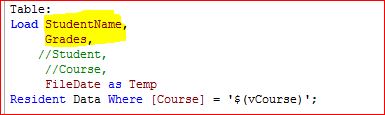
try to change the field names like below screen shot.

 tamilarasu
- Mark as New
- Bookmark
- Subscribe
- Mute
- Subscribe to RSS Feed
- Permalink
- Report Inappropriate Content
Hello Ami,
My bad. Settu has pointed out my mistake. Let us know If there is any issues.
Hi Settu,
Thanks for correcting me 
userid128223
- Mark as New
- Bookmark
- Subscribe
- Mute
- Subscribe to RSS Feed
- Permalink
- Report Inappropriate Content
Thank you very much Tamil & Settu
userid128223
- Mark as New
- Bookmark
- Subscribe
- Mute
- Subscribe to RSS Feed
- Permalink
- Report Inappropriate Content
Hi Tamil
One question on your solution.
Let vFileDate = Peek('Temp',0,'Table');
what was the purpose of doing above in the script?
tamilarasu
- Mark as New
- Bookmark
- Subscribe
- Mute
- Subscribe to RSS Feed
- Permalink
- Report Inappropriate Content
Hello Ami,
Kindly check the word document for understanding.
tamilarasu
- Mark as New
- Bookmark
- Subscribe
- Mute
- Subscribe to RSS Feed
- Permalink
- Report Inappropriate Content
If you want to generate output files on a daily basis, you should make a small change in the script. Attached is the solution for it.
Kindly check and let me know If you have any questions or clarifications on this.

- « Previous Replies
-
- 1
- 2
- Next Replies »