Unlock a world of possibilities! Login now and discover the exclusive benefits awaiting you.

- Qlik Community
- :
- All Forums
- :
- QlikView App Dev
- :
- help to obtain a running total in Qlikview
- Subscribe to RSS Feed
- Mark Topic as New
- Mark Topic as Read
- Float this Topic for Current User
- Bookmark
- Subscribe
- Mute
- Printer Friendly Page

- Mark as New
- Bookmark
- Subscribe
- Mute
- Subscribe to RSS Feed
- Permalink
- Report Inappropriate Content
help to obtain a running total in Qlikview
Apologies for asking what must be such a simple question but I am having trouble displaying a daily total of open incidents. As an example lets say the database contains just 3 fields of interest
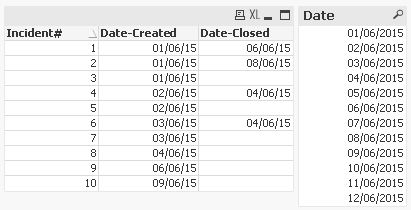
Incident# Date-Created Date-Closed
1 01/06/15 06/06/15
2 01/06/15 08/06/15
3 01/06/15
4 02/06/15 04/06/15
5 02/06/15
6 03/06/15 04/06/15
7 03/06/15
8 04/06/15
9 06/06/15
10 09/06/15
so the daily open total would be
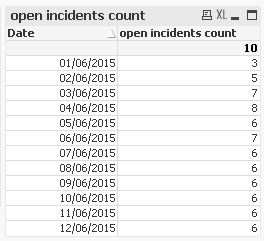
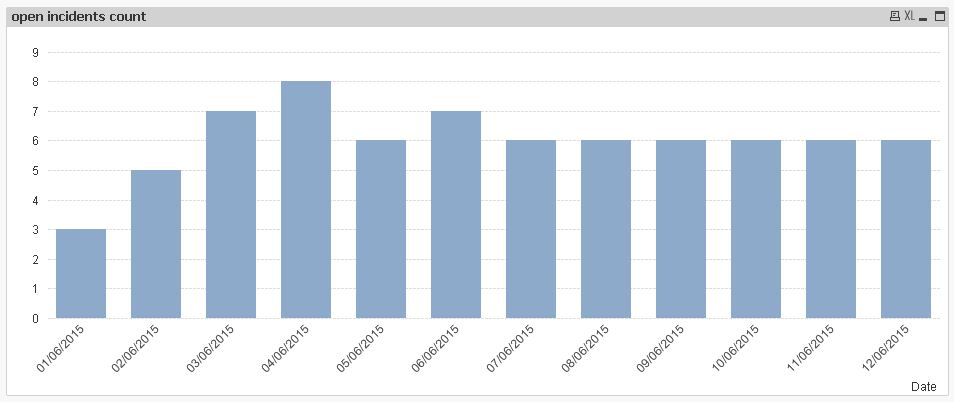
01/06/15 3 opened - 0 closed Open total = 3
02/06/15 2 opened - 0 closed Open total = 3 + 2 =5
03/06/15 2 opened - 0 closed Open total = 5 + 2 = 7
04/06/15 1 opened - 2 closed Open total = 7 -1 = 6
05/06/15 0 opened - 0 closed Open total = 6
06/06/15 1 opened - 1 closed Open total = 6
07/06/15 0 opened - 0 closed Open total = 6
08/06/15 0 opened - 1 closed Open total = 5
09/06/15 1 opened - 0 closed Open total = 6
Tks Dave
Accepted Solutions

 MarcoWedel
- Mark as New
- Bookmark
- Subscribe
- Mute
- Subscribe to RSS Feed
- Permalink
- Report Inappropriate Content
Hi,
one solution could be:
tabIncidents:
LOAD * INLINE [
    Incident#, Date-Created, Date-Closed
    1, 01/06/15, 06/06/15
    2, 01/06/15, 08/06/15
    3, 01/06/15
    4, 02/06/15, 04/06/15
    5, 02/06/15
    6, 03/06/15, 04/06/15
    7, 03/06/15
    8, 04/06/15
    9, 06/06/15
    10, 09/06/15
];

tabCalendar:
LOAD Date(MinDate+IterNo()-1) as Date
While MinDate+IterNo()-1 <= Today();
LOAD Min([Date-Created]) as MinDate
Resident tabIncidents;

tabLink:
IntervalMatch(Date)
LOAD [Date-Created],
    [Date-Closed]
Resident tabIncidents;
(although still linking the closing dates to the incidents and thus counting slightly different)
hope this helps nevertheless
regards
Marco
MarcoWedel
- Mark as New
- Bookmark
- Subscribe
- Mute
- Subscribe to RSS Feed
- Permalink
- Report Inappropriate Content
Hi,
one solution could be:
tabIncidents:
LOAD * INLINE [
    Incident#, Date-Created, Date-Closed
    1, 01/06/15, 06/06/15
    2, 01/06/15, 08/06/15
    3, 01/06/15
    4, 02/06/15, 04/06/15
    5, 02/06/15
    6, 03/06/15, 04/06/15
    7, 03/06/15
    8, 04/06/15
    9, 06/06/15
    10, 09/06/15
];

tabCalendar:
LOAD Date(MinDate+IterNo()-1) as Date
While MinDate+IterNo()-1 <= Today();
LOAD Min([Date-Created]) as MinDate
Resident tabIncidents;

tabLink:
IntervalMatch(Date)
LOAD [Date-Created],
    [Date-Closed]
Resident tabIncidents;
(although still linking the closing dates to the incidents and thus counting slightly different)
hope this helps nevertheless
regards
Marco
- Mark as New
- Bookmark
- Subscribe
- Mute
- Subscribe to RSS Feed
- Permalink
- Report Inappropriate Content
Tks very much Marco - yes that will do the trick – I
didn’t expect such a fast reply so didn’t check until later today
I think we can easily explain the one day count difference –
could be an overnight close!
Can I be a bit cheeky and ask how you would display the number
of incidents opened and number closed on each day on the same chart – maybe
using the right hand axis as the daily counts will be very small compared with
the overall open incidents ?
Again Many Tks – I will mark the query as answered
Sorry – I have to do more in Qlikview to become more proficient
Regards
Dave