Unlock a world of possibilities! Login now and discover the exclusive benefits awaiting you.

- Qlik Community
- :
- All Forums
- :
- QlikView App Dev
- :
- label color change
- Subscribe to RSS Feed
- Mark Topic as New
- Mark Topic as Read
- Float this Topic for Current User
- Bookmark
- Subscribe
- Mute
- Printer Friendly Page

 ssriramin19
- Mark as New
- Bookmark
- Subscribe
- Mute
- Subscribe to RSS Feed
- Permalink
- Report Inappropriate Content
label color change
Please help me in how to change the color of the label as mentioned below.
This is not for all the dimension labels only for the selected.
!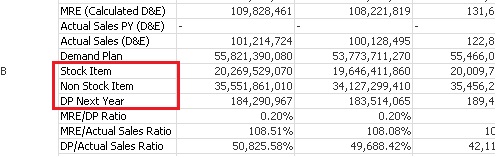
As mentioned above only the highlighted label names needs to be colored.
How this needs to be achieved?
Thanks
Sriram
- « Previous Replies
- Next Replies »
ssriramin19
- Mark as New
- Bookmark
- Subscribe
- Mute
- Subscribe to RSS Feed
- Permalink
- Report Inappropriate Content
tried doing that in + in the expression . Entire cell values are getting changed to red color but I need only the label color to be changed to red

 tresesco
- Mark as New
- Bookmark
- Subscribe
- Mute
- Subscribe to RSS Feed
- Permalink
- Report Inappropriate Content
Alternative one is not that elegant that can be suggested. If the calculation can be taken into the script..
ssriramin19
- Mark as New
- Bookmark
- Subscribe
- Mute
- Subscribe to RSS Feed
- Permalink
- Report Inappropriate Content
calculation cannot be taken into the script .Already script is more complex.Its is because of that I have written the expression with many if conditions in the front end.
As you told then it is not possible to achieve this , only option is to inform the users that it is not possible

- « Previous Replies
- Next Replies »