Unlock a world of possibilities! Login now and discover the exclusive benefits awaiting you.

- Qlik Community
- :
- All Forums
- :
- QlikView
- :
- About Dimension
- Subscribe to RSS Feed
- Mark Topic as New
- Mark Topic as Read
- Float this Topic for Current User
- Bookmark
- Subscribe
- Mute
- Printer Friendly Page

 sarfaraz_sheikh
- Mark as New
- Bookmark
- Subscribe
- Mute
- Subscribe to RSS Feed
- Permalink
- Report Inappropriate Content
About Dimension
Dear ALL,
I have one column called as ' STATUS_ID' having following contents....
(75,77,78,80,82,87,91,93,94,100)
I am taking this in calculated dimension.like below
if(Wildmatch(STATUS_ID,80),'Insurer_Reject',if(Wildmatch(STATUS_ID,75),'Follow_Up' , if(Wildmatch(STATUS_ID,75,80),'Sales_Closed_Final')))
I am getting Insurer Reject and Follow_up as dimension content however i am not getting sales_closed_final in dimension content
What can be the reason ? ..........Is something i am doing wrong.....If it is possible then how i can do this
Kindly help
Sarfaraz
- « Previous Replies
-
- 1
- 2
- Next Replies »

 robert_mika
- Mark as New
- Bookmark
- Subscribe
- Mute
- Subscribe to RSS Feed
- Permalink
- Report Inappropriate Content
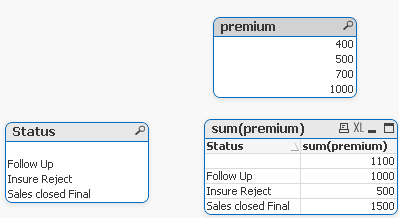
Maybe like that:
t1:
LOAD If([Staus_ID]=75,'Insure Reject', if([Staus_ID]=80, 'Follow Up','')) as Status,
premium
FROM
[156144.xlsx]
(ooxml, embedded labels, table is Sheet1);
join(t1)
load
If([Staus_ID]=75 or [Staus_ID]=80,'Sales closed Final', '') as Status,
premium
FROM
[156144.xlsx]
(ooxml, embedded labels, table is Sheet1);
sarfaraz_sheikh
- Mark as New
- Bookmark
- Subscribe
- Mute
- Subscribe to RSS Feed
- Permalink
- Report Inappropriate Content
Hi peter,
Can you keep any example for my understanding of concatetnation function .....
Sarfaraz

 Peter_Cammaert
- Mark as New
- Bookmark
- Subscribe
- Mute
- Subscribe to RSS Feed
- Permalink
- Report Inappropriate Content
You were very vague about the context of your calculated dimension, so I made up some data and objects. Have a look at the object containing CalcDim2.
The basis of this solution that doesn't force you to change your Load Script is an aggregation of STATUS_IDs per (imaginary) Contract. Your document may allow you to simplify the expression, so do not hesitate and experiment.
Best,
Peter
sarfaraz_sheikh
- Mark as New
- Bookmark
- Subscribe
- Mute
- Subscribe to RSS Feed
- Permalink
- Report Inappropriate Content
Dear Peter ,
I have used your logic in my app ...however it is showing wrong figures..
Please go through the attachment..
Sarfaraz
Peter_Cammaert
- Mark as New
- Bookmark
- Subscribe
- Mute
- Subscribe to RSS Feed
- Permalink
- Report Inappropriate Content
In the Calculated Dimension of object Bad Figures, change every occurrence of SALARY into SSN. A Salary is not your typical dimension field, and that's what the aggr() function needs to do its job well.
Good luck,
Peter
sarfaraz_sheikh
- Mark as New
- Bookmark
- Subscribe
- Mute
- Subscribe to RSS Feed
- Permalink
- Report Inappropriate Content
Dear Peter,
I have done the same what u told to do me ........However this time the dimension content 'Fabulous' has Not coming
Please find the attached QVW here.
Sarfaraz
Peter_Cammaert
- Mark as New
- Bookmark
- Subscribe
- Mute
- Subscribe to RSS Feed
- Permalink
- Report Inappropriate Content
Then tell me what exactly you are qualifying as 'Fabulous' in your example document. Emplyees? No employee seems to have more than one D_NO. Locations? There are no locations that have D_NOs of both 1 and 2.
This case is pretty different from your initial question.
sarfaraz_sheikh
- Mark as New
- Bookmark
- Subscribe
- Mute
- Subscribe to RSS Feed
- Permalink
- Report Inappropriate Content
Dear Peter,
Fabulous is combination of both 1 and 2 D_NO ..........Whatever the salary D_NO 1 and 2 have will be the addition and appear as Fabulous ....
That is only i want ...
Sarfaraz

- « Previous Replies
-
- 1
- 2
- Next Replies »