Unlock a world of possibilities! Login now and discover the exclusive benefits awaiting you.

- Qlik Community
- :
- All Forums
- :
- QlikView
- :
- Re: Could ListBox backgroud be set as transparent?
- Subscribe to RSS Feed
- Mark Topic as New
- Mark Topic as Read
- Float this Topic for Current User
- Bookmark
- Subscribe
- Mute
- Printer Friendly Page

- Mark as New
- Bookmark
- Subscribe
- Mute
- Subscribe to RSS Feed
- Permalink
- Report Inappropriate Content
Could ListBox backgroud be set as transparent?
Hi guys,
As question above, could the listbox backgroud be set as transparent? and where to set it?
Thanks!
- « Previous Replies
-
- 1
- 2
- Next Replies »
Accepted Solutions

 manideep78
- Mark as New
- Bookmark
- Subscribe
- Mute
- Subscribe to RSS Feed
- Permalink
- Report Inappropriate Content
Hi Jack,
First Set full transparency in the Document properties --> General tab
and then
Open Multi box Properties --> Presentation tab --> Click on Background button --> Set Transparency to 100%
If you forgot to set transparency in any one of the cases, it will not work. So you need to put transparency in both cases to get it work for a list box or multibox.
Regards,
Manideep

 ashfaq_haseeb
- Mark as New
- Bookmark
- Subscribe
- Mute
- Subscribe to RSS Feed
- Permalink
- Report Inappropriate Content
Hi,
Have a look at the attached application.
Regards
ASHFAQ
ashfaq_haseeb
- Mark as New
- Bookmark
- Subscribe
- Mute
- Subscribe to RSS Feed
- Permalink
- Report Inappropriate Content
Hi,
Have a look at the attached application.
Regards
ASHFAQ
- Mark as New
- Bookmark
- Subscribe
- Mute
- Subscribe to RSS Feed
- Permalink
- Report Inappropriate Content
failed to load qvw file, could you please just let me know the steps? I could try it on my local machine.
Thanks!
ashfaq_haseeb
- Mark as New
- Bookmark
- Subscribe
- Mute
- Subscribe to RSS Feed
- Permalink
- Report Inappropriate Content
Hi,
Have a look at the attached images.
Regards
ASHFAQ


 aveeeeeee7en
- Mark as New
- Bookmark
- Subscribe
- Mute
- Subscribe to RSS Feed
- Permalink
- Report Inappropriate Content
Yes, this is possible.
Go to Settings> Document Properties or ( CNTRL+Alt+D ) > On General Tab > Extreme Bottom Right > Strech the Scroll> The List Box will become Transparent.
See the Snapshot:
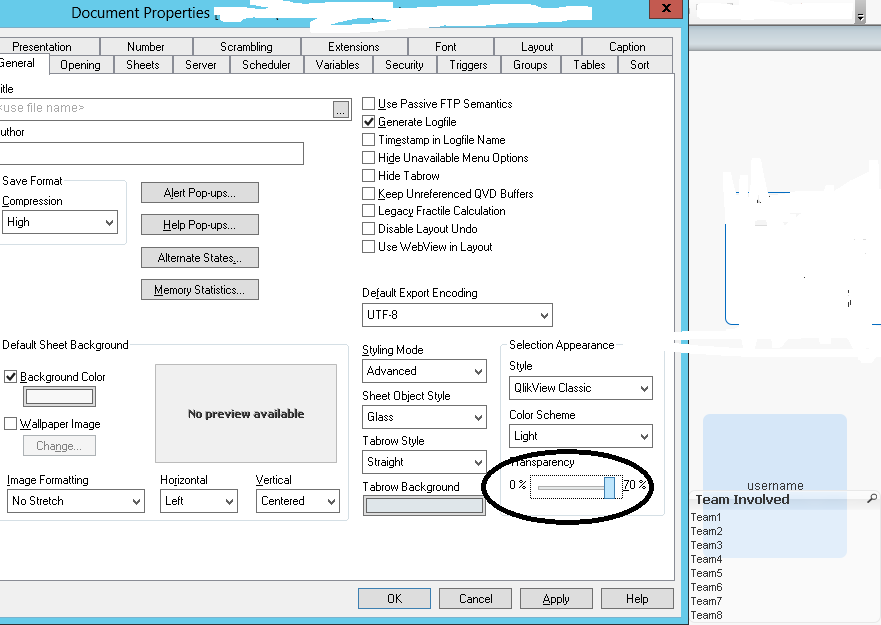
Regards
Aviral Nag
manideep78
- Mark as New
- Bookmark
- Subscribe
- Mute
- Subscribe to RSS Feed
- Permalink
- Report Inappropriate Content
Hi Jack Zhang
It is not possible to change the background color or transparency for a single list box when list box was using in User Default Style or Classic Style. Instead you can change it to any of the Styles except the above two and then try to make it transparent.
To get this:
Right Click on List Box --> Properties --> Presentation tab --> Selection Style Override (Change style) --> Click on Background --> Set Color Transparency to 100%.
OR
If you want to make all the list box transparent, then Go to Document Properties --> General tab --> Set full Transparency (right bottom corner).
This can be applied to all the list boxes in the document irrespective of the List Box Style.
Hope this helps.
Regards,
Manideep
- Mark as New
- Bookmark
- Subscribe
- Mute
- Subscribe to RSS Feed
- Permalink
- Report Inappropriate Content
Great thanks! It works! Now I still have one multipleBox to set as transparent background. Would you mind also show me the setting capture? Thx!
- Mark as New
- Bookmark
- Subscribe
- Mute
- Subscribe to RSS Feed
- Permalink
- Report Inappropriate Content
Hi thanks! Actually I found the scroll bar is locked(do you know why), I tried to set selection appearance as 'LED' and it became transparent also.
- Mark as New
- Bookmark
- Subscribe
- Mute
- Subscribe to RSS Feed
- Permalink
- Report Inappropriate Content
quite detailed and helpful! Thank you!
do you know how to change multibox to transparent background?
- « Previous Replies
-
- 1
- 2
- Next Replies »