Unlock a world of possibilities! Login now and discover the exclusive benefits awaiting you.

- Qlik Community
- :
- All Forums
- :
- QlikView
- :
- Re: Don't suppress null()
- Subscribe to RSS Feed
- Mark Topic as New
- Mark Topic as Read
- Float this Topic for Current User
- Bookmark
- Subscribe
- Mute
- Printer Friendly Page

- Mark as New
- Bookmark
- Subscribe
- Mute
- Subscribe to RSS Feed
- Permalink
- Report Inappropriate Content
Don't suppress null()
Hi,
I have a straight table with a count expression and it's showing only rows which are meeting criteria and suppressing others.
Expression is - =count({<ReportedMonth={$(vCurrentActMonth)},ReportedYear= {$(vCurrentActYear)}>} distinct floor(CreatedOn))
Now I want all Employee Name, irrespective of when it was created. if it doesn't match the criteria, show 0.
I have tried unchecking suppress null values in both dimension and expression, but nothing worked.
Regards,
Navdeep
- « Previous Replies
-
- 1
- 2
- Next Replies »

 buzzy996
- Mark as New
- Bookmark
- Subscribe
- Mute
- Subscribe to RSS Feed
- Permalink
- Report Inappropriate Content
can u try this way,
=If(isnull(count({<ReportedMonth={$(vCurrentActMonth)},ReportedYear= {$(vCurrentActYear)}>} distinct floor(CreatedOn))),null(),count({<ReportedMonth={$(vCurrentActMonth)},ReportedYear= {$(vCurrentActYear)}>} distinct floor(CreatedOn)))
else if possible share ur qvw?

 Gysbert_Wassena
- Mark as New
- Bookmark
- Subscribe
- Mute
- Subscribe to RSS Feed
- Permalink
- Report Inappropriate Content
Can you post a qlikview document that demonstrates the problem?
talk is cheap, supply exceeds demand
- Mark as New
- Bookmark
- Subscribe
- Mute
- Subscribe to RSS Feed
- Permalink
- Report Inappropriate Content
Hi,
PFA the app. ! I want to show all rows in table irrsepective of year DOJ

 PrashantSangle
- Mark as New
- Bookmark
- Subscribe
- Mute
- Subscribe to RSS Feed
- Permalink
- Report Inappropriate Content
Hi,
What is your expected Count??
Regards
Please appreciate our Qlik community members by giving Kudos for sharing their time for your query. If your query is answered, please mark the topic as resolved 🙂
buzzy996
- Mark as New
- Bookmark
- Subscribe
- Mute
- Subscribe to RSS Feed
- Permalink
- Report Inappropriate Content
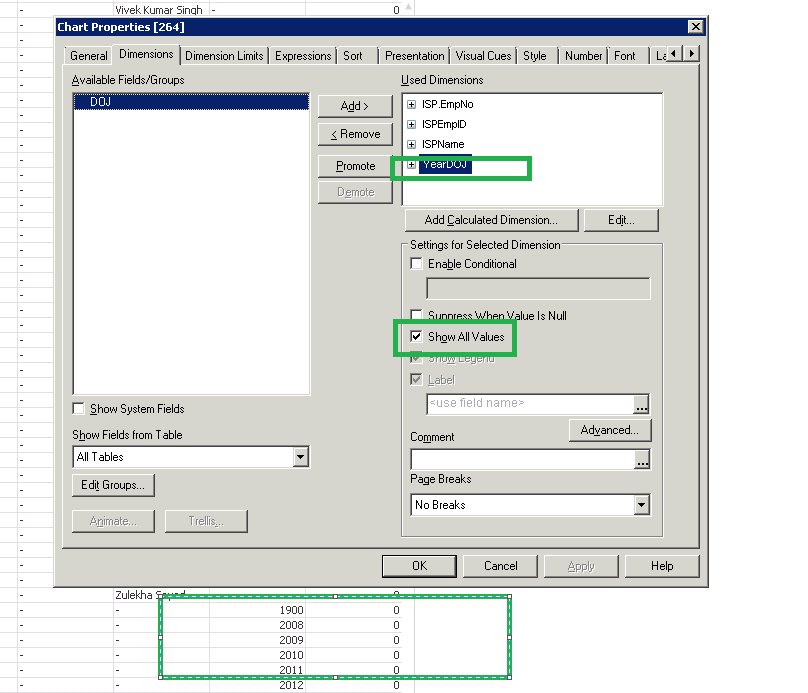
try this
- Mark as New
- Bookmark
- Subscribe
- Mute
- Subscribe to RSS Feed
- Permalink
- Report Inappropriate Content
Hi,
I tried but no success.
- Mark as New
- Bookmark
- Subscribe
- Mute
- Subscribe to RSS Feed
- Permalink
- Report Inappropriate Content
Then nulls are coming in other columns.
buzzy996
- Mark as New
- Bookmark
- Subscribe
- Mute
- Subscribe to RSS Feed
- Permalink
- Report Inappropriate Content
u have to uncheck the check box by selecting the other dimensions.
- Mark as New
- Bookmark
- Subscribe
- Mute
- Subscribe to RSS Feed
- Permalink
- Report Inappropriate Content
No problem with count, just that need to show all values and those who don't meet the criteria should be shown as 0
- « Previous Replies
-
- 1
- 2
- Next Replies »