Unlock a world of possibilities! Login now and discover the exclusive benefits awaiting you.

- Qlik Community
- :
- All Forums
- :
- QlikView
- :
- Exclude total for one date
- Subscribe to RSS Feed
- Mark Topic as New
- Mark Topic as Read
- Float this Topic for Current User
- Bookmark
- Subscribe
- Mute
- Printer Friendly Page

 nareshthavidish
- Mark as New
- Bookmark
- Subscribe
- Mute
- Subscribe to RSS Feed
- Permalink
- Report Inappropriate Content
Exclude total for one date
Hi ,
We were showing the business starts from every last day of month end to till date and now we were doing normal total.
But the businesses want to exclude the month end and include the total starts from 1st of month.
Below is the output qlikview which need to exclude the first row value in the total.
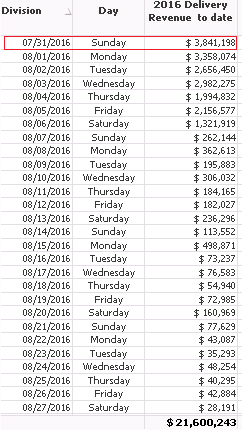
Dimension: =if(Date>='$(vMonthEnd)' and Date <='$(vCurrMonth)',Date)
where vMonthEnd = (monthend(addmonths(Date(today(),'MM/DD/YYYY'),-1)))
vCurrMonth = =(MonthEnd(today()))
Expression : Sum(Product$)
Chart Type : Straight Table
So the final total should show as $21,600,243 - $3,841,198 = $ 17,7590,45(Final Total $)
Thanks..
nareshthavidish- Mark as New
- Bookmark
- Subscribe
- Mute
- Subscribe to RSS Feed
- Permalink
- Report Inappropriate Content
Hi Sunny,
I have used the division and day as below
division =if(Date>='$(vMonthEnd)' and Date <='$(vCurrMonth)',Date)
Day =pick(match(WeekDay(Date),'Mon','Tue','Wed','Thu','Fri','Sat','Sun'),'Monday','Tuesday','Wednesday','Thursday','Friday','Saturday','Sunday')
is this logic Sum({<Division -= {.......}>}Aggr(Sum(Product$), Division, Day)) will work?
Thanks..

 sunny_talwar
- Mark as New
- Bookmark
- Subscribe
- Mute
- Subscribe to RSS Feed
- Permalink
- Report Inappropriate Content
Yes, I am almost certain it will, just not sure how your data is to provide suggestion related to the set analysis.
nareshthavidish- Mark as New
- Bookmark
- Subscribe
- Mute
- Subscribe to RSS Feed
- Permalink
- Report Inappropriate Content
Can you please provide the full expression which includes division and day dimensions mentioned above.Actually am got little bit of confuse.
Thanks..
sunny_talwar
- Mark as New
- Bookmark
- Subscribe
- Mute
- Subscribe to RSS Feed
- Permalink
- Report Inappropriate Content
Would you be able to provide a sample to help us help you better 
nareshthavidish- Mark as New
- Bookmark
- Subscribe
- Mute
- Subscribe to RSS Feed
- Permalink
- Report Inappropriate Content
yeah sure but how to attach document in this.
Thanks..
sunny_talwar
- Mark as New
- Bookmark
- Subscribe
- Mute
- Subscribe to RSS Feed
- Permalink
- Report Inappropriate Content
Look here:
nareshthavidish- Mark as New
- Bookmark
- Subscribe
- Mute
- Subscribe to RSS Feed
- Permalink
- Report Inappropriate Content
Hi Sunny,
Please find attached spread sheet.In qlikview we derived Division and Day as Calculated Dimension.
Thanks..
sunny_talwar
- Mark as New
- Bookmark
- Subscribe
- Mute
- Subscribe to RSS Feed
- Permalink
- Report Inappropriate Content
Would it be possible to provide the raw data behind this output? or provide the sample application you have been working with? If confidentiality is a concern, you can look here:
Preparing examples for Upload - Reduction and Data Scrambling
nareshthavidish- Mark as New
- Bookmark
- Subscribe
- Mute
- Subscribe to RSS Feed
- Permalink
- Report Inappropriate Content
Hi Sunny,
Attached is the same app.
Thanks..

 vinieme12
- Mark as New
- Bookmark
- Subscribe
- Mute
- Subscribe to RSS Feed
- Permalink
- Report Inappropriate Content
Frank has already pointed out the problem in your Expression
You vMonthend is 7/31/2016
if you want to exclude this date then you should be comparing as just Greater than and NOT as Greater than equal to which then includes your monthend date. Just remove the equal sign
=if(Date>'$(vMonthEnd)' and Date <='$(vCurrentmonth)',Date)
If a post helps to resolve your issue, please accept it as a Solution.
