Unlock a world of possibilities! Login now and discover the exclusive benefits awaiting you.

- Qlik Community
- :
- All Forums
- :
- QlikView
- :
- Re: Images in Qlikview
- Subscribe to RSS Feed
- Mark Topic as New
- Mark Topic as Read
- Float this Topic for Current User
- Bookmark
- Subscribe
- Mute
- Printer Friendly Page

 guruprem
- Mark as New
- Bookmark
- Subscribe
- Mute
- Subscribe to RSS Feed
- Permalink
- Report Inappropriate Content
Images in Qlikview
Hi I have to bring customers photos into Application, Please guide me.
At the moment I have table with inRegId, stPhoto fields like these
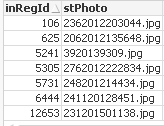
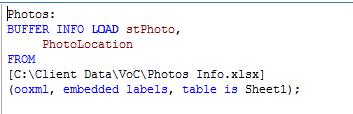
I do have the dump of files in my folder and I am calling them using bundle Load like this
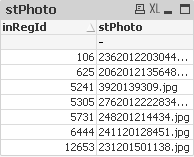
But I could not get a table with Images, I wanna see images here instead of text:
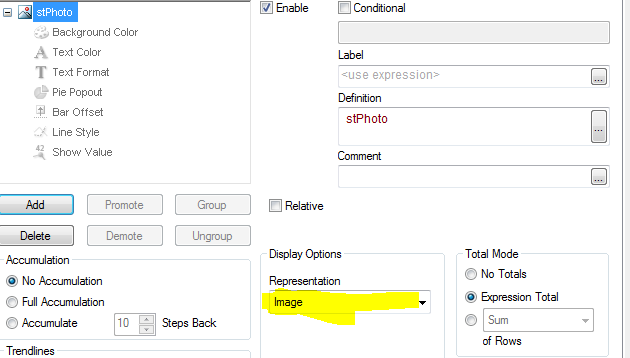
My expression is :
Accepted Solutions
guruprem
- Mark as New
- Bookmark
- Subscribe
- Mute
- Subscribe to RSS Feed
- Permalink
- Report Inappropriate Content
Hi Experts,
BUNDLE LOAD and BUFFER INFO LOAD both methods are correct. Currently I used BUNDLE LOAD and in table used Dimension as punitpopli said to resolve this issue.
 ali_hijazi
- Mark as New
- Bookmark
- Subscribe
- Mute
- Subscribe to RSS Feed
- Permalink
- Report Inappropriate Content
use Info(InRegId)
ali_hijazi
- Mark as New
- Bookmark
- Subscribe
- Mute
- Subscribe to RSS Feed
- Permalink
- Report Inappropriate Content
and Use Bundle Load

- Mark as New
- Bookmark
- Subscribe
- Mute
- Subscribe to RSS Feed
- Permalink
- Report Inappropriate Content

 punitpopli
- Mark as New
- Bookmark
- Subscribe
- Mute
- Subscribe to RSS Feed
- Permalink
- Report Inappropriate Content
Hi Guruprem
Add column as dimension and under advanced setting Image options -->representation -> select Image and you are done.
If you have to display image in the list box you can use Info(image) in the expression under general tab in list box
Regards,
Punit

 HirisH_V7
- Mark as New
- Bookmark
- Subscribe
- Mute
- Subscribe to RSS Feed
- Permalink
- Report Inappropriate Content

 Chanty4u
- Mark as New
- Bookmark
- Subscribe
- Mute
- Subscribe to RSS Feed
- Permalink
- Report Inappropriate Content
chk below examples
guruprem
- Mark as New
- Bookmark
- Subscribe
- Mute
- Subscribe to RSS Feed
- Permalink
- Report Inappropriate Content
Hi Experts,
BUNDLE LOAD and BUFFER INFO LOAD both methods are correct. Currently I used BUNDLE LOAD and in table used Dimension as punitpopli said to resolve this issue.