Unlock a world of possibilities! Login now and discover the exclusive benefits awaiting you.

- Qlik Community
- :
- All Forums
- :
- QlikView
- :
- Need help in successfully installing Qlikview Serv...
- Subscribe to RSS Feed
- Mark Topic as New
- Mark Topic as Read
- Float this Topic for Current User
- Bookmark
- Subscribe
- Mute
- Printer Friendly Page

- Mark as New
- Bookmark
- Subscribe
- Mute
- Subscribe to RSS Feed
- Permalink
- Report Inappropriate Content
Need help in successfully installing Qlikview Server/Publisher
Hi All,
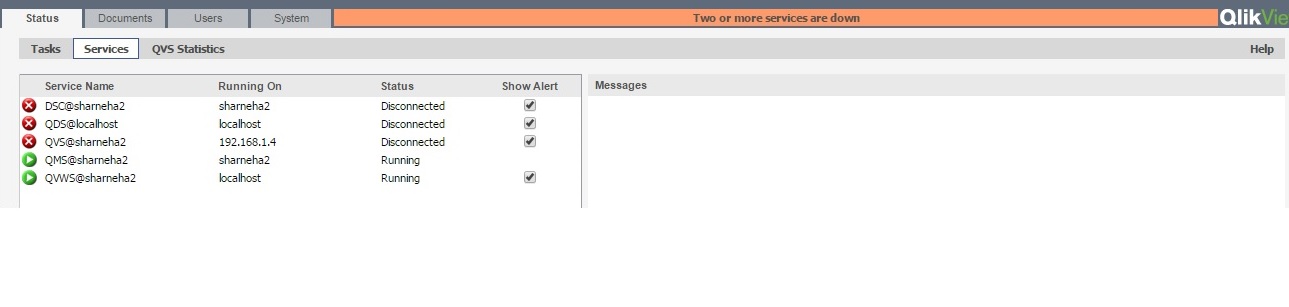
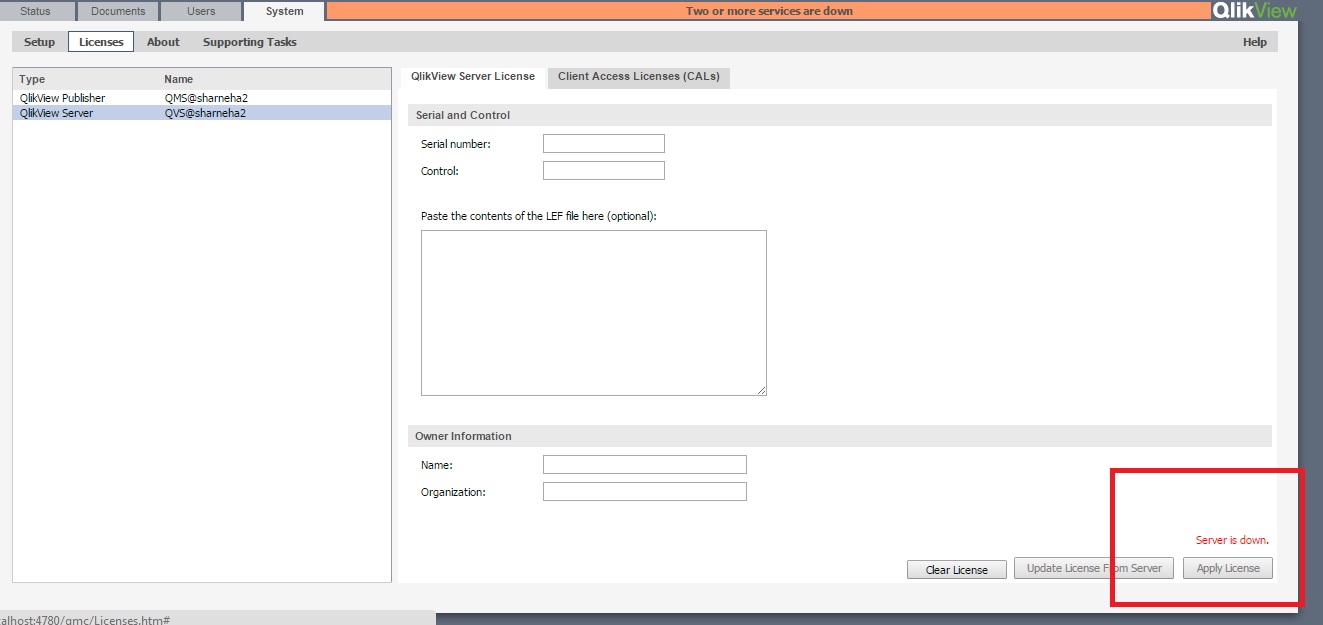
I tried installing Qlikview Server/Publisher. When I open QMC and try to enter License key in QVS, it always shows QVS down or "Server is down" error and I am not able to apply the license key however I could successfully enter license key for Publisher.
Also the status tab always shows the following - DSC@{my system name}, QDS@localhost and QVS {my system name} as "Disconnected" .
Also Access point shows "Message: No Server"
Any idea how do I resolve this issue? Please bear with me as I am new to QMC.
Attached the screenshot of errors.
Thanks,
Neha
- Tags:
- new_to_qlikview
- « Previous Replies
-
- 1
- 2
- Next Replies »

 prma7799
- Mark as New
- Bookmark
- Subscribe
- Mute
- Subscribe to RSS Feed
- Permalink
- Report Inappropriate Content
Hi Neha,
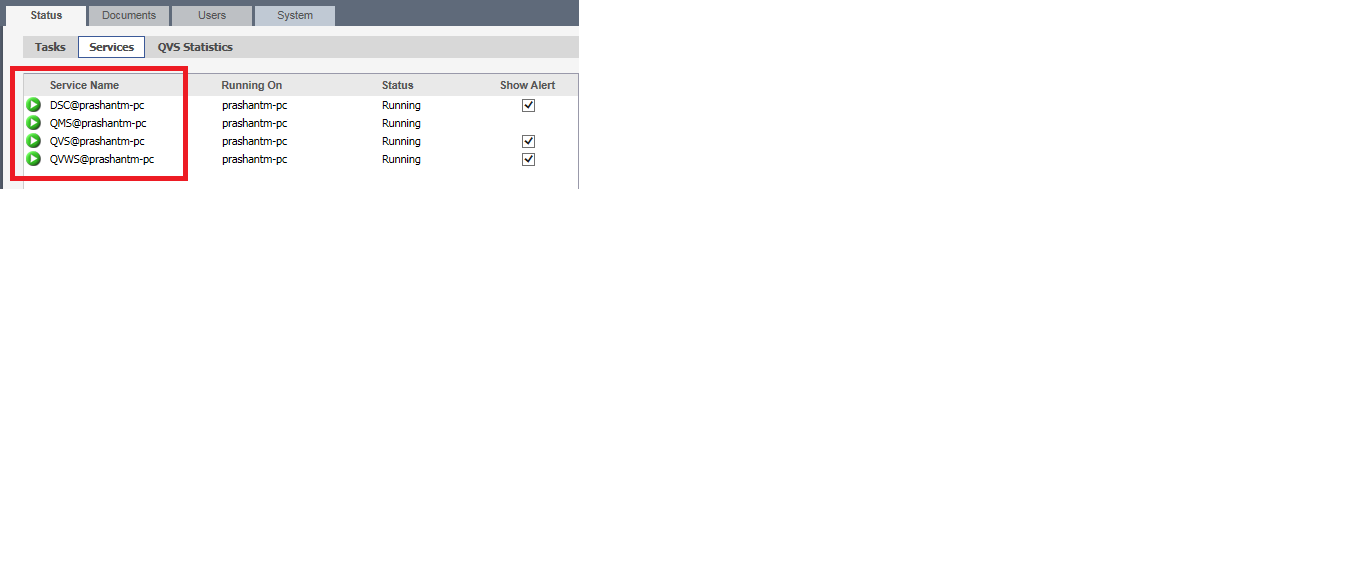
You need to start all service for it.
Thanks,
Prashant
- Mark as New
- Bookmark
- Subscribe
- Mute
- Subscribe to RSS Feed
- Permalink
- Report Inappropriate Content
Hi Prashant,
Thanks for the response but I already tried restarting services multiple times but no luck.
Thanks,
Neha
prma7799
- Mark as New
- Bookmark
- Subscribe
- Mute
- Subscribe to RSS Feed
- Permalink
- Report Inappropriate Content
- Mark as New
- Bookmark
- Subscribe
- Mute
- Subscribe to RSS Feed
- Permalink
- Report Inappropriate Content
Does not work for me, Prashant. I tried restarting the services and in services (run->services.msc), all services are running fine but issue is only when I check that in QMC, it shows as "Server is down". Please see the screenshot that I provided in original post for more information.
Thanks,
Neha
- Mark as New
- Bookmark
- Subscribe
- Mute
- Subscribe to RSS Feed
- Permalink
- Report Inappropriate Content
It could be many things causing the issue.
But as a starter, check that the AD user the QV Windows Services run under are in the local group QlikView Administrators on the server.
prma7799
- Mark as New
- Bookmark
- Subscribe
- Mute
- Subscribe to RSS Feed
- Permalink
- Report Inappropriate Content
Hi Neha,
Can you me the access of your pc right now?
Thanks
Prashant
- Mark as New
- Bookmark
- Subscribe
- Mute
- Subscribe to RSS Feed
- Permalink
- Report Inappropriate Content
Hi Prashant,
I can give you access to my system now. Please let me know if you are available.
Thanks,
Neha

 SunilChauhan
- Mark as New
- Bookmark
- Subscribe
- Mute
- Subscribe to RSS Feed
- Permalink
- Report Inappropriate Content
qlikview server is down | Qlik Community
 ashfaq_haseeb
- Mark as New
- Bookmark
- Subscribe
- Mute
- Subscribe to RSS Feed
- Permalink
- Report Inappropriate Content
Hi,
Make sure your Qlikview services are running with admin account and in turn they belong to Qlikview administrator group.
Let me know if that solves.
Regards
ASHFAQ
- « Previous Replies
-
- 1
- 2
- Next Replies »