Unlock a world of possibilities! Login now and discover the exclusive benefits awaiting you.

- Qlik Community
- :
- All Forums
- :
- QlikView
- :
- No Display until selection Made in any field
- Subscribe to RSS Feed
- Mark Topic as New
- Mark Topic as Read
- Float this Topic for Current User
- Bookmark
- Subscribe
- Mute
- Printer Friendly Page

- Mark as New
- Bookmark
- Subscribe
- Mute
- Subscribe to RSS Feed
- Permalink
- Report Inappropriate Content
No Display until selection Made in any field
Hi All,
I want the chart to show no display until some selection is made in some particular fields (field A, Field B, Field C, Field D). Please advise. Also I want to show message in chart, please make selection in field A, Field B, Field C, Field D to show chart/data.
BR,
SAK

 er_mohit
- Mark as New
- Bookmark
- Subscribe
- Mute
- Subscribe to RSS Feed
- Permalink
- Report Inappropriate Content
Try to use set analysis
avg({<year={"$(=year)"}>}sales)

 Gysbert_Wassena
- Mark as New
- Bookmark
- Subscribe
- Mute
- Subscribe to RSS Feed
- Permalink
- Report Inappropriate Content
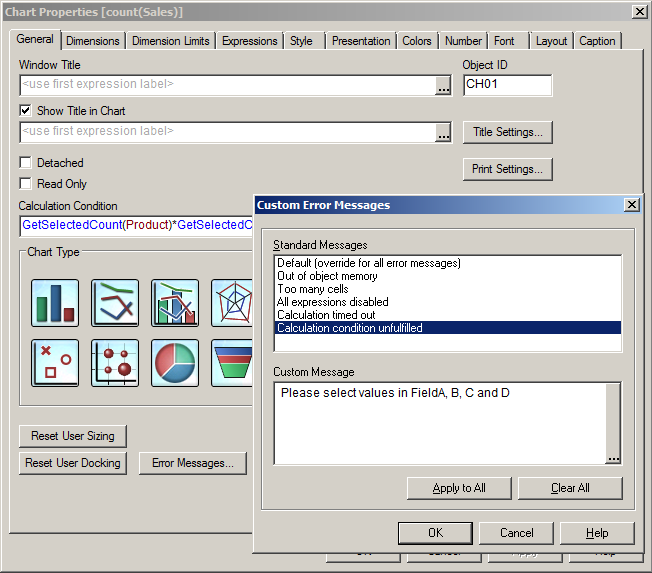
On the General tab of the charts properties window enter an expression in the Calculation Condition input field. You can use as expression
getselectedcount(FieldA)*getselectedcount(FieldB)*getselectedcount(FieldC)*getselectedcount(FieldD)
Also on the General tab is the button Error Messages. Click on that button, select Calculation Condition Unfulfilled
talk is cheap, supply exceeds demand