Unlock a world of possibilities! Login now and discover the exclusive benefits awaiting you.

- Qlik Community
- :
- All Forums
- :
- QlikView
- :
- Re: Pick Last Year Data
- Subscribe to RSS Feed
- Mark Topic as New
- Mark Topic as Read
- Float this Topic for Current User
- Bookmark
- Subscribe
- Mute
- Printer Friendly Page

- Mark as New
- Bookmark
- Subscribe
- Mute
- Subscribe to RSS Feed
- Permalink
- Report Inappropriate Content
Pick Last Year Data
Hi Guys,
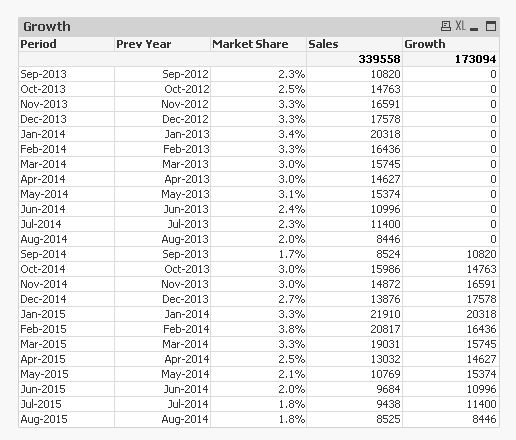
I have created below data in Pivot. In Growth Column What I want is Pick the value of last year which I will use in Growth Calculation.
e.g. in Sep-2014 the value should be 10820 and oct 2014 value should be 14763 and so on...
as of now I am try to find it using addyears function. Which is not giving the desire result. Please help on this.
=sum({<Period={$(=AddYears(Period,-1))}>} Sales)
| Product1 | Product1 | Product1 | |
| Period | Sum of Sales | Market Share | Growth |
| Sep-2013 | 10820 | 2.3% | 0 |
| Oct-2013 | 14763 | 2.5% | 0 |
| Nov-2013 | 16591 | 3.3% | 0 |
| Dec-2013 | 17578 | 3.3% | 0 |
| Jan-2014 | 20318 | 3.4% | 0 |
| Feb-2014 | 16436 | 3.3% | 0 |
| Mar-2014 | 15745 | 3.0% | 0 |
| Apr-2014 | 14627 | 3.0% | 0 |
| May-2014 | 15374 | 3.1% | 0 |
| Jun-2014 | 10996 | 2.4% | 0 |
| Jul-2014 | 11400 | 2.3% | 0 |
| Aug-2014 | 8446 | 2.0% | 0 |
| Sep-2014 | 8524 | 1.7% | 0 |
| Oct-2014 | 15986 | 3.0% | 0 |
| Nov-2014 | 14872 | 3.0% | 0 |
| Dec-2014 | 13876 | 2.7% | 0 |
| Jan-2015 | 21910 | 3.3% | 0 |
| Feb-2015 | 20817 | 3.8% | 0 |
| Mar-2015 | 19031 | 3.3% | 0 |
| Apr-2015 | 13032 | 2.5% | 0 |
| May-2015 | 10769 | 2.1% | 0 |
| Jun-2015 | 9684 | 2.0% | 0 |
| Jul-2015 | 9438 | 1.8% | 0 |
| Aug-2015 | 8525 | 1.8% | 0 |
- « Previous Replies
-
- 1
- 2
- Next Replies »

 nagarjuna_kotha
- Mark as New
- Bookmark
- Subscribe
- Mute
- Subscribe to RSS Feed
- Permalink
- Report Inappropriate Content
Try this:
=sum({<Period={$(=date(AddYears(Period,-1), 'MMM-YYYY'))}>} Sales)

 senpradip007
- Mark as New
- Bookmark
- Subscribe
- Mute
- Subscribe to RSS Feed
- Permalink
- Report Inappropriate Content
Have a look at this app. Hope it will help.
- Mark as New
- Bookmark
- Subscribe
- Mute
- Subscribe to RSS Feed
- Permalink
- Report Inappropriate Content
Hi Pradip,
No Attachemt found.
 PradeepReddy
- Mark as New
- Bookmark
- Subscribe
- Mute
- Subscribe to RSS Feed
- Permalink
- Report Inappropriate Content
check the 'period' is in date format or not..
can u share the app, that will be easy to others to suggest the solution..

 Digvijay_Singh
- Mark as New
- Bookmark
- Subscribe
- Mute
- Subscribe to RSS Feed
- Permalink
- Report Inappropriate Content
You may like to create new field in backend like -
Main:
Load *,alt(peek(Product1_Sum,-12),0) as Growth resident table;
Drop table table;
 SreeniJD
- Mark as New
- Bookmark
- Subscribe
- Mute
- Subscribe to RSS Feed
- Permalink
- Report Inappropriate Content
Hi Maksood,
As Digvijay suggested,
Try this script.. its working perfectly fine 
Tab1:
LOAD Period,
[Sum of Sales],
[Market Share],
Growth
FROM
[https://community.qlik.com/thread/184654]
(html, codepage is 1252, embedded labels, table is @1, filters(
Remove(Row, Pos(Top, 1))
));
Tab2:
Load
*, alt(peek([Sum of Sales],-12),0) as Growth1
resident Tab1;
drop table Tab1;
 sunilkumarqv
- Mark as New
- Bookmark
- Subscribe
- Mute
- Subscribe to RSS Feed
- Permalink
- Report Inappropriate Content
@
- « Previous Replies
-
- 1
- 2
- Next Replies »