Unlock a world of possibilities! Login now and discover the exclusive benefits awaiting you.

- Qlik Community
- :
- All Forums
- :
- QlikView
- :
- Re: Table not found- might be a residente problem?
- Subscribe to RSS Feed
- Mark Topic as New
- Mark Topic as Read
- Float this Topic for Current User
- Bookmark
- Subscribe
- Mute
- Printer Friendly Page

- Mark as New
- Bookmark
- Subscribe
- Mute
- Subscribe to RSS Feed
- Permalink
- Report Inappropriate Content
Table not found- might be a residente problem?
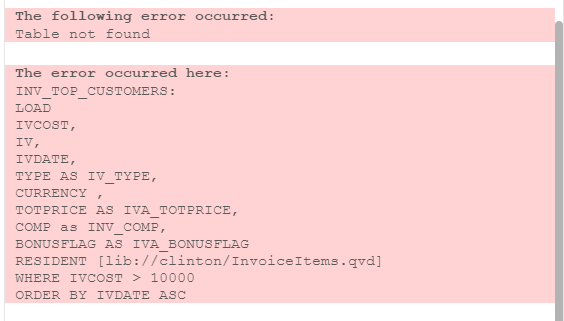
hey i am trying to run this but keep getting the error message on the bottom,
INV_TOP_CUSTOMERS:
LOAD
IVCOST,
IV,
IVDATE,
TYPE AS IV_TYPE,
CURRENCY ,
TOTPRICE AS IVA_TOTPRICE,
COMP as INV_COMP,
BONUSFLAG AS IVA_BONUSFLAG
RESIDENT [lib://clinton/InvoiceItems.qvd]
WHERE IVCOST > 10000
ORDER BY IVDATE ASC;
concatenate (INV_TOP_CUSTOMERS)
LOAD
CUST,
CUSTNAME,
COUNTRY,
CURRENCY
FROM [lib://clinton/customers.qvd](qvd);
concatenate (INV_TOP_CUSTOMERS)
LOAD
COST,
CURRENCY,
IV
FROM [lib://clinton/Trans.qvd](qvd);
concatenate (INV_TOP_CUSTOMERS)
LOAD
IVDATE,
CURRENCY,
IVNUM as INV_NUMBER,
FINAL AS INV_FINAL
RESIDENT [lib://clinton/Invoices.qvd]
ORDER BY INV_NUMBER ASC;
- Tags:
- qlikview_scripting
Accepted Solutions

 miguelbraga
- Mark as New
- Bookmark
- Subscribe
- Mute
- Subscribe to RSS Feed
- Permalink
- Report Inappropriate Content
Hi Jhonatan,
You can't use resident load on a qvd file. To use Resident you must call an already created table. Please check my document about the different types of Load:
Regards,
MB
- Mark as New
- Bookmark
- Subscribe
- Mute
- Subscribe to RSS Feed
- Permalink
- Report Inappropriate Content
Not sure.
whether Resident will Load the data from path specified QVD.
 Gysbert_Wassena
- Mark as New
- Bookmark
- Subscribe
- Mute
- Subscribe to RSS Feed
- Permalink
- Report Inappropriate Content
When you use the RESIDENT keyword you can only reference a table that you already loaded, not an external source. If you want to load data from the qvd file then use FROM instead.
talk is cheap, supply exceeds demand
 simospa
- Mark as New
- Bookmark
- Subscribe
- Mute
- Subscribe to RSS Feed
- Permalink
- Report Inappropriate Content
I suggest you to open this thread in Qlik Sense forum 🙂
S.
 jagan
jagan
- Mark as New
- Bookmark
- Subscribe
- Mute
- Subscribe to RSS Feed
- Permalink
- Report Inappropriate Content
Hi,
I think the issue is with the ORder by remove order by and try .
INV_TOP_CUSTOMERS:
LOAD
*
ORDER BY IVDATE ASC;
LOAD
IVCOST,
IV,
IVDATE,
TYPE AS IV_TYPE,
CURRENCY ,
TOTPRICE AS IVA_TOTPRICE,
COMP as INV_COMP,
BONUSFLAG AS IVA_BONUSFLAG
RESIDENT [lib://clinton/InvoiceItems.qvd]
WHERE IVCOST > 10000;

 Clever_Anjos
- Mark as New
- Bookmark
- Subscribe
- Mute
- Subscribe to RSS Feed
- Permalink
- Report Inappropriate Content
Please try to not crosposting your issues invalid path error
miguelbraga
- Mark as New
- Bookmark
- Subscribe
- Mute
- Subscribe to RSS Feed
- Permalink
- Report Inappropriate Content
Hi Jhonatan,
You can't use resident load on a qvd file. To use Resident you must call an already created table. Please check my document about the different types of Load:
Regards,
MB