More frequent scheduled App reloads on Qlik Sense SaaS: more than once per hour
Attachments
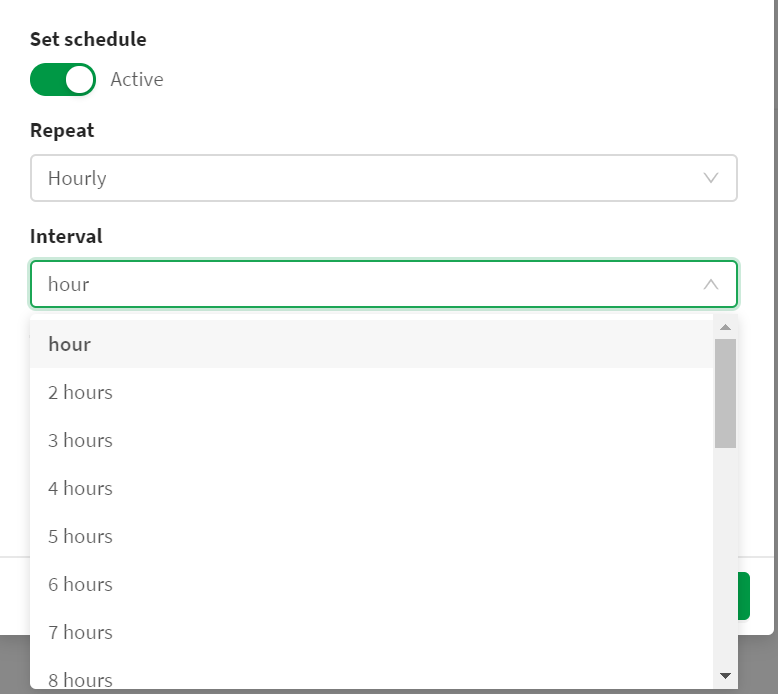
Challenge in Qlik Sense SaaS In Qlik Sense SaaS, we can only select 'hourly' as smallest refresh schedule for an App. Not every 30 minutes. Not every 10 minutes. See attached screenshot.
Description of idea To have the possibility to set the reload schedule for an app as "every X minutes".
This functionality was available in QlikView QMC. Not anymore in Qlik Sense SaaS.
Value proposition Some apps are looked at multiple times a day by end users, e.g. apps that display *today's* sale performance for online shops. An hourly refresh is not frequent enough to detect possible issues early, during the day. Or to do daily management activities. The users would require the sales data to flow in Qlik app every 30 minutes to have a good grip on their business.
Additional context If this feature would risk taking too much Cloud CPU/Memory, then the Qlik SaaS could 'assess' the resources required for the app reload first. If an app would reload very quickly, then Qlik SaaS should allow for a refresh schedule "every X minutes". If not, then the option would be greyed out and user first needs to optimize the app.
coming back to your idea from last year. This is certainly something we do want to add as a capability. I can't give you a date for it but it is on our roadmap and we are planning to work on it rather sooner than later.
And overall, there is much more to come for a better schedule management this year. Stay tuned ...
@Thomas_Hopp can you combine this suggestion and that of @Ron_van_Rooij as effectively they are the same request, just mine was done at a time before Qlik SaaS became Qlik SaaS or change both status to be Open - On Roadmap.
I am surprised to see that this is not high priority. There are some light weight apps I have and I need to leave them on-prem, because of this. Little disappointed, as SaaS is not ne to Qlik and everyone wants to move off-prem, but this gap is way too large. If this is on a roadmap, ten there is an estimated delivery dat?
So, I found the best way around this (hack) was to have qlik Transfer app installed on another VM and then setup the data folder connection. I setup a small job to run every 5-10 min on QMC console on prem to export a qvd with last refresh date in it. In QlikTransfer you can then setup to point at that folder and on synce, refresh specific apps.
So now every 10 min I have a qvd with nothing interesting generated, Qlik Transfer sees it in the set folder, then copies it across and on complete, it refreshes the items I identified with the check box.
Fairly easy once you setup Qlik Transfer and a separate VM for it (as it conflicts with Qlik if on the same server). Would still expect it as part of the SaaS package, but this works