Unlock a world of possibilities! Login now and discover the exclusive benefits awaiting you.

- Qlik Community
- :
- Forums
- :
- Analytics & AI
- :
- Products & Topics
- :
- Visualization and Usability
- :
- FILTER PANE : Adding Multiple Dimension in One Fil...
- Subscribe to RSS Feed
- Mark Topic as New
- Mark Topic as Read
- Float this Topic for Current User
- Bookmark
- Subscribe
- Mute
- Printer Friendly Page

 Purushothaman
- Mark as New
- Bookmark
- Subscribe
- Mute
- Subscribe to RSS Feed
- Permalink
- Report Inappropriate Content
FILTER PANE : Adding Multiple Dimension in One Filter Pane
Hi All,
I have requirement of adding a multiple dimension under Two Filter pane.
Below is my Table Field Names and Its Field values

Below is my Filter Pane Requirements:

Attached is the sample dataset for your reference.
Anyone, Please help!!
Thank you!
- Subscribe by Topic:
-
Data Load Editor
-
Developers
-
dimension
-
expression
-
filter
-
General Question
-
Script
-
Set Analysis
-
Visualization
Accepted Solutions

 Andrei_Cusnir
- Mark as New
- Bookmark
- Subscribe
- Mute
- Subscribe to RSS Feed
- Permalink
- Report Inappropriate Content
Hello,
This can be easily done following these steps:
1. I have loaded the following dataset:
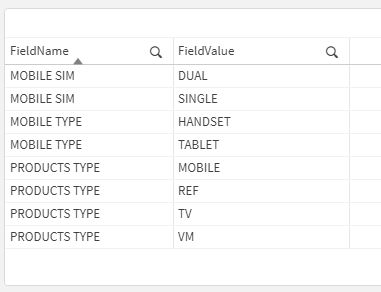
2. Now create the first Filter pane and add FieldName as dimension
3. Create another Filter pane and add the following expression: =If(Match(FieldName,GetFieldSelections(FieldName)),FieldValue)
4. This will only display the FieldValue values where FieldName matches the selected one
5. To limit the selections of the FieldName to only one, go to Edit Sheet > Fields (on the left menu) > Select the field FieldName and edit it. Check the option "Always one selected value"
6. This will give you the outcome:
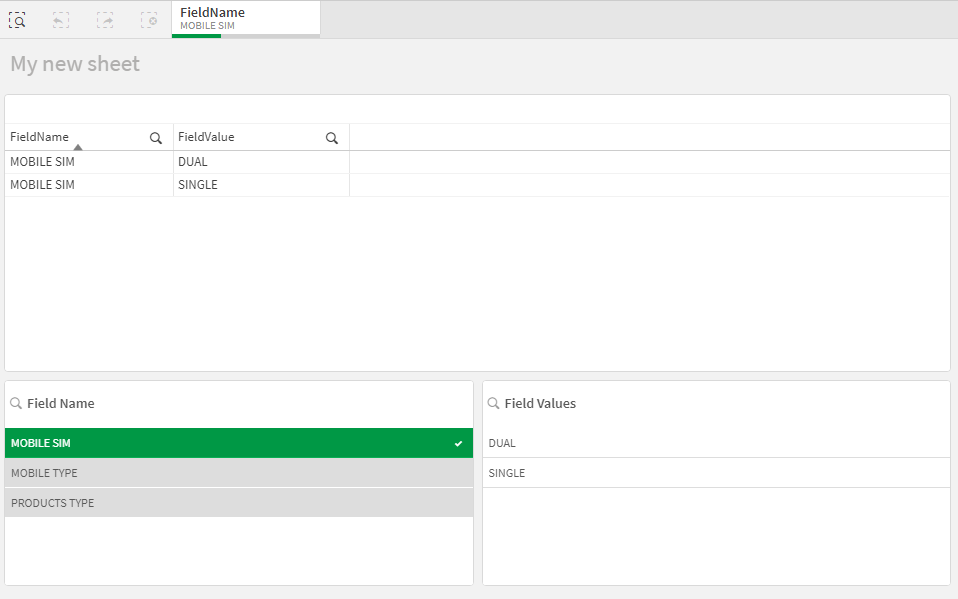
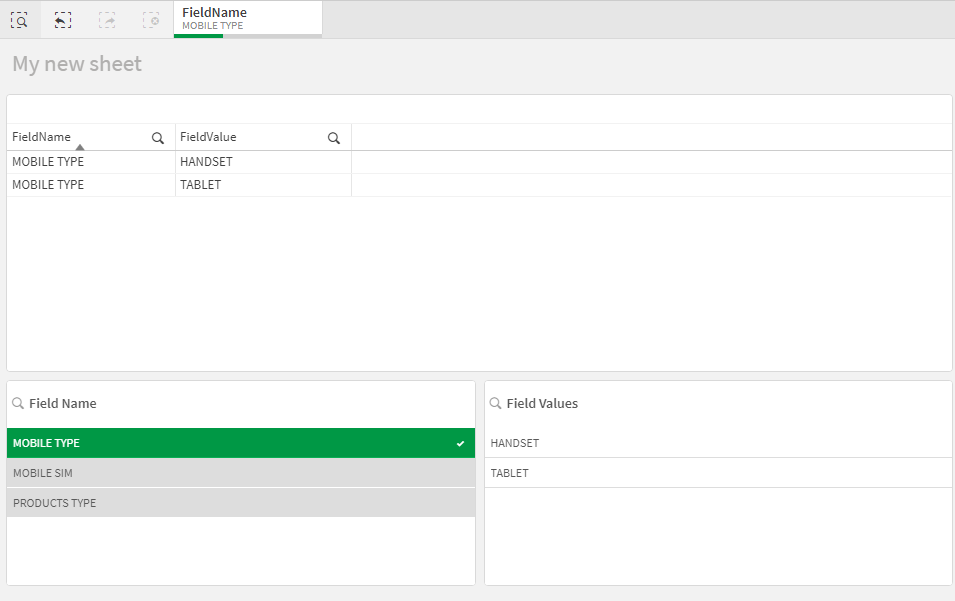
As you can see when you select one value from FieldName, it will give you only the corresponding options from FieldValue values.
I hope that this information was helpful. In case I have misunderstood the use case scenario, please elaborate in details by providing additional information. However, if it has helped you resolve the issue, please mark it as accepted solution to give further visibility to other community members.
Andrei_Cusnir
- Mark as New
- Bookmark
- Subscribe
- Mute
- Subscribe to RSS Feed
- Permalink
- Report Inappropriate Content
Hello,
This can be easily done following these steps:
1. I have loaded the following dataset:
2. Now create the first Filter pane and add FieldName as dimension
3. Create another Filter pane and add the following expression: =If(Match(FieldName,GetFieldSelections(FieldName)),FieldValue)
4. This will only display the FieldValue values where FieldName matches the selected one
5. To limit the selections of the FieldName to only one, go to Edit Sheet > Fields (on the left menu) > Select the field FieldName and edit it. Check the option "Always one selected value"
6. This will give you the outcome:
As you can see when you select one value from FieldName, it will give you only the corresponding options from FieldValue values.
I hope that this information was helpful. In case I have misunderstood the use case scenario, please elaborate in details by providing additional information. However, if it has helped you resolve the issue, please mark it as accepted solution to give further visibility to other community members.
Purushothaman
- Mark as New
- Bookmark
- Subscribe
- Mute
- Subscribe to RSS Feed
- Permalink
- Report Inappropriate Content
Thank you Andrei, I had heard great things about you. Thanks for your help in finding a solution.
Andrei_Cusnir
- Mark as New
- Bookmark
- Subscribe
- Mute
- Subscribe to RSS Feed
- Permalink
- Report Inappropriate Content
Hello,
Thank you very much for your kind message! I am glad that this information has helped you achieve your use case scenario 😊
