Unlock a world of possibilities! Login now and discover the exclusive benefits awaiting you.

- Qlik Community
- :
- Forums
- :
- Analytics & AI
- :
- Products & Topics
- :
- Visualization and Usability
- :
- Re: Qlik Sense Cloud
- Subscribe to RSS Feed
- Mark Topic as New
- Mark Topic as Read
- Float this Topic for Current User
- Bookmark
- Subscribe
- Mute
- Printer Friendly Page

- Mark as New
- Bookmark
- Subscribe
- Mute
- Subscribe to RSS Feed
- Permalink
- Report Inappropriate Content
Qlik Sense Cloud
I am in a Data Load Editor screen , have loaded the data and it compiled without an error, now I want to jump on visualization screen from here, but not getting the option? Can anyone please guide...

 Gysbert_Wassena
- Mark as New
- Bookmark
- Subscribe
- Mute
- Subscribe to RSS Feed
- Permalink
- Report Inappropriate Content
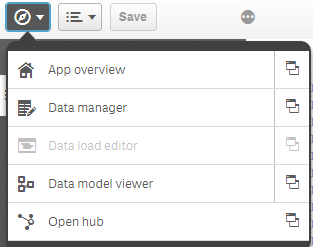
On the top left you can find a button to switch to the other screens like App overview. You can also open such a screen in a new browser tab by clicking on the icon on the right side of the menu.
talk is cheap, supply exceeds demand
- Mark as New
- Bookmark
- Subscribe
- Mute
- Subscribe to RSS Feed
- Permalink
- Report Inappropriate Content
Thanks for replying, so does it mean that I need to click on "App overview Screen" then select the sheet from there and "Edit" to open the Visualization window? Dont we have any direct way post data load to see the Visualization empty sheet directly ?
Gysbert_Wassena- Mark as New
- Bookmark
- Subscribe
- Mute
- Subscribe to RSS Feed
- Permalink
- Report Inappropriate Content
Not if you use the data load editor. If you use the Data Manager you'll be directed to the app overview.
talk is cheap, supply exceeds demand