Unlock a world of possibilities! Login now and discover the exclusive benefits awaiting you.

- Qlik Community
- :
- Forums
- :
- Analytics & AI
- :
- Products & Topics
- :
- Visualization and Usability
- :
- Re: Removing not hiding Date from Timestamp
- Subscribe to RSS Feed
- Mark Topic as New
- Mark Topic as Read
- Float this Topic for Current User
- Bookmark
- Subscribe
- Mute
- Printer Friendly Page

 mloy3
mloy3
- Mark as New
- Bookmark
- Subscribe
- Mute
- Subscribe to RSS Feed
- Permalink
- Report Inappropriate Content
Removing not hiding Date from Timestamp
Hi, I am trying to do some interval summation with 2 different timestamp. However, i am not able to remove the date that is associated with Expression A(only interested in hh:mm).
Expression A:
Using a simple formula to add the time stamps together:
time([Work Unit Complete Hour] & ':' & [Work Unit Complete Minute], 'hh:mm')
however, when i check further using:
date(time([Work Unit Complete Hour] & ':' & [Work Unit Complete Minute ], 'hh:mm'),'m/d/yyyy')
i noticed a bunch of dates associated resulting in correct hh:mm but wrong dd/mm/yyyy when i sum this with another field.
I am not trying to hide the display, but really removing the date associated so that i can add this to another expression.
Accepted Solutions

 sunny_talwar
- Mark as New
- Bookmark
- Subscribe
- Mute
- Subscribe to RSS Feed
- Permalink
- Report Inappropriate Content
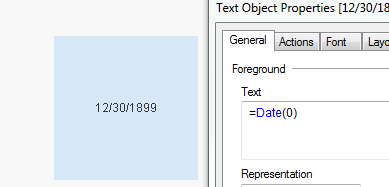
I am guessing you are must be seeing a date from the year 12/30/1899? It is just a Date for when the value is 0
 sunny_talwar
- Mark as New
- Bookmark
- Subscribe
- Mute
- Subscribe to RSS Feed
- Permalink
- Report Inappropriate Content
I am guessing you are must be seeing a date from the year 12/30/1899? It is just a Date for when the value is 0
mloy3
- Mark as New
- Bookmark
- Subscribe
- Mute
- Subscribe to RSS Feed
- Permalink
- Report Inappropriate Content
Thank you Sunny, another colleague pointed out to me that i was using 'm/d/yyyy' instead of 'M/D/YYYY' and that made the whole difference when doing the summation. But yes, i thought what you pointed was an error with the data which i couldnt verify
