Unlock a world of possibilities! Login now and discover the exclusive benefits awaiting you.

- Qlik Community
- :
- Forums
- :
- Analytics & AI
- :
- Products & Topics
- :
- Visualization and Usability
- :
- Re: average of total anticipated
- Subscribe to RSS Feed
- Mark Topic as New
- Mark Topic as Read
- Float this Topic for Current User
- Bookmark
- Subscribe
- Mute
- Printer Friendly Page

 fmazzarelli
- Mark as New
- Bookmark
- Subscribe
- Mute
- Subscribe to RSS Feed
- Permalink
- Report Inappropriate Content
average of total anticipated
Hi Community,
how could I make the average of a total (automatically calculated)?
See image attached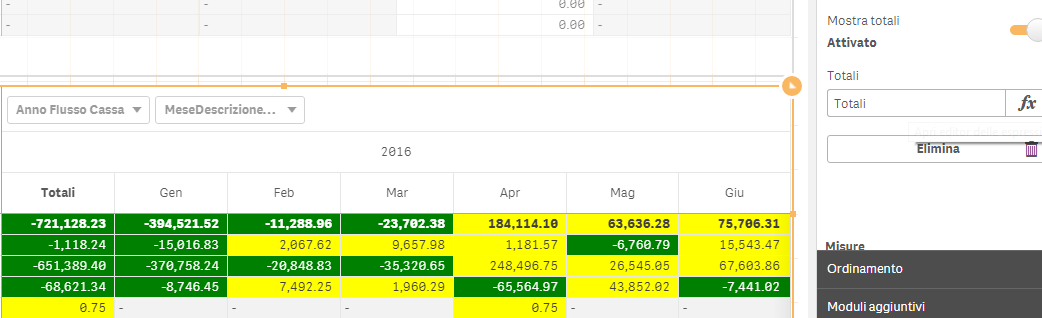
 shraddha_g
- Mark as New
- Bookmark
- Subscribe
- Mute
- Subscribe to RSS Feed
- Permalink
- Report Inappropriate Content
Try below expression,
if(dimensionality>1, sum(Sales),avg(Sales))

 rubenmarin
- Mark as New
- Bookmark
- Subscribe
- Mute
- Subscribe to RSS Feed
- Permalink
- Report Inappropriate Content
Hi Fabio, if yer and month are dimensions you can check the level to set a different expression for the total:
Try set an expression with "=SecondaryDimensionality()" (without the double quotes)
It may show '0' in the total column and '1' in the months columns, in this case you can use this to set the different expressions, so the expression you need may be something like:
If(Secondarydimensionalty()>0,
YourCurrentExpression,
Avg(Aggr(YourCurrentExpression, YearFieldName, MonthfieldName)) // For Total column
)
