Unlock a world of possibilities! Login now and discover the exclusive benefits awaiting you.

- Qlik Community
- :
- All Forums
- :
- QlikView
- :
- Problems months crosstable
- Subscribe to RSS Feed
- Mark Topic as New
- Mark Topic as Read
- Float this Topic for Current User
- Bookmark
- Subscribe
- Mute
- Printer Friendly Page

 marcel_olmo
- Mark as New
- Bookmark
- Subscribe
- Mute
- Subscribe to RSS Feed
- Permalink
- Report Inappropriate Content
Problems months crosstable
MHey guys, I have an excel with a simple butget.
It looks like this :
| Subject | January | ... | December |
|---|---|---|---|
| Sales | 1000 | ... | 200 |
| ... | ... | ... | ... |
And I already have a facts table that has Year and month fields.
So I've loaded my budget table, and I've renamed the name of the months as the default MonthNames of the script.
Here you have my default spanish names :
SET MonthNames='ene;feb;mar;abr;may;jun;jul;ago;sep;oct;nov;dic';
And here is the code :
Budget:
LOAD
F1 as [Subject],
Enero as ene,
Febrero as feb,
Marzo as mar,
Abril as abr,
Mayo as may,
Junio as jun,
Julio as jul,
Agosto as ago,
Septiem as sep,
Octubre as oct,
Noviembre as nov,
Diciembre as dic
FROM MyTable;
CrossBudget :
CrossTable (Month,Amount,2)
load * resident Budget;
Once I merge my facts table with my budget table, I've created a table box with fields Year and Month :
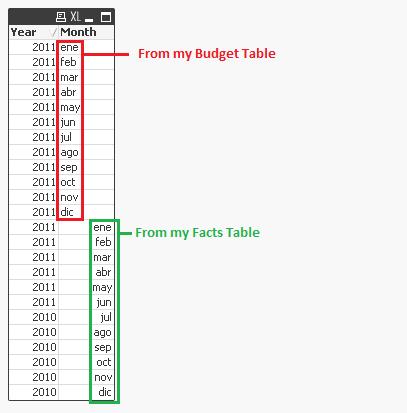
My desired result would be that there will not be difference between budget months and fact months, but I've found no way to join them.
Any ideas about how to solve that???
Many thanks in advance!!
Accepted Solutions
.png "Miguel_Angel_Baeyens")
 Miguel_Angel_Ba
- Mark as New
- Bookmark
- Subscribe
- Mute
- Subscribe to RSS Feed
- Permalink
- Report Inappropriate Content
Hello Marcel,
Since dates have a subjacent numeric value in QlikView and fieldnames are dealt as literals (text), you will need a two step load so all values are formatted properly
Step1:
CrossTable(Month, Data)
LOAD Subject,
January AS 1,
February AS 2,
March AS 3,
April AS 4,
May AS 5,
June AS 6,
July AS 7,
August AS 8,
September AS 9
FROM
File.xlsx
(ooxml, embedded labels, table is S1);
Step2:
NOCONCATENATE LOAD Subject,
Month(MakeDate(2011, Num(Num#(Month)))) AS Month,
Data
RESIDENT Step1;
DROP TABLE Step1;
In the example above I'm forcing the values to be months of 2011, but you can use your own year field to get that value right.
Hope that helps.
BI Consultant

 swuehl
- Mark as New
- Bookmark
- Subscribe
- Mute
- Subscribe to RSS Feed
- Permalink
- Report Inappropriate Content
Hi Marcel,
just from the formatting I would say that month from budget table is differently interpreted than month from facts table (left vs right, text vs. numbers). This might explain why it doesn't merge correctly. Use correct parsing functions on load to correct this.
If my assumption is incorrect, it would be helpful if you could post the way you merge the two tables, best as zipped example application including your input table.
Regards,
Stefan
Miguel_Angel_Ba- Mark as New
- Bookmark
- Subscribe
- Mute
- Subscribe to RSS Feed
- Permalink
- Report Inappropriate Content
Hello Marcel,
Since dates have a subjacent numeric value in QlikView and fieldnames are dealt as literals (text), you will need a two step load so all values are formatted properly
Step1:
CrossTable(Month, Data)
LOAD Subject,
January AS 1,
February AS 2,
March AS 3,
April AS 4,
May AS 5,
June AS 6,
July AS 7,
August AS 8,
September AS 9
FROM
File.xlsx
(ooxml, embedded labels, table is S1);
Step2:
NOCONCATENATE LOAD Subject,
Month(MakeDate(2011, Num(Num#(Month)))) AS Month,
Data
RESIDENT Step1;
DROP TABLE Step1;
In the example above I'm forcing the values to be months of 2011, but you can use your own year field to get that value right.
Hope that helps.
BI Consultant
marcel_olmo
- Mark as New
- Bookmark
- Subscribe
- Mute
- Subscribe to RSS Feed
- Permalink
- Report Inappropriate Content
Thanks Miguel, now it works great! You've helped me again!
See you around!!
Cheers!
