Unlock a world of possibilities! Login now and discover the exclusive benefits awaiting you.

- Qlik Community
- :
- All Forums
- :
- QlikView
- :
- How to put a preview available into access point
- Subscribe to RSS Feed
- Mark Topic as New
- Mark Topic as Read
- Float this Topic for Current User
- Bookmark
- Subscribe
- Mute
- Printer Friendly Page

- Mark as New
- Bookmark
- Subscribe
- Mute
- Subscribe to RSS Feed
- Permalink
- Report Inappropriate Content
How to put a preview available into access point
Hi
I developed a QVD, but I insert an Extension Object so this document must be see on Web View, but when I open access point there is no preview available, is there any way to put an image for preview using access point?
Accepted Solutions
- Mark as New
- Bookmark
- Subscribe
- Mute
- Subscribe to RSS Feed
- Permalink
- Report Inappropriate Content
First, I think you are refering to a QVW. And yes, you can use a thumbnail image for your document in the Access Point. You can define this image in Document Properties --> Opening:
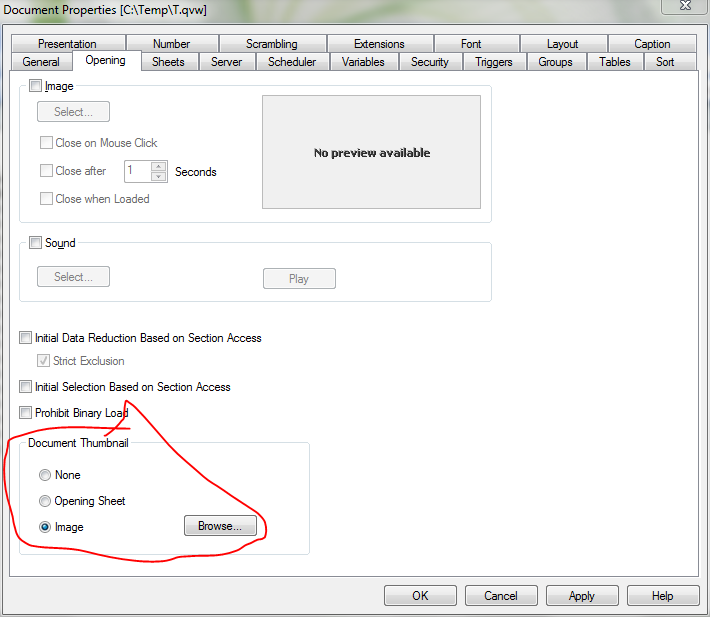
This image will be reduced to 192x108 pixel , that is the standard resolution for Access Point thumbnails.
JG
- Mark as New
- Bookmark
- Subscribe
- Mute
- Subscribe to RSS Feed
- Permalink
- Report Inappropriate Content
First, I think you are refering to a QVW. And yes, you can use a thumbnail image for your document in the Access Point. You can define this image in Document Properties --> Opening:
This image will be reduced to 192x108 pixel , that is the standard resolution for Access Point thumbnails.
JG