Unlock a world of possibilities! Login now and discover the exclusive benefits awaiting you.

- Qlik Community
- :
- All Forums
- :
- QlikView
- :
- Re: STAR ratings
- Subscribe to RSS Feed
- Mark Topic as New
- Mark Topic as Read
- Float this Topic for Current User
- Bookmark
- Subscribe
- Mute
- Printer Friendly Page

- Mark as New
- Bookmark
- Subscribe
- Mute
- Subscribe to RSS Feed
- Permalink
- Report Inappropriate Content
STAR ratings
I intend to use the star ratings in my dashboard where the rating from (1-5) is selected according to quantity of sales of a particular product.
Can anyone explain how will i get this functionality??
Any help will do.
Thanks in Advance
Regards,
Rohan Shetty
- « Previous Replies
-
- 1
- 2
- Next Replies »
Accepted Solutions
- Mark as New
- Bookmark
- Subscribe
- Mute
- Subscribe to RSS Feed
- Permalink
- Report Inappropriate Content
Hi Rohan
If the text stars using repeat() are not suitable *,*** etc then there are 2 alternatives so you can use pictures:
1) Create a bar chart, with the number of sales, and overlay with an image that looks like the stars, except that the background is blank and the stars are transparent. That way the stars will "fill up" with the data from the bars, which is actually behind them. You can also do this in a table
2) Create a set of images, which look like a full star, a half star, as much detail as you want. Create a table with the product as the dimension, and 5 expressions. Check out the bundle load functionality in the script, this is how you load images. Then the expression in each one should look like:
star1:
if(sum(sales)/sum(total sales)<=0.5,'Half picture','full picture')
star2: if (sum(sales)/sum(total sales) >=1.5, 'full picture' ,
if(sum(sales) / sum(total sales) >=1,'alf picture'))
And so on
Erica

 aveeeeeee7en
- Mark as New
- Bookmark
- Subscribe
- Mute
- Subscribe to RSS Feed
- Permalink
- Report Inappropriate Content
Use this Expression:
=if(aggr(rank(sum(sales)),product)<=5,product).
It will give you 1-5 Products means Top 5.
Change the given expression fields with your Table Fields.
Regards
Aviral Nag
- Mark as New
- Bookmark
- Subscribe
- Mute
- Subscribe to RSS Feed
- Permalink
- Report Inappropriate Content
Thanks for the reply, but what I am looking is to categorise them depending on products sold.
for Example when Total Sales=1000
*(1 star)=0-100 products sold in the selected category
**(2 Star)=100-200 products sold in the selected category
***(3 Star)=200-300 products sold in the selected category & so on.
Do you know how to implement the star ratings?(for eg:-***(3 star))
Regards,
Rohan Shetty
- Mark as New
- Bookmark
- Subscribe
- Mute
- Subscribe to RSS Feed
- Permalink
- Report Inappropriate Content
Hi Rohan,
How is your fact data?
Like quantity is a direct field or a new line for every sale?
If quantity is a direct field, it is better to handle this in script level while loading data
eg: if(quantity>0 and quantity <100, '1 star') as Rating
If latter is the case, u can derive in chart expression like
if(Count(Sold)>0 and Count(Sold<100) , '1 star')
Thanks,
Prabhu
- Mark as New
- Bookmark
- Subscribe
- Mute
- Subscribe to RSS Feed
- Permalink
- Report Inappropriate Content
Hi Rohan,
Try the class function:
Class(sum(Sales),100)
this will give you intervalls like "100< x <= 200"
You can then change the interval to suit the total sales
eg class (Sum(sales),sum(total Sales)/10)
Alternately, use the repeat(text,n) function to repeat a set of text n times
N could be a function of your total sales
=repeat('*',floor((5*sum(sales)/sum(total sales)+1)))
This will give you 1 * for 0-100, 2 ** for 101-200 sales, where the sum(total sales) = 1000
Erica
- Mark as New
- Bookmark
- Subscribe
- Mute
- Subscribe to RSS Feed
- Permalink
- Report Inappropriate Content
Thanks Prabhu for replying. I can use your formula to get the values of the products sold in the range of (1-5).But I am unable to Implement STAR Rating(for eg:-***(3 star)).How do I use the values for getting the output in star rating?
- Mark as New
- Bookmark
- Subscribe
- Mute
- Subscribe to RSS Feed
- Permalink
- Report Inappropriate Content
Can't you just hardcode the rating values? How do you want to diplay the data? Do you want *(1 star) as column name in table?
- Mark as New
- Bookmark
- Subscribe
- Mute
- Subscribe to RSS Feed
- Permalink
- Report Inappropriate Content
I can definitely hardcode it but it would be better if I could get the output similar to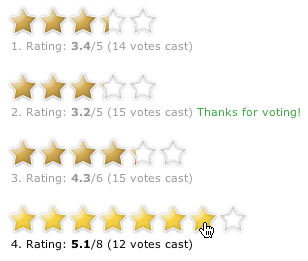
- Mark as New
- Bookmark
- Subscribe
- Mute
- Subscribe to RSS Feed
- Permalink
- Report Inappropriate Content
Rohan,
Its sound a great idea can you please explain how you get star ratings in your dashboard
i mean can you share your app?
- Mark as New
- Bookmark
- Subscribe
- Mute
- Subscribe to RSS Feed
- Permalink
- Report Inappropriate Content
That is what I am trying to develop. It is possible in Microstrategy. Any Idea on how it could be done here?
- « Previous Replies
-
- 1
- 2
- Next Replies »