Do not input private or sensitive data. View Qlik Privacy & Cookie Policy.
Skip to main content

Announcements
Now accepting applications for the Qlik Luminary and Partner Ambassador Programs: Apply by July 6!
cancel
Showing results for 
Search instead for 
Did you mean: 
This widget could not be displayed.
1 Solution

Accepted Solutions
This widget could not be displayed.
17 Replies
This widget could not be displayed.

Hi there,

Is it possible to set a start position for a scroll bar in a chart object? (line chart)

Please see my attached images. As you can see, my x-axis dimension consists of periods, and I want to have the scroll bar placed to the right as default when I open the QlikView document. I have used the chart scroll setting (also attached) och the Presentation tab in the object. I thought it would be nice to see the last 12 months, but i don't want to reverse my dimension as getting the latest period to the left makes no sense.

I also read about the "Preverse scroll position" setting on the Layout tab, but that couldn't help me... Is it possible to get a solution to this slight problem?

Thanks in advance.

Best regards,

Filip

Labels (1)

Scrolling start position in chart?

Hi there,

Is it possible to set a start position for a scroll bar in a chart object? (line chart)

Please see my attached images. As you can see, my x-axis dimension consists of periods, and I want to have the scroll bar placed to the right as default when I open the QlikView document. I have used the chart scroll setting (also attached) och the Presentation tab in the object. I thought it would be nice to see the last 12 months, but i don't want to reverse my dimension as getting the latest period to the left makes no sense.

I also read about the "Preverse scroll position" setting on the Layout tab, but that couldn't help me... Is it possible to get a solution to this slight problem?

Thanks in advance.

Best regards,

Filip

Labels (1)
Anonymous
Not applicable

Scrolling start position in chart?

Hi there,

Is it possible to set a start position for a scroll bar in a chart object? (line chart)

Please see my attached images. As you can see, my x-axis dimension consists of periods, and I want to have the scroll bar placed to the right as default when I open the QlikView document. I have used the chart scroll setting (also attached) och the Presentation tab in the object. I thought it would be nice to see the last 12 months, but i don't want to reverse my dimension as getting the latest period to the left makes no sense.

I also read about the "Preverse scroll position" setting on the Layout tab, but that couldn't help me... Is it possible to get a solution to this slight problem?

Thanks in advance.

Best regards,

Filip

Labels (1)
Anonymous
Not applicable

Scrolling start position in chart?

Hi there,

Is it possible to set a start position for a scroll bar in a chart object? (line chart)

Please see my attached images. As you can see, my x-axis dimension consists of periods, and I want to have the scroll bar placed to the right as default when I open the QlikView document. I have used the chart scroll setting (also attached) och the Presentation tab in the object. I thought it would be nice to see the last 12 months, but i don't want to reverse my dimension as getting the latest period to the left makes no sense.

I also read about the "Preverse scroll position" setting on the Layout tab, but that couldn't help me... Is it possible to get a solution to this slight problem?

Thanks in advance.

Best regards,

Filip

Labels (1)
Anonymous
Not applicable

Scrolling start position in chart?

Hi there,

Is it possible to set a start position for a scroll bar in a chart object? (line chart)

Please see my attached images. As you can see, my x-axis dimension consists of periods, and I want to have the scroll bar placed to the right as default when I open the QlikView document. I have used the chart scroll setting (also attached) och the Presentation tab in the object. I thought it would be nice to see the last 12 months, but i don't want to reverse my dimension as getting the latest period to the left makes no sense.

I also read about the "Preverse scroll position" setting on the Layout tab, but that couldn't help me... Is it possible to get a solution to this slight problem?

Thanks in advance.

Best regards,

Filip

Labels (1)
Anonymous
Not applicable

Scrolling start position in chart?

Hi there,

Is it possible to set a start position for a scroll bar in a chart object? (line chart)

Please see my attached images. As you can see, my x-axis dimension consists of periods, and I want to have the scroll bar placed to the right as default when I open the QlikView document. I have used the chart scroll setting (also attached) och the Presentation tab in the object. I thought it would be nice to see the last 12 months, but i don't want to reverse my dimension as getting the latest period to the left makes no sense.

I also read about the "Preverse scroll position" setting on the Layout tab, but that couldn't help me... Is it possible to get a solution to this slight problem?

Thanks in advance.

Best regards,

Filip

Labels (1)
Anonymous
Not applicable

Scrolling start position in chart?

Hi there,

Is it possible to set a start position for a scroll bar in a chart object? (line chart)

Please see my attached images. As you can see, my x-axis dimension consists of periods, and I want to have the scroll bar placed to the right as default when I open the QlikView document. I have used the chart scroll setting (also attached) och the Presentation tab in the object. I thought it would be nice to see the last 12 months, but i don't want to reverse my dimension as getting the latest period to the left makes no sense.

I also read about the "Preverse scroll position" setting on the Layout tab, but that couldn't help me... Is it possible to get a solution to this slight problem?

Thanks in advance.

Best regards,

Filip

Labels (1)
Anonymous
Not applicable

Scrolling start position in chart?

Hi there,

Is it possible to set a start position for a scroll bar in a chart object? (line chart)

Please see my attached images. As you can see, my x-axis dimension consists of periods, and I want to have the scroll bar placed to the right as default when I open the QlikView document. I have used the chart scroll setting (also attached) och the Presentation tab in the object. I thought it would be nice to see the last 12 months, but i don't want to reverse my dimension as getting the latest period to the left makes no sense.

I also read about the "Preverse scroll position" setting on the Layout tab, but that couldn't help me... Is it possible to get a solution to this slight problem?

Thanks in advance.

Best regards,

Filip

Labels (1)
Anonymous
Not applicable

Scrolling start position in chart?

Hi there,

Is it possible to set a start position for a scroll bar in a chart object? (line chart)

Please see my attached images. As you can see, my x-axis dimension consists of periods, and I want to have the scroll bar placed to the right as default when I open the QlikView document. I have used the chart scroll setting (also attached) och the Presentation tab in the object. I thought it would be nice to see the last 12 months, but i don't want to reverse my dimension as getting the latest period to the left makes no sense.

I also read about the "Preverse scroll position" setting on the Layout tab, but that couldn't help me... Is it possible to get a solution to this slight problem?

Thanks in advance.

Best regards,

Filip

Labels (1)
richard_pearce6
richard_pearce6
richard_pearce6
richard_pearce6
richard_pearce6
Partner - Specialist

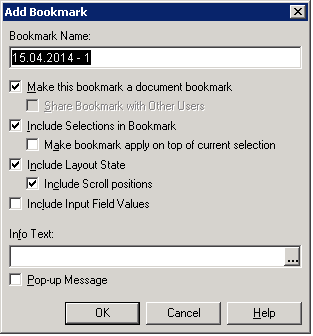
I tried the bookmark option and it didn't work for chart scrolls

Partner - Specialist

I tried the bookmark option and it didn't work for chart scrolls

Partner - Specialist

I tried the bookmark option and it didn't work for chart scrolls

Partner - Specialist

I tried the bookmark option and it didn't work for chart scrolls

Partner - Specialist

I tried the bookmark option and it didn't work for chart scrolls

richard_pearce6
richard_pearce6
richard_pearce6
richard_pearce6
richard_pearce6
Partner - Specialist

I also tried the layout option and that didn't seem to work

Partner - Specialist

I also tried the layout option and that didn't seem to work

Partner - Specialist

I also tried the layout option and that didn't seem to work

Partner - Specialist

I also tried the layout option and that didn't seem to work

Partner - Specialist

I also tried the layout option and that didn't seem to work

Anonymous
Not applicable
Author

Back to my original question,

Is it possible to set a start position for a scroll bar in a chart object?

I don't want to use bookmarks and as I wrote in my post, "Preserve Scroll Position" doesn't help me...

Anonymous
Not applicable
Author

Back to my original question,

Is it possible to set a start position for a scroll bar in a chart object?

I don't want to use bookmarks and as I wrote in my post, "Preserve Scroll Position" doesn't help me...

Anonymous
Not applicable
Author

Back to my original question,

Is it possible to set a start position for a scroll bar in a chart object?

I don't want to use bookmarks and as I wrote in my post, "Preserve Scroll Position" doesn't help me...

Anonymous
Not applicable
Author

Back to my original question,

Is it possible to set a start position for a scroll bar in a chart object?

I don't want to use bookmarks and as I wrote in my post, "Preserve Scroll Position" doesn't help me...

Anonymous
Not applicable
Author

Back to my original question,

Is it possible to set a start position for a scroll bar in a chart object?

I don't want to use bookmarks and as I wrote in my post, "Preserve Scroll Position" doesn't help me...

Anonymous
Not applicable
Author

Is there nobody who knows a solution to this problem? Is it not possible?

Anonymous
Not applicable
Author

Is there nobody who knows a solution to this problem? Is it not possible?

Anonymous
Not applicable
Author

Is there nobody who knows a solution to this problem? Is it not possible?

Anonymous
Not applicable
Author

Is there nobody who knows a solution to this problem? Is it not possible?

Anonymous
Not applicable
Author

Is there nobody who knows a solution to this problem? Is it not possible?

bnichol
bnichol
bnichol
bnichol
bnichol
Specialist
Specialist

Did you ever find an answer?

Thanks,

B

Specialist
Specialist

Did you ever find an answer?

Thanks,

B

Specialist
Specialist

Did you ever find an answer?

Thanks,

B

Specialist
Specialist

Did you ever find an answer?

Thanks,

B

Specialist
Specialist

Did you ever find an answer?

Thanks,

B

Anonymous
Not applicable
Author

Unfortunately not.

Anonymous
Not applicable
Author

Unfortunately not.

Anonymous
Not applicable
Author

Unfortunately not.

Anonymous
Not applicable
Author

Unfortunately not.

Anonymous
Not applicable
Author

Unfortunately not.