Unlock a world of possibilities! Login now and discover the exclusive benefits awaiting you.

- Qlik Community
- :
- All Forums
- :
- QlikView
- :
- Re: Alternate States and Drill-Down Groups
- Subscribe to RSS Feed
- Mark Topic as New
- Mark Topic as Read
- Float this Topic for Current User
- Bookmark
- Subscribe
- Mute
- Printer Friendly Page

- Mark as New
- Bookmark
- Subscribe
- Mute
- Subscribe to RSS Feed
- Permalink
- Report Inappropriate Content
Alternate States and Drill-Down Groups
Has anyone gotten this to work in QlikView 11?
I have some alternate states set up for comparison purposes and was hoping to use a drill-down chart that I'm using elsewhere in the same document.
* I copied the working drill-down chart into two new places and assigned each its own alternate state.
* No, they're new objects, not links!
No mas. When I attempt to make a selection and drill down, it simply doesn't drill down - I get a single bar.
Has anyone else gotten these two to work together, or might this be Yet Another QlikView Bug?
Thanks,
Kent
- « Previous Replies
-
- 1
- 2
- Next Replies »

 bhorneber
- Mark as New
- Bookmark
- Subscribe
- Mute
- Subscribe to RSS Feed
- Permalink
- Report Inappropriate Content
Hi all,
based on Cesar's answer I build a file using conditional dimensions (with function GetPossibleCount) and a text object with actions (to clear selections).
It's not a solution, but might help some people to build a workaround.
Benedikt
- Mark as New
- Bookmark
- Subscribe
- Mute
- Subscribe to RSS Feed
- Permalink
- Report Inappropriate Content
This is working as expected/designed.
Groups(drill down/cyclic) are defined under Document Properties, which reflects the entire document with a default state, rather than a particular object with an alternate state.
This is a consequence of the fact the groups are defined globally for the entire document and not locally for a specific object, and the way alternate states is implemented. Alternate states only propagates to a specified object (i.e. not a global group).
- Mark as New
- Bookmark
- Subscribe
- Mute
- Subscribe to RSS Feed
- Permalink
- Report Inappropriate Content
Daniel,
I can understand that it's working as "expected" because it sounds like Alternate States were an outgrowth of Detach. However, I sure hope it wasn't "designed" that way - There's already an awful lot of weird undocumented dependencies, quirks, and inconsistencies in QlikView that are the antithesis of good design.
- Mark as New
- Bookmark
- Subscribe
- Mute
- Subscribe to RSS Feed
- Permalink
- Report Inappropriate Content
You apply the alternate state to a Set expression and not the sheet or an object on a sheet. Do this and drill down works as it should.
e.g SUM({yourAlternateState<your Set Expression>}your Variable)
bhorneber
- Mark as New
- Bookmark
- Subscribe
- Mute
- Subscribe to RSS Feed
- Permalink
- Report Inappropriate Content
Hi John,
could you please provide a demo file (feel free to use my attached file from above)?
I tried, but cannot make your proposal work.
- Mark as New
- Bookmark
- Subscribe
- Mute
- Subscribe to RSS Feed
- Permalink
- Report Inappropriate Content
Yes, agreed. this does work.
It's a bit of a mission though but it does work.
- Mark as New
- Bookmark
- Subscribe
- Mute
- Subscribe to RSS Feed
- Permalink
- Report Inappropriate Content
Thank , this has helped
How would the condition statement "=if(GetPossibleCount(Country)=1,False(),True())" look
if i want to create a drill down to the 4th dimension e.g. Continent>Country>State>City ?
Regards
- Mark as New
- Bookmark
- Subscribe
- Mute
- Subscribe to RSS Feed
- Permalink
- Report Inappropriate Content
hi Nhlanhla, i have the same problem as you do. I am curious did you find a solution? thanks
- Mark as New
- Bookmark
- Subscribe
- Mute
- Subscribe to RSS Feed
- Permalink
- Report Inappropriate Content
HI Jinhua
In my case I wanted to drill down 4 levels. Province>Local_Market>Centre>Name.
Each level gets more specific.
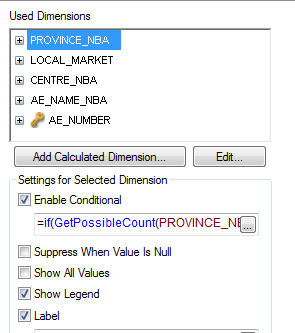
The conditional statements I used for each level were as follows:
Province_NBA : =if(GetPossibleCount(PROVINCE_NBA)=1,False(),true())
Local_Market: =if(GetPossibleCount(PROVINCE_NBA)=1,True(),False())
Centre_NBA: =if(GetPossibleCount(LOCAL_MARKET)=1,True(),False())
AE_Name_NBA: =if(GetPossibleCount(CENTRE_NBA)=1,True(),False())
At each level the formula counts the level above it except for the first 2 levels. If you want your graph to drill down more than 2 levels you will have to use a line chart because bar graphs don't drill down more than 2 levels.
This is how my graph looks
First level: Province_NBA : =if(GetPossibleCount(PROVINCE_NBA)=1,False(),true())
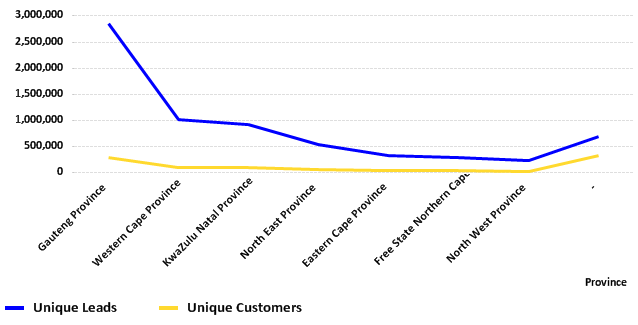
Second level: Local_Market: =if(GetPossibleCount(PROVINCE_NBA)=1,True(),False())

Third level: Centre_NBA: =if(GetPossibleCount(LOCAL_MARKET)=1,True(),False())
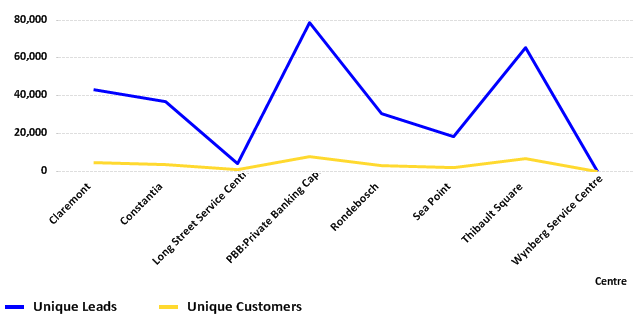
Fourth level: AE_Name_NBA: =if(GetPossibleCount(CENTRE_NBA)=1,True(),False())

I hope this was helpful.
- « Previous Replies
-
- 1
- 2
- Next Replies »