Unlock a world of possibilities! Login now and discover the exclusive benefits awaiting you.

- Qlik Community
- :
- All Forums
- :
- QlikView
- :
- Load order in Concat() function
- Subscribe to RSS Feed
- Mark Topic as New
- Mark Topic as Read
- Float this Topic for Current User
- Bookmark
- Subscribe
- Mute
- Printer Friendly Page

 sunny_talwar
- Mark as New
- Bookmark
- Subscribe
- Mute
- Subscribe to RSS Feed
- Permalink
- Report Inappropriate Content
Load order in Concat() function
Hi Guys -
While helping someone on the community (First Function() in a table graph), I stumbled across a scenario where I wanted to use Concat() function and wanted to sort is by load order. I know this can be done easily by adding a RecNo() or RowNo() in the script. But the idea is if I don't want to make changes in the script, is it still possible?
I thought of using Aggr() function, as Stefan (swuehl) once mentioned in a post that Aggr() function usually sorts by load order. But that doesn't seem to be true in this particular case. Have a look at the attached sample:
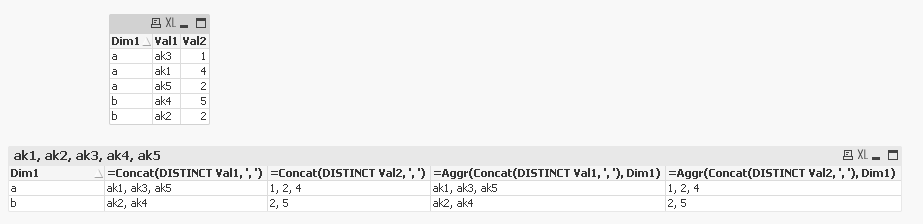
Sample Data:
Table:
LOAD * Inline [
Dim1, Val1, Val2
a, ak3, 1
a, ak1, 4
a, ak5, 2
b, ak4, 5
b, ak2, 2
];
I tried these expressions:
=Concat(DISTINCT Val1, ', ')
=Concat(DISTINCT Val2, ', ')
=Aggr(Concat(DISTINCT Val1, ', '), Dim1)
=Aggr(Concat(DISTINCT Val2, ', '), Dim1)
The order for Expression1 and 3 I am getting is this -> ak1, ak3, ak5 and I am looking for -> ak3, ak1, ak5 when Dim1 = a
Best,
Sunny
Accepted Solutions
sunny_talwar
- Mark as New
- Bookmark
- Subscribe
- Mute
- Subscribe to RSS Feed
- Permalink
- Report Inappropriate Content
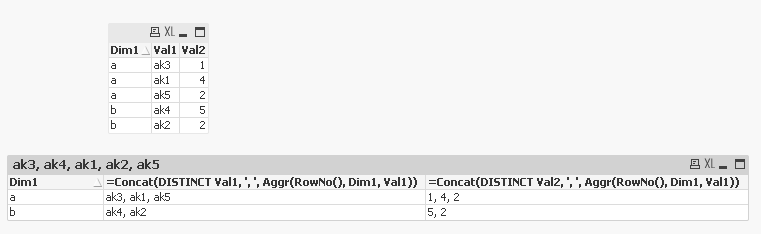
I think I found the solution to my problem:
=Concat(DISTINCT Val1, ', ', Aggr(RowNo(), Dim1, Val1))
sunny_talwar
- Mark as New
- Bookmark
- Subscribe
- Mute
- Subscribe to RSS Feed
- Permalink
- Report Inappropriate Content
I think I found the solution to my problem:
=Concat(DISTINCT Val1, ', ', Aggr(RowNo(), Dim1, Val1))
