Unlock a world of possibilities! Login now and discover the exclusive benefits awaiting you.

- Qlik Community
- :
- Forums
- :
- Analytics & AI
- :
- Products & Topics
- :
- App Development
- :
- A difficult nut to crack!
- Subscribe to RSS Feed
- Mark Topic as New
- Mark Topic as Read
- Float this Topic for Current User
- Bookmark
- Subscribe
- Mute
- Printer Friendly Page

- Mark as New
- Bookmark
- Subscribe
- Mute
- Subscribe to RSS Feed
- Permalink
- Report Inappropriate Content
A difficult nut to crack!
Hi Experts,
I'm trying to present data in a straight table in a certain way. Below is the table I have.
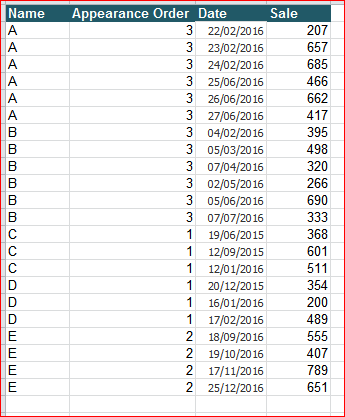
The Table has Name, Appearance Order, Date and Sale value. I want to present this in a straight table using the Appearance order. For example, the Appearance order is 3 for A, so I should be able to see only last 3 Sale and date values for Name A. I want to present this data in like this in a straight table:
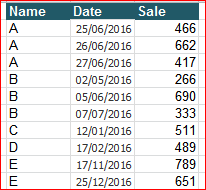
Is there anyway we can do this? Either at the script level or within Qlik at expression level?
Thanks
- Tags:
- straight table
- Mark as New
- Bookmark
- Subscribe
- Mute
- Subscribe to RSS Feed
- Permalink
- Report Inappropriate Content
This is brilliant! Thanks a lot.

 sunny_talwar
- Mark as New
- Bookmark
- Subscribe
- Mute
- Subscribe to RSS Feed
- Permalink
- Report Inappropriate Content
No problem at all 
- Mark as New
- Bookmark
- Subscribe
- Mute
- Subscribe to RSS Feed
- Permalink
- Report Inappropriate Content
Thanks again. I've another small addition to this if you can help me...
Basically I have another Date field which contains all the same dates but also future dates meaning >today()
I want to show these future dates in new columns.
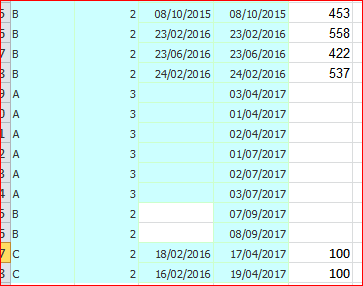
So this is my new table. Same table but one new date column.

I want to show this data in straight table like this:

So you think this is possible?
sunny_talwar
- Mark as New
- Bookmark
- Subscribe
- Mute
- Subscribe to RSS Feed
- Permalink
- Report Inappropriate Content
Would you be able to share the app by updating this new date column in it?
- Mark as New
- Bookmark
- Subscribe
- Mute
- Subscribe to RSS Feed
- Permalink
- Report Inappropriate Content
Sure. Here is the app and the data.
sunny_talwar
- Mark as New
- Bookmark
- Subscribe
- Mute
- Subscribe to RSS Feed
- Permalink
- Report Inappropriate Content
So to understand the logic.... if we Appearance order is 3, the planned date will be in increments of 3? Like A's appearance order is 3, you have 6 additional planned date. for B you have 2. Just trying to understand what would have happened if there were only 2 planned dates for A?
- Mark as New
- Bookmark
- Subscribe
- Mute
- Subscribe to RSS Feed
- Permalink
- Report Inappropriate Content
Yep! Planned dates will be in the increment of 3. So for A there are 6 planned dates. So the first three planned dates should go to Planned Date 1 Column and thee last three should go to Planned Date 2 Column in the straight table.
If A only had 3 Planned Dates then Planned Dates 2 column should be empty as there are only 3 planned dates.
Similarly for B there are 2 future planned dates which should go to Planned Dates 1 column of the straight table and Planned Dates 2 column should be empty as there are no more planned dates.
sunny_talwar
- Mark as New
- Bookmark
- Subscribe
- Mute
- Subscribe to RSS Feed
- Permalink
- Report Inappropriate Content
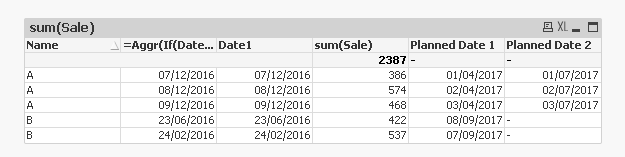
With slight intervention in script....
- Mark as New
- Bookmark
- Subscribe
- Mute
- Subscribe to RSS Feed
- Permalink
- Report Inappropriate Content
This is brilliant Sunny! Looks like this will do the trick. The only think I was thinking is if there is a way the Planned Date 1 and Planned Date 2 are sorted. For example, in Planned Date 1, 08/09/2017 is appearing before 07/09/2017.
- Mark as New
- Bookmark
- Subscribe
- Mute
- Subscribe to RSS Feed
- Permalink
- Report Inappropriate Content
The other thing i noticed is that if I add new data which is Name C then it doesn't add the planned dates in Planned Date 1. Not sure what wrong here...