Unlock a world of possibilities! Login now and discover the exclusive benefits awaiting you.

Announcements
Share your agentic AI experience, learn from others, and earn a new badge: Put Agentic AI to Work
- Qlik Community
- :
- Forums
- :
- Analytics & AI
- :
- Products & Topics
- :
- App Development
- :
- Adding two new calculated dimensions in a (straigh...
Options
- Subscribe to RSS Feed
- Mark Topic as New
- Mark Topic as Read
- Float this Topic for Current User
- Bookmark
- Subscribe
- Mute
- Printer Friendly Page
Turn on suggestions
Auto-suggest helps you quickly narrow down your search results by suggesting possible matches as you type.
Showing results for

Anonymous
Not applicable
2018-08-28
09:14 AM
- Mark as New
- Bookmark
- Subscribe
- Mute
- Subscribe to RSS Feed
- Permalink
- Report Inappropriate Content
Adding two new calculated dimensions in a (straight) table
Hello Everyone,
Hope someone can help me with my challenges.
I have a straight table shown below, using this table I would like to add two new calculated dimensions (1) # of days aging (2) Pass/Fail.
Hope someone can guide me if it is possible to add those using LOAD or in Expressions?
This would be the logic:
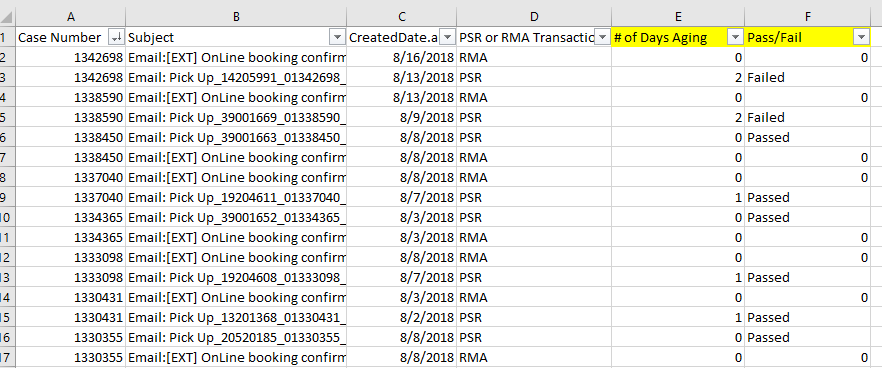
1. # of days aging
if ("Case Number" is equals, if ( "PSR or RMA Transaction" = 'RMA' = 0, Otherwise (PSR),
(RMA&CreatedDate - PSR&CreatedDate)
I have attached an excel file as a reference for this logic.
2. Pass/Fail - If <=1, Passed, Failed
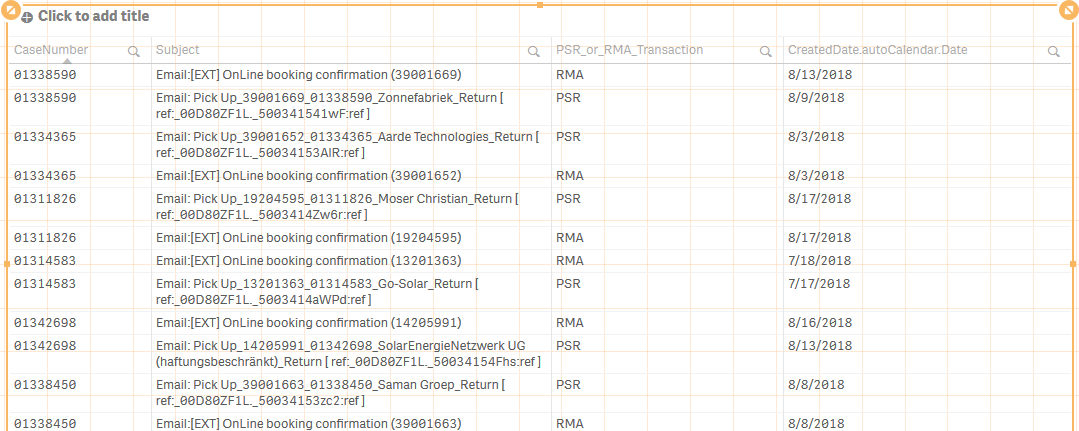
Appreciate any inputs there may be.
Thank you in advance!
IC
424 Views
0 Replies