Unlock a world of possibilities! Login now and discover the exclusive benefits awaiting you.

- Qlik Community
- :
- Forums
- :
- Analytics & AI
- :
- Products & Topics
- :
- App Development
- :
- Data disappears on Year selection
- Subscribe to RSS Feed
- Mark Topic as New
- Mark Topic as Read
- Float this Topic for Current User
- Bookmark
- Subscribe
- Mute
- Printer Friendly Page

 JustinDallas
- Mark as New
- Bookmark
- Subscribe
- Mute
- Subscribe to RSS Feed
- Permalink
- Report Inappropriate Content
Data disappears on Year selection
Hello Everyone,
I've got a strange issue whereby my data is disappearing from my chart when I select a year. With nothing selected, the Max(Year) =2017 and I get a chart like this.
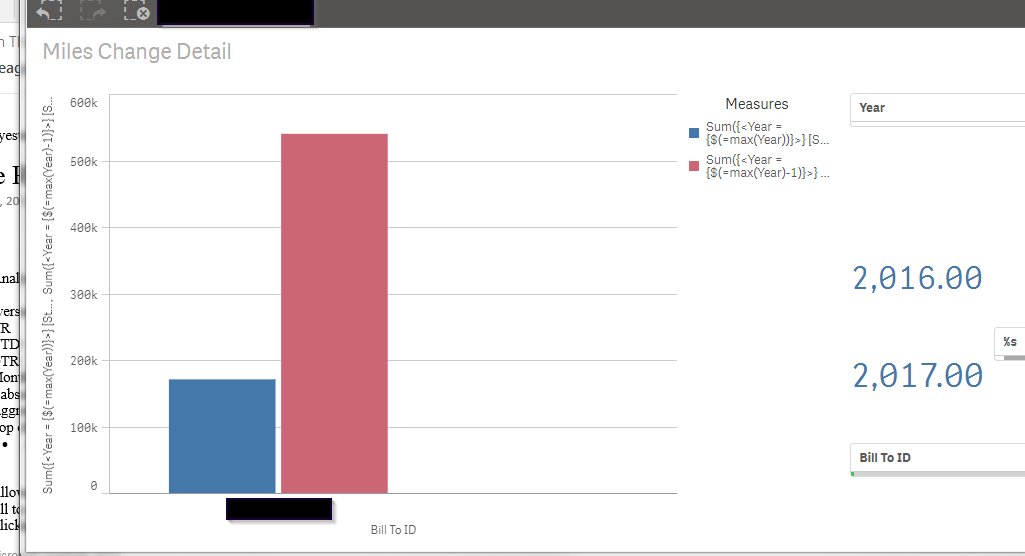
If you look to the right, you can see that I've got a spot for the result of Max(Year) - 1 and Max(Year). However, as soon as I select the Year [2017] from a filter list, all of the data that should show based on Max(Year) - 1 disappears.
My bar chart Expressions look like this
Sum({<Year = {$(=max(Year))}>} [Stop Leg Mileage])
for the current year, and
Sum({<Year = {$(=max(Year)-1)}>} [Stop Leg Mileage])
for the previous year.
Generally, when data falls away, it means that you haven't linked in correctly, but I've verified that the data does exist.
Any help is greatly appreciated.
JustinDallas
- Mark as New
- Bookmark
- Subscribe
- Mute
- Subscribe to RSS Feed
- Permalink
- Report Inappropriate Content
The data does appear when I add a '1' to the front of my Set Analysis. I went from
Sum({<Year = {$(=max(Year)-1)}>} [Stop Leg Mileage])
to Sum({1<Year = {$(=max(Year)-1)}>} [Stop Leg Mileage])
and it works fine. I guess what was happening was that when the Year was selected, the data pertaining to 'Year-1' was excluded. The 1 tells the system to ignore the Year selections made by the user.
